PDM on debian

Bran-Ko

Well-Known Member
Jul 31, 2019
32
6
48
Slovakia, Zilina
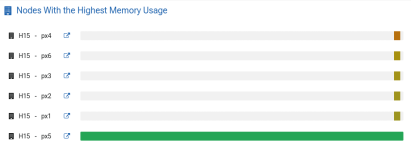
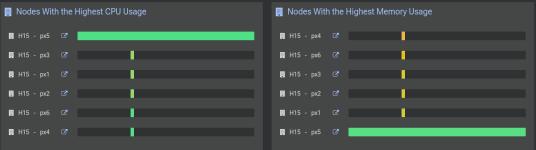
HI, I have two PDM installed (different clusters). One PDM is from PDM iso - work perfectly, byt second was installed on Debian configured. And I have som problems with getting data to this PDM. When I have version 0.1.8 only som outages was in graphs, but after update to 0.1.9 I getting data only from one PVE (there is 6 PVE in cluster).

there is little sample of log
Code:
Dec 26 13:19:02 fe99pdm101 proxmox-datacenter-api[478]: rrd journal successfully committed (1241 files in 0.526 seconds)
Dec 26 13:20:01 fe99pdm101 proxmox-datacenter-api[478]: failed to collect metrics for H15: api error (status = 500 Internal Server Error): error: invalid value: integer `-1`, expected u32

Dec 26 13:36:00 fe99pdm101 proxmox-datacenter-api[478]: failed to collect metrics for H15: api error (status = 500 Internal Server Error): error: invalid value: integer `-1`, expected u32

Dec 26 13:50:01 fe99pdm101 proxmox-datacenter-api[478]: rrd journal successfully committed (1241 files in 0.556 seconds)
Dec 26 13:51:00 fe99pdm101 proxmox-datacenter-api[478]: failed to collect metrics for H15: api error (status = 500 Internal Server Error): error: invalid value: integer `-1`, expected u32

Dec 26 14:04:00 fe99pdm101 proxmox-datacenter-api[478]: failed to collect metrics for H15: api error (status = 500 Internal Server Error): error: invalid value: integer `-1`, expected u32

but after restart it is looks like that all metrics are loaded
 
Hello,

thanks for the report. Do you still have this issue with the latest version (0.1.10)?
After the restart, were there any log messages for the cluster nodes from which no data was collected?

Which version of Proxmox VE is running on the cluster? (e.g. show the output of pveversion -v)

Thanks in advance!
 
Hello, I just updated both PDM.
PDM installed from pdm.iso is OK, byt PDM on debian has same failure.
I think that when it was rebooted - it can download last 30minutes of metrics from servers. But new values don't comming.
All proxmoxes are same (newest) - it is mix one has subscription - others are without subscription.
But it is true that the one which sending metrics was rebooted 6 days ago (and the others servers has uptime about 40 days). I mean that installed was all updates but active binaries ...
 
so there is pveversion files of:
px1 non reporting, not rebooted
px4 non reporting, rebooted (hour ago)
px5 reporting, rebooted (6days ago)

which logs can I upload (from cluster servers)? I checked syslog, and /var/logs/pve but I can't find any information about PDM (IP address)...
 

Attachments

Last edited:
After the restart, were there any log messages for the cluster nodes from which no data was collected?
Sorry, I meant, in the system logs for the node running PDM on Debian, do you still see the same messages as reported in your initial post?

Just to rule any time sync issues, could you install the chrony package (the same NTP client we use in Proxmox VE by default) on the Debian PDM host and restart it, checking if the issue still persists?
 
so I installed chrony. All servers have same time source. But logs and functionality is the same - without metrcs.
When I reboot PDM all metrcs was downloade for past 30mins. But without live metrics..
Attached log is syslog from PDM after reboot
 

Attachments

Could you try logging into each cluster member via SSH and check if the following command gives you a list of all cluster members?

Code:
pvesh get /cluster/metrics/export --output-format json-pretty | grep node/ | uniq

For example, in my 2 node test cluster, this would give me something like
Code:
$ pvesh get /cluster/metrics/export --output-format json-pretty | grep node/ | uniq
         "id" : "node/pdm-clu-2",
         "id" : "node/pdm-clu-1",

When collecting metrics, PDM connects to a single cluster member (right now always the first node in the list of nodes in /etc/proxmox-datacenter-manager/remotes.cfg). In the API handler, this node then 'fans-out' to all other cluster members to fetch their local metric data, before merging them with the nodes own data and returning it to PDM. With command above we can verify whether every cluster member can fetch each other cluster members metric data via its API.

Also, could you check whether px5, the node for which metric collection works properly, is the first node in the list of nodes in /etc/proxmox-datacenter-manager/remotes.cfg?

Just to verify again, the other PDM installation collects metrics just fine in the meanwhile? Does its remotes.cfg file have a different cluster node as first entry in the list of nodes?

Thanks in advance for your cooperation!
 
So first command give same results from every node
Bash:
root@px6:~# pvesh get /cluster/metrics/export --output-format json-pretty | grep node/ | uniq
         "id" : "node/px1",
         "id" : "node/px2",
         "id" : "node/px4",
         "id" : "node/px6",
         "id" : "node/px3",
         "id" : "node/px5",

PX5 is last node added to cluster.

Bash:
root@fe99pdm101:~# cat /etc/proxmox-datacenter-manager/remotes.cfg
pve: H15
        authid root@pam!pdm-admin
        nodes px1,fingerprint=93:48:AD:...
        nodes px2,fingerprint=AD:71:C9:...
        nodes px3,fingerprint=FB:A8:BA:...
        nodes px4,fingerprint=96:0C:05:...
        nodes px5,fingerprint=B3:3F:D6:...
        nodes px6,fingerprint=48:E2:56:...
        token 5d9a...

No first node is px1
Second PDM is working. And his remotes.cfg contains FQDN server names in Debian12 is only names. So I try to edit /etc/hosts file with IP, FQDN and NAME.
But without success after reboot metrics wasn't stay alive..

1736932500291.png
 
I've still not managed to find a reproducer for this nor have I a good explanation why this error is occurring. Is there anything unusual that you may not have mentioned yet about your PDM installation on Debian (although at this point I don't think that Debian has anything to do with it, it's probably just a coincidence)?

Thanks for your help!
 
Last edited:
So after my holiday - it is working perfectly. I have all metrics. I don't know what happened...
Thanks for letting me know! A very weird issue indeed, let's see if anybody else runs into this in the future...