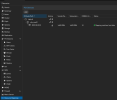
PCIE passthrough of coprocessor not visible

rusticsauce

New Member
Jun 5, 2024
1
0
1
hello, I was in the process of configuring my proxmox machine which has a gpiu and a hailo AI Coprocessor module attached to it.
the host lspci command displays the Hailo Module and the GPU correctly
but when i go to create a VM the gpu passthrough is visible but not the Hailo Module.

if i create a resource mapping and attach that to a vm then the whole host crashes with it.
 
I am seeing the same, would love some guidance how to at least collect some additional debugging logs to help resolve the issue.
 
Hi folks,

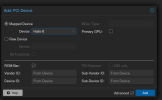
I am attempting the same, while also facing this issue. So I tried to workaround it by creating Mapped PCI Device with Hailo-8L, as it is listed there, and attach it to the VM. However, the VM fails to boot. So far I have tried only one VM running Home Assistant, maybe someone else will get lucky with different config, or its just broken for everyone.

Screenshot_20240708_153356.pngScreenshot_20240708_153435.png


Code:
TASK ERROR: start failed: command '/usr/bin/kvm -id 100 -name 'hass,debug-threads=on' -no-shutdown -chardev 'socket,id=qmp,path=/var/run/qemu-server/100.qmp,server=on,wait=off' -mon 'chardev=qmp,mode=control' -chardev 'socket,id=qmp-event,path=/var/run/qmeventd.sock,reconnect=5' -mon 'chardev=qmp-event,mode=control' -pidfile /var/run/qemu-server/100.pid -daemonize -smbios 'type=1,uuid=f45294e5-054f-4656-9ff3-7c079ee7020e' -drive 'if=pflash,unit=0,format=raw,readonly=on,file=/usr/share/pve-edk2-firmware//OVMF_CODE_4M.fd' -drive 'if=pflash,unit=1,id=drive-efidisk0,format=raw,file=/dev/zvol/fast/vm-100-disk-0,size=540672' -smp '8,sockets=1,cores=8,maxcpus=8' -nodefaults -boot 'menu=on,strict=on,reboot-timeout=1000,splash=/usr/share/qemu-server/bootsplash.jpg' -vnc 'unix:/var/run/qemu-server/100.vnc,password=on' -cpu qemu64,+aes,enforce,+kvm_pv_eoi,+kvm_pv_unhalt,+pni,+popcnt,+sse4.1,+sse4.2,+ssse3 -m 8128 -object 'iothread,id=iothread-virtio0' -object 'iothread,id=iothread-virtio1' -device 'pci-bridge,id=pci.1,chassis_nr=1,bus=pci.0,addr=0x1e' -device 'pci-bridge,id=pci.2,chassis_nr=2,bus=pci.0,addr=0x1f' -device 'pci-bridge,id=pci.3,chassis_nr=3,bus=pci.0,addr=0x5' -device 'vmgenid,guid=6b870731-e794-4439-98bf-c0f39aa7a38c' -device 'piix3-usb-uhci,id=uhci,bus=pci.0,addr=0x1.0x2' -device 'usb-tablet,id=tablet,bus=uhci.0,port=1' -device 'vfio-pci,host=0000:26:00.0,id=hostpci0,bus=pci.0,addr=0x10' -device 'VGA,id=vga,bus=pci.0,addr=0x2' -chardev 'socket,path=/var/run/qemu-server/100.qga,server=on,wait=off,id=qga0' -device 'virtio-serial,id=qga0,bus=pci.0,addr=0x8' -device 'virtserialport,chardev=qga0,name=org.qemu.guest_agent.0' -device 'virtio-balloon-pci,id=balloon0,bus=pci.0,addr=0x3,free-page-reporting=on' -iscsi 'initiator-name=iqn.1993-08.org.debian:01:ef51fec7252d' -drive 'file=/dev/zvol/fast/vm-100-disk-1,if=none,id=drive-virtio0,format=raw,cache=none,aio=io_uring,detect-zeroes=on' -device 'virtio-blk-pci,drive=drive-virtio0,id=virtio0,bus=pci.0,addr=0xa,iothread=iothread-virtio0,bootindex=100' -drive 'file=/dev/zvol/slow/vm-100-disk-0,if=none,id=drive-virtio1,format=raw,cache=none,aio=io_uring,detect-zeroes=on' -device 'virtio-blk-pci,drive=drive-virtio1,id=virtio1,bus=pci.0,addr=0xb,iothread=iothread-virtio1' -netdev 'type=tap,id=net0,ifname=tap100i0,script=/var/lib/qemu-server/pve-bridge,downscript=/var/lib/qemu-server/pve-bridgedown,vhost=on' -device 'virtio-net-pci,mac=XX:XX:XX:ED:06:76,netdev=net0,bus=pci.0,addr=0x12,id=net0,rx_queue_size=1024,tx_queue_size=256' -machine 'type=pc+pve0'' failed: got timeout

 
I have the same issues here, I try to pass through a Hailo 8 device, which in my case is a m.2 m-key device that I try to get working in an Intel Nuc 12 running proxmox 8.3.2. I tried installing the card in the nvme port and I also tried installing it in a Thunderbolt m.2 m-key enclosure (Orico M.2 USB-C PCIe3.0x4 Adapter for NVMe M-Key). lscpi lists the device in both scenarios, no driver is using it and it's also not sharing any IOMMU groups. Device won't list in the raw device dropdown. Adding a resource mapping and adding it as a mapped device will make the entire proxmox node go *poof*.
 
Gentlemen, I got it working. I did a lot of trial and error and I will try to write my steps down here and hopefully you guys can confirm that this is actually the way to configure it. The problem for me is that after so much tinkering, I may have changed something that I forgot to document here and I'd really like to document all my steps properly so I can reproduce it when I have to do a clean proxmox installation.

I am currently using the M-key Hailo 8 (the 26 TOPS variant, not the L one) inside a Orico M.2 USB-C PCIe3.0x4 Thunderbolt Adapter. I think this guide will also work when installing the Hailo directly inside nvme slot on the motherboard, but I have not tried this yet.

First of all, I enabled vt-d related settings in the BIOS to allow hardware virtualization support.

Then I verified that I don't have any hardware that is shared by the MMIO group. I used this script:
Bash:
#!/bin/bash
for d in $(find /sys/kernel/iommu_groups/ -type l | sort -n -k5 -t/); do
    n=${d#*/iommu_groups/*}; n=${n%%/*}
    printf 'IOMMU Group %s ' "$n"
    lspci -nns "${d##*/}"
done;

Here's the part of the output that is Hailo and Thunderbolt related:
Code:
...
IOMMU Group 7 00:0d.0 USB controller [0c03]: Intel Corporation Alder Lake-P Thunderbolt 4 USB Controller [8086:461e] (rev 02)
IOMMU Group 7 00:0d.2 USB controller [0c03]: Intel Corporation Alder Lake-P Thunderbolt 4 NHI #0 [8086:463e] (rev 02)
IOMMU Group 7 00:0d.3 USB controller [0c03]: Intel Corporation Alder Lake-P Thunderbolt 4 NHI #1 [8086:466d] (rev 02)
IOMMU Group 15 02:00.0 PCI bridge [0604]: ASMedia Technology Inc. Device [1b21:2463]
IOMMU Group 16 03:00.0 PCI bridge [0604]: ASMedia Technology Inc. Device [1b21:2463]
IOMMU Group 16 04:00.0 Co-processor [0b40]: Hailo Technologies Ltd. Hailo-8 AI Processor [1e60:2864] (rev 01)
...

So in this case, the Hailo is in group 16. Documentation states that a device should be in its own group, since we cannot use devices in the same group in different virtual machines (or host). The ASMedia controller shares group 16 with the Hailo. This is ok in this scenario, as the ASMedia is probably the controller inside the Orico Thunderbolt NVMe m-key adapter.

Side note: My first attempt was to attach the thunderbolt group 7 devices to the VM. This worked! Boltctl would even list the controller as green up-and-running, but the Hailo would still be attached to the Proxmox host. So I guess that these devices only manage whatever is connected on Thunderbolt and it's not required for passing through the actual plugged in thunderbolt devices.

In `/etc/modules` I added the following modules:
Code:
vfio
vfio_iommu_type1
vfio_pci
And in `/etc/default/grub` I added the following options (use space to seperate them from any existing options) to GRUB_CMDLINE_LINUX and GRUB_CMDLINE_LINUX_DEFAULT:
Code:
intel_iommu=on  iommu=pt

Then update the grub config:
Bash:
sudo update-grub

Then
Bash:
lspci -nn

Should include the devices along with the hardware id:
Code:
03:00.0 PCI bridge [0604]: ASMedia Technology Inc. Device [1b21:2463]
04:00.0 Co-processor [0b40]: Hailo Technologies Ltd. Hailo-8 AI Processor [1e60:2864] (rev 01)

I created a new file to instruct the kernel to use vfio-pci as device driver for all the devices in my IOMMU Group 16 devices (Hailo & ASMedia PCI bridge). I'm not sure if the bridge is also required, but this is the setup in which I got it working:
`/etc/modprobe.d/passthrough-hailo.conf`
Code:
options vfio-pci ids=1e60:2864,1b21:2463

The Hailo community link had instructions to add this, I also have no idea if this is required or not:
`/etc/initramfs-tools/modules`
After testing, the following instruction is not required to make it run on my machine:
Code:
options kvm ignore_msrs=1

Since we changed grub (and maybe also for the added modules?) you need to run update-initramfs:
Bash:
update-initramfs -u -k all

Reboot your proxmox and then verify that the vfio is properly assigned as kernel driver for the Hailo module using:

Bash:
lspci -nnk

And this should output something like:
Code:
03:00.0 PCI bridge [0604]: ASMedia Technology Inc. Device [1b21:2463]
        Subsystem: ASMedia Technology Inc. Device [1b21:2463]
        Kernel driver in use: pcieport
04:00.0 Co-processor [0b40]: Hailo Technologies Ltd. Hailo-8 AI Processor [1e60:2864] (rev 01)
        Subsystem: Hailo Technologies Ltd. Hailo-8 AI Processor [1e60:2864]
        Kernel driver in use: vfio-pci

As you can see, the Hailo device is using "vfio-pci" as kernel driver. Since the ASMedia PCI bridge is not saying anything about vfio, I doubt that adding the ASMedia device in `/etc/modprobe.d/passthrough-hailo.conf` is required. Just including it here, since that's how it works on my machine. Adding the ASMedia device is required or else the VM will not boot or the whole Proxmox node can stop responding when booting the VM.

We need to change the reset method for the Hailo device. If you run this code (and substitute the device id for the one you find your Hailo running on):
Bash:
cat /sys/bus/pci/devices/0000\:04\:00.0/reset_method
It would output the default (wrong) reset method:
Code:
flr bus

And this will make my proxmox machine crash or output errors in dmesg, related to unable to change power states.

To solve this create a file `hailo_reset_method_null.sh`, the location doesn't matter:
Bash:
#!/bin/bash
lspci -D | grep -E "Co-processor: Device 1e60:2864 \(rev 01\)|Hailo" | awk '{print $1}' | while read -r device; do
    echo "Current device reset method /sys/bus/pci/devices/$device/reset_method:"
    cat "/sys/bus/pci/devices/$device/reset_method"
    echo "Updating the reset method to null..."
    echo " " | tee /sys/bus/pci/devices/$device/reset_method
    echo "Finished updating /sys/bus/pci/devices/$device/reset_method with the following new reset method content: "
    cat "/sys/bus/pci/devices/$device/reset_method"
    echo "End of file"
done

And run it every time PRIOR to starting the virtual machine to change the device reset procedure!

After running the script, the following should not have an output:
Bash:
cat /sys/bus/pci/devices/0000\:04\:00.0/reset_method

Now to get things up and running we need to attach the Hailo PCI device to the VM and you cannot do this through the graphical user interface, as it is not listed as PCIe device. I think that this is caused, because the hardware ID does not exist in some database that is used to list a human friendly device name and this causes it to be empty and not being listed at all. As @SomePatrik mentioned, you might be able to attach it by adding it as a mapped resource. I have not tried this method yet, but I do know . I just verified that you can use a resource mapping OR you can attach it using the following command:
Code:
qm set 103 -hostpci0 04:00.0


My VM id is 103 and once again, the Hailo is using id 04:00.0. This would also list it in the UI as "PCI Device (hostpci0)" with value "04:00.0".

Now boot the VM and then use
Bash:
lspci
And it hopefully outputs:
Code:
00:10.0 Co-processor: Hailo Technologies Ltd. Hailo-8 AI Processor (rev 01)

After which you need to continue with installing the hailo driver, firmware, etc.

Sources that helped:
Proxmox PCI(e) pass through
Hailo community enabling virtual machine to acces hailo 8 devices

I hope this helps someone out! Please let me know if this works for your setup.
 
Last edited: