

PCI Passthrough RTX PRO 6000 with OVMF (UEFI) guest has not initialized the display (yet) (was: ... to Windows guest)

ISG-YB

New Member
Feb 17, 2026
6
0
1
Hi all, I have a freshly installed Proxmox VE 9.1 on a workstation with 2x Nvidia RTX PRO 6000 Blackwell GPUs. We would like to attach one GPU to a Linux VM and the other to a Windows VM. So I setup the host for PCI passthrough added the GPU and the corresponding audio device as PCI raw device to the VMs (Q35, PCIe). When I boot the Linux VM everthings seems to be ok:

root@debian13-103:~# lspci
00:10.0 VGA compatible controller: NVIDIA Corporation GB202GL [RTX PRO 6000 Blackwell Max-Q Workstation Edition] (rev a1)
00:11.0 Audio device: NVIDIA Corporation Device 22e8 (rev a1)

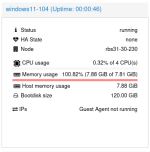
When I boot the Windows 11 VM with the attached PCI devices, it gets stuck rigth away with "Guest has not initialized display (yet)" and in the summary the ram usage of the VM rises to 100.2%. The VM isn't responding to pings. I tried a lot of diffrent hardware settings with no success.

Has someone any ideas what I do wrong or could try?

Thanks, Yves

root@rbs31-30-230:~# pveversion
pve-manager/9.1.5/80cf92a64bef6889 (running kernel: 6.17.9-1-pve)
root@rbs31-30-230:~# lspci -nnk |grep vfio -B2 -A2
c1:00.0 VGA compatible controller [0300]: NVIDIA Corporation GB202GL [RTX PRO 6000 Blackwell Max-Q Workstation Edition] [10de:2bb4] (rev a1)
Subsystem: NVIDIA Corporation Device [10de:204c]
Kernel driver in use: vfio-pci
Kernel modules: nvidiafb, nouveau
c1:00.1 Audio device [0403]: NVIDIA Corporation Device [10de:22e8] (rev a1)
Subsystem: NVIDIA Corporation Device [10de:0000]
Kernel driver in use: vfio-pci
Kernel modules: snd_hda_intel
d0:00.0 Host bridge [0600]: Advanced Micro Devices, Inc. [AMD] Turin Root Complex [1022:153a]
--
e1:00.0 VGA compatible controller [0300]: NVIDIA Corporation GB202GL [RTX PRO 6000 Blackwell Max-Q Workstation Edition] [10de:2bb4] (rev a1)
Subsystem: NVIDIA Corporation Device [10de:204c]
Kernel driver in use: vfio-pci
Kernel modules: nvidiafb, nouveau
e1:00.1 Audio device [0403]: NVIDIA Corporation Device [10de:22e8] (rev a1)
Subsystem: NVIDIA Corporation Device [10de:0000]
Kernel driver in use: vfio-pci
Kernel modules: snd_hda_intel
f0:00.0 Host bridge [0600]: Advanced Micro Devices, Inc. [AMD] Turin Root Complex [1022:153a]
 
hi,

can you post the vm config ?
does the windows vm boot without the passed through devices?

also the journal from the host during that time would be interesting.
 
Hi and sorry for the late response.

> does the windows vm boot without the passed through devices?

Yes it boots windows fine without the attached PCI devices.

> can you post the vm config ?

root@rbs31-30-230:~# qm config 104
agent: 1
bios: ovmf
boot: order=ide0;ide2;net0
cores: 64
cpu: x86-64-v2-AES
efidisk0: local-lvm:vm-104-disk-0,efitype=4m,ms-cert=2023,pre-enrolled-keys=1,size=4M
hostpci0: 0000:e1:00.0,pcie=1
hostpci1: 0000:e1:00.1,pcie=1
ide0: local-lvm:vm-104-disk-1,size=120G
ide2: local:iso/SW_DVD9_WIN_ENT_LTSC_2024_64-bit_English_International_MLF_X23-70047.ISO,media=cdrom,size=5017448K
machine: pc-q35-10.1,viommu=virtio
memory: 98304
meta: creation-qemu=10.1.2,ctime=1770724890
name: windows11-104
net0: rtl8139=BC:24:11:6D:86:4B,bridge=vmbr0,firewall=1
numa: 0
ostype: win11
scsihw: virtio-scsi-single
smbios1: uuid=68a1c96e-280d-4251-99e3-202a238e0d46
sockets: 1
tpmstate0: local-lvm:vm-104-disk-2,size=4M,version=v2.0
vmgenid: 39e0f225-0e3d-4b4e-be01-3fdd14dafb7a

Is there something suspicious (reset) in the journal?

Thanks for any help. It would be great we could use the GPU wit windows.
 

Attachments

can you try with the following changes to the config:

instead of
Code:
hostpci0: 0000:e1:00.0,pcie=1
hostpci1: 0000:e1:00.1,pcie=1

please use
Code:
hostpci0: 0000:e1:00,pcie=1

this will passthrough both functions as one device, like it is visible on the host

also instead of
Code:
machine: pc-q35-10.1,viommu=virtio

try:
Code:
machine: pc-q35-10.1

or is there some special reason why you need to enable the viommu?
 
I changed the two settings you mentioned, but it's sadly still the same. Some other things to try?

The settings for the Linux VM are as following and with these settings the Linux VM boots and the GPU is accessible. It would be nice we could do the same with a Windows VM.

root@rbs31-30-230:~# qm config 103
boot: order=scsi0;ide2;net0
cores: 1
cpu: x86-64-v2-AES
hostpci0: 0000:c1:00.0
hostpci1: 0000:c1:00.1
ide2: local:iso/debian-13.3.0-amd64-netinst.iso,media=cdrom,size=754M
memory: 4096
meta: creation-qemu=10.1.2,ctime=1770133011
name: debian13-103
net0: virtio=BC:24:11:3A:A8:64,bridge=vmbr0,firewall=1
numa: 0
ostype: l26
scsi0: local-lvm:vm-103-disk-0,iothread=1,size=64G
scsihw: virtio-scsi-single
smbios1: uuid=26e9da2a-2f95-4fee-97ce-165fbc3c7917
sockets: 4
vmgenid: 67369d0b-d4d4-46aa-8b55-7b6c61a3da69
 

Attachments

one other issue that could be happening is that allocating the memory of the windows vm just takes an (absurd) amount of time. we had such behavior in the past, especially if the memory is fragmented. Could you try to reduce the amount of memory in the windows vm (temporarily) to e.g. 8G to test?

alternatively you could start looking into 'hugepages' so that the allocation of memory does not happen in 4k blocks, but e.g. in 2M or 1G blocks
 
mhmm does it progress if you change the ostype from windows 11 to linux? this only sets a few specific parameters, but maybe one of them is the culprit
 
When I change to linux, the same happens. But when I change from UEFI to seaBIOS it works. So I installed Windows 11 with the Regedit > LabConfig and the 3 entries: BypassSecureBootCheck, BypassTPMCheck, BypassRAMCheck and know I can use the NV RTX also in Windows.

root@rbs31-30-230:~# qm config 107
boot: order=ide0;ide2;net0
cores: 16
cpu: x86-64-v2-AES,flags=+pdpe1gb
hostpci0: 0000:e1:00.0,pcie=1
ide0: local-lvm:vm-107-disk-0,size=160G
ide2: local:iso/SW_DVD9_WIN_ENT_LTSC_2024_64-bit_English_International_MLF_X23-70047.ISO,media=cdrom,size=5017448K
machine: pc-q35-10.1
memory: 32768
meta: creation-qemu=10.1.2,ctime=1772540206
name: windows11-107
net0: e1000=BC:24:11:6D:86:4B,bridge=vmbr0,firewall=1
numa: 0
ostype: win11
scsihw: virtio-scsi-single
smbios1: uuid=a401c7a6-52d3-4773-8364-a14b344954fc
sockets: 1
tpmstate0: local-lvm:vm-107-disk-1,size=4M,version=v2.0
vmgenid: 6e139340-9261-488b-a5b7-9cbac9b2e506
 
Removed the "Solved" from the thread and changed the title. The issue is now, that I need the VM hardware with UEFI. In SeaBIOS I get problems with "Failed to allocate" and what I have seen in the web, these kinds of problems could be solved with UEFI.

The exact message with SeaBIOS is:

[ 11.369936] [drm:nv_drm_dev_load [nvidia_drm]] *ERROR* [nvidia-drm] [GPU ID 0x00000100] Failed to allocate NvKmsKapiDevice

So now when I change the BIOS to OVMF and start the VM I get "guest has not initialized the display (yet)" like I described and tried to resolve in this thread before and it doesn't matter if it's a Linux or Windows VM.

Are there any debugging option to try when I start such a VM with the PCIe passthrough?

Any other tips what could be wrong?

Thanks, Yves