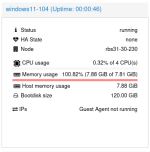
Hi all, I have a freshly installed Proxmox VE 9.1 on a workstation with 2x Nvidia RTX PRO 6000 Blackwell GPUs. We would like to attach one GPU to a Linux VM and the other to a Windows VM. So I setup the host for PCI passthrough added the GPU and the corresponding audio device as PCI raw device to the VMs (Q35, PCIe). When I boot the Linux VM everthings seems to be ok:
When I boot the Windows 11 VM with the attached PCI devices, it gets stuck rigth away with "Guest has not initialized display (yet)" and in the summary the ram usage of the VM rises to 100.2%. The VM isn't responding to pings. I tried a lot of diffrent hardware settings with no success.
Has someone any ideas what I do wrong or could try?
Thanks, Yves
root@debian13-103:~# lspci 00:10.0 VGA compatible controller: NVIDIA Corporation GB202GL [RTX PRO 6000 Blackwell Max-Q Workstation Edition] (rev a1)00:11.0 Audio device: NVIDIA Corporation Device 22e8 (rev a1)When I boot the Windows 11 VM with the attached PCI devices, it gets stuck rigth away with "Guest has not initialized display (yet)" and in the summary the ram usage of the VM rises to 100.2%. The VM isn't responding to pings. I tried a lot of diffrent hardware settings with no success.
Has someone any ideas what I do wrong or could try?
Thanks, Yves
root@rbs31-30-230:~# pveversion pve-manager/9.1.5/80cf92a64bef6889 (running kernel: 6.17.9-1-pve)root@rbs31-30-230:~# lspci -nnk |grep vfio -B2 -A2c1:00.0 VGA compatible controller [0300]: NVIDIA Corporation GB202GL [RTX PRO 6000 Blackwell Max-Q Workstation Edition] [10de:2bb4] (rev a1) Subsystem: NVIDIA Corporation Device [10de:204c] Kernel driver in use: vfio-pci Kernel modules: nvidiafb, nouveauc1:00.1 Audio device [0403]: NVIDIA Corporation Device [10de:22e8] (rev a1) Subsystem: NVIDIA Corporation Device [10de:0000] Kernel driver in use: vfio-pci Kernel modules: snd_hda_inteld0:00.0 Host bridge [0600]: Advanced Micro Devices, Inc. [AMD] Turin Root Complex [1022:153a]--e1:00.0 VGA compatible controller [0300]: NVIDIA Corporation GB202GL [RTX PRO 6000 Blackwell Max-Q Workstation Edition] [10de:2bb4] (rev a1) Subsystem: NVIDIA Corporation Device [10de:204c] Kernel driver in use: vfio-pci Kernel modules: nvidiafb, nouveaue1:00.1 Audio device [0403]: NVIDIA Corporation Device [10de:22e8] (rev a1) Subsystem: NVIDIA Corporation Device [10de:0000] Kernel driver in use: vfio-pci Kernel modules: snd_hda_intelf0:00.0 Host bridge [0600]: Advanced Micro Devices, Inc. [AMD] Turin Root Complex [1022:153a]