Passing AMD IGPU to VM

Mangy_Dog

New Member
Jan 25, 2025
1
0
1
Im trying to get a Kodi (LibreElec) vm running on my setup. Im using an AMD chip with a GPU built in.
I want to have my VM output a signal over the motherboard HDMI when it loads up...

Ive gone through a dozen guides already and nothing has seemed to work...
Currently I am running a VM thats built on importing the ova from libreElec following this guide
https://syncbricks.com/how-to-import-ova-to-proxmox/

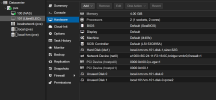
My VM hardware setup is as follows...
1737824205077.png

I have attached the pci devices addresses for the igpu and audio.
But I dont get an output of the VM on my tv... The proxmox pve login console just freezes (cursor stops blinking)
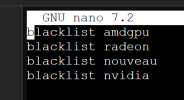
blacklist file is
1737824426484.png

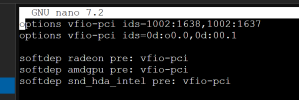
vfio

1737824546009.png


not sure what else to show right now....

what more do i need to do to pass the display though?
 
Hi, I am in a similar situation I have a N150 (EQ14 Beelink Mini Computer). Been chasing down that HDMI issued for several days now. Without success.

I got iGPU Passthrough successfully resolved and in a Win11 VM can see through RDP that the GPU successfully installed (without Code 43).

However, when plugging in a Monitor at the HDMI port I only get the PVE Login screen - when starting up the VM there is no change - nothing - I am also not able to get the actual VM desktop passed through to the HDMI port with an e.g. Ubuntu machine.

So apparently I came a long way, however the last stretch before the finish line I somehow can not pass ... which is frustrating. Has anyone, any information how to get this resolved - I wonder, if I need to pass another "PCIe" component to the VM that "bridges" the port (e.g. a HDMI controller - however there is no such thing to be found through lspci)

1) There are reports that HDMI is possible (however all instructions found do not work here)
2) On the other side I also read, that HDMI output is not possible - but you rather have to go through USB port (I have a dual monitor setup) - so do I need to buy a USB to HDMI adapter? But the success is questionable?

I would highly appreciate any help given!!!!
 
amd is certainly a pain compared to intel iGPUs and certain nvidia gpu's (i usually stick to those), i think the easiest ones ive used so far were the GVT-g igpus from intel, although it left a bit to be desired as far as vram profiles go.


you could try checking out these tutorials? see if anything in these helps.
Proxmox - Ryzen 7000 series - AMD Radeon 680M/780M/RDNA2/RDNA3 GPU passthrough
Enable iGPU Passthrough: AMD 8700G/8700GE 780M Radeon for Proxmox Windows VM
there is also this random list of notes on github of someones failed attempts with a lot of information and links that could have some helpful information:
Proxmox 5700G APU GPU Passthrough Notes

personally i have never tried an AMD iGPU setup, even AMD GPUs can be a pain unless you have a pro version, so i cant really share any tips from experience there.