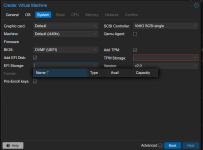
Rather simple and I'm likely overlooking something that is in front of my face. Proxmox 8.5 current as of June 5th 2025. Cluster is 30 minutes old and is a dev one running on another hypervisor as a proof of concept and script builder. Rather not blow up real nodes.
In Datacenter, Storage, Click Ceph edit. In Content drop down all options are added.
Disabled local storage as those are small drives so don't want containers or backups going to the OS drive.
Click on 1 of 3 nodes create VM.
Give the VM a name. devtest1
Move to OS select Iso. Win 11 24H2 "my most hated OS ever"
Change type to Windows and add the virtio iso.
Move to system where I'm unable to select EFI storage as Ceph and TMP storage as Ceph.
What did I miss? I recall having to change the storage on ZFS to a directory and not direct to get it to work. No such joys on the same trick with Ceph so far. This is a 100% default click next setup for Ceph nothing else out of the box.
Not to self nested VM's on another companies KVM = clock skew
In Datacenter, Storage, Click Ceph edit. In Content drop down all options are added.
Disabled local storage as those are small drives so don't want containers or backups going to the OS drive.
Click on 1 of 3 nodes create VM.
Give the VM a name. devtest1
Move to OS select Iso. Win 11 24H2 "my most hated OS ever"
Change type to Windows and add the virtio iso.
Move to system where I'm unable to select EFI storage as Ceph and TMP storage as Ceph.
What did I miss? I recall having to change the storage on ZFS to a directory and not direct to get it to work. No such joys on the same trick with Ceph so far. This is a 100% default click next setup for Ceph nothing else out of the box.
Not to self nested VM's on another companies KVM = clock skew