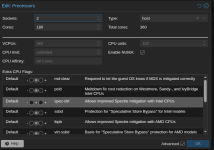
Proxmox: 8.4.0
The host has 2 sockets and 192 cores per socket. It has a VM (Ubuntu 24.04) with this CPU configuration: 2 sockets, 180 cores, NUMA on. In the dashboard the VM is marked as having 360 cores. However, the VM sees only half of the cores, and the other half is marked as offline.
dmesg has these lines (for all cores >=180):
so it seems like there's something wrong between passing the cores to the VM, as the VM doesn't properly see them as active. Changing NUMA to be off does not help. The Proxmox host sees all 384 cores in both sockets. Any ideas?
The host has 2 sockets and 192 cores per socket. It has a VM (Ubuntu 24.04) with this CPU configuration: 2 sockets, 180 cores, NUMA on. In the dashboard the VM is marked as having 360 cores. However, the VM sees only half of the cores, and the other half is marked as offline.
srdecny@blackwell1 ~> lscpuArchitecture: x86_64 CPU op-mode(s): 32-bit, 64-bit Address sizes: 52 bits physical, 57 bits virtual Byte Order: Little EndianCPU(s): 360 On-line CPU(s) list: 0-179 Off-line CPU(s) list: 180-359Vendor ID: AuthenticAMD Model name: AMD EPYC 9655 96-Core Processor CPU family: 26 Model: 2 Thread(s) per core: 1 Core(s) per socket: 180 Socket(s): 1dmesg has these lines (for all cores >=180):
[ 0.000000] KERNEL supported cpus:[ 2.877842] setup_percpu: NR_CPUS:8192 nr_cpumask_bits:360 nr_cpu_ids:360 nr_node_ids:1(...)[ 2.924034] printk: log_buf_len individual max cpu contribution: 4096 bytes[ 2.924035] printk: log_buf_len total cpu_extra contributions: 1470464 bytes[ 3.766829] rcu: RCU restricting CPUs from NR_CPUS=8192 to nr_cpu_ids=360.[ 3.766833] rcu: Adjusting geometry for rcu_fanout_leaf=16, nr_cpu_ids=360[ 3.767054] RCU Tasks: Setting shift to 9 and lim to 1 rcu_task_cb_adjust=1 rcu_task_cpu_ids=360.[ 3.767061] RCU Tasks Rude: Setting shift to 9 and lim to 1 rcu_task_cb_adjust=1 rcu_task_cpu_ids=360.[ 3.767067] RCU Tasks Trace: Setting shift to 9 and lim to 1 rcu_task_cb_adjust=1 rcu_task_cpu_ids=360.[ 3.771647] x86/cpu: User Mode Instruction Prevention (UMIP) activated[ 3.880836] smpboot: native_kick_ap: bad cpu 180[ 3.881004] smpboot: native_kick_ap: bad cpu 181[ 3.881165] smpboot: native_kick_ap: bad cpu 182so it seems like there's something wrong between passing the cores to the VM, as the VM doesn't properly see them as active. Changing NUMA to be off does not help. The Proxmox host sees all 384 cores in both sockets. Any ideas?