

This has been adventure but I'll try to explain. Started with a working AMD desktop running Ubuntu desktop that boots off NVME. Installed a second NVME, loaded Proxmox 9 on that. Within PVE, created a VM with no disk, instead passed through that first NVME. I did PCI pass through to the MSI video card with a Radeon chip on it. Passed through USB mouse, keyboard etc and all that generally worked.
I took out the Radeon video card and installed a Geforce GTX 960. Booting off the first NVME, Ubuntu running on the bare metal, I got the GPU to work to play Velocidrone. The card would always display video fine, but i had to switch from Nouveau to the proprietary Nvidea drivers before the GPU actually started doing work. In glmark2, the GPU was barely better than the Radeon card until i switched drivers and rebooted.
So I started booting up PVE, I repeated the steps taken to get the Radeon to go, except with consideration for the Nvidia GPU. I can never seem to get a display, with Ubuntu set for Nouveou or Nvidia. With Ubuntu running on bare metal, I can use nvtop to look at the GPU performance. But when PVE is going, while in the VM, nvtop says there is no GPU.
In Ubuntu native,
While in PVE:
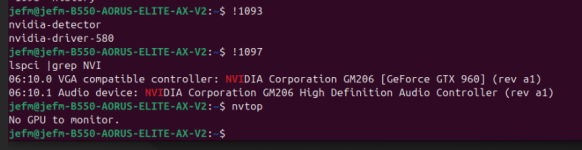
And it seems like it's going to work, because the monitor shows the PVE boot process up to the point where the blacklist kicks and hangs, until I start the VM, and the displays go blank. lspci in the VM shows the card but nvtop won't find a GPU.
Tweety76 posted a similar problem but with a better description so I'm copying their request a bit:
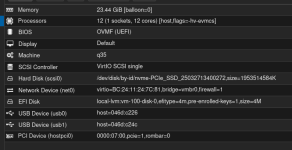
The VM:
Grub
Blacklist
Modules
vfio.conf
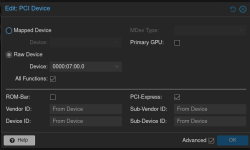
(tried rom-bar & pci-express variations)
Thanks for any help, i'll try anything
I took out the Radeon video card and installed a Geforce GTX 960. Booting off the first NVME, Ubuntu running on the bare metal, I got the GPU to work to play Velocidrone. The card would always display video fine, but i had to switch from Nouveau to the proprietary Nvidea drivers before the GPU actually started doing work. In glmark2, the GPU was barely better than the Radeon card until i switched drivers and rebooted.
So I started booting up PVE, I repeated the steps taken to get the Radeon to go, except with consideration for the Nvidia GPU. I can never seem to get a display, with Ubuntu set for Nouveou or Nvidia. With Ubuntu running on bare metal, I can use nvtop to look at the GPU performance. But when PVE is going, while in the VM, nvtop says there is no GPU.
In Ubuntu native,
jefm@jefm-B550-AORUS-ELITE-AX-V2:~$ nvidia-detectornvidia-driver-580jefm@jefm-B550-AORUS-ELITE-AX-V2:~$ lspci |grep NVI07:00.0 VGA compatible controller: NVIDIA Corporation GM206 [GeForce GTX 960] (rev a1)07:00.1 Audio device: NVIDIA Corporation GM206 High Definition Audio Controller (rev a1)jefm@jefm-B550-AORUS-ELITE-AX-V2:~$While in PVE:
And it seems like it's going to work, because the monitor shows the PVE boot process up to the point where the blacklist kicks and hangs, until I start the VM, and the displays go blank. lspci in the VM shows the card but nvtop won't find a GPU.
Tweety76 posted a similar problem but with a better description so I'm copying their request a bit:
The VM:
Grub
GRUB_CMDLINE_LINUX_DEFAULT="quiet amd_iommu=force_enable iommu=pt"GRUB_CMDLINE_LINUX=""Blacklist
blacklist radeonblacklist nouveaublacklist nvidiablacklist amdgpublacklist nvidiafbModules
# /etc/modules is obsolete and has been replaced by /etc/modules-load.d/.# Please see modules-load.d(5) and modprobe.d(5) for details.## Updating this file still works, but it is undocumented and unsupported.vfiovfio_iommu_type1vfio_pcivfio_virqfdvfio.conf
options vfio-pci ids=10de:1401, 10de:0fba disable_vga=1(tried rom-bar & pci-express variations)
Thanks for any help, i'll try anything
