

Hello World!
Proxmox recently added a new feature in PDM called “Proxmox Backup Server (Experimental)”. You can get this feature after updating the current Alpha version.
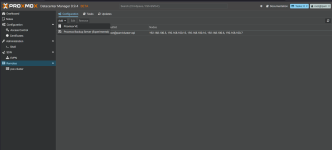
Update your recent PDM server using the “apt update && apt upgrade -y” command and you will be able to see the feature, but remember this feature is only experimental.
Add PBS as Remote in PDM
Since I am also new to this feature, I don’t have a clear concept. But according to the PDM Roadmap (https://pve.proxmox.com/wiki/Proxmox_Datacenter_Manager_Roadmap), it is mentioned that PDM will be able to “Integrate other projects like Proxmox Backup Server and Proxmox Mail Gateway.” So let’s experiment with the PBS experimental feature of PDM.
By clicking on the Datastore, you can see the backups of your VMs or Containers and the backup status.
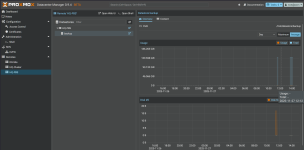
When you click on “Overview” of the Datastore, you can see graphical representation of the storage used for the Datastore.
What to Expect Next?
Well, seeing these features in PDM, I am excited. I am hoping to see the PBS and PVE robust integration which enables freedom of Backup Restoration— for example, from any PBS you can restore inter-cluster Proxmox infrastructure.
Before completing this article, I would really like to express my huge appreciation for the Proxmox developer team and hope to see more features like VM Replication and Disaster Recovery Site features in the Proxmox Datacenter Manager.
Having said that, if you like this information please like, share, and comment. In the future, I will bring more information like this. Until then, stay healthy and goodbye.
Proxmox recently added a new feature in PDM called “Proxmox Backup Server (Experimental)”. You can get this feature after updating the current Alpha version.
Update your recent PDM server using the “apt update && apt upgrade -y” command and you will be able to see the feature, but remember this feature is only experimental.
Add PBS as Remote in PDM
Since I am also new to this feature, I don’t have a clear concept. But according to the PDM Roadmap (https://pve.proxmox.com/wiki/Proxmox_Datacenter_Manager_Roadmap), it is mentioned that PDM will be able to “Integrate other projects like Proxmox Backup Server and Proxmox Mail Gateway.” So let’s experiment with the PBS experimental feature of PDM.
- Login to the PDM server and click on the Remotes blade.
On the left side, click on Add and select “Proxmox Backup Server (Experimental)”. - In the server address, enter your Proxmox Backup Server IP Address.
Copy and paste the PBS Fingerprint and click on Next.
- In the Settings, enter the Remote ID, e.g., “HQ-PBS”, provide the authorized username/password (here I am using the “root” user) and click on Next.
If everything is completed, you will see the screen below. - Click on Finish.
By clicking on the Datastore, you can see the backups of your VMs or Containers and the backup status.
When you click on “Overview” of the Datastore, you can see graphical representation of the storage used for the Datastore.
What to Expect Next?
Well, seeing these features in PDM, I am excited. I am hoping to see the PBS and PVE robust integration which enables freedom of Backup Restoration— for example, from any PBS you can restore inter-cluster Proxmox infrastructure.
Before completing this article, I would really like to express my huge appreciation for the Proxmox developer team and hope to see more features like VM Replication and Disaster Recovery Site features in the Proxmox Datacenter Manager.
Having said that, if you like this information please like, share, and comment. In the future, I will bring more information like this. Until then, stay healthy and goodbye.
