

Hello, just started out with Proxmox. I have several LXCs and VMs running, yet for some reason as of today, i log into the web gui and everything in my single node is blanked out:

I can't access anything on the node, but it's the only node i have so obviously it's running somewhere. I tried power cycling, nothing changed. Tried rebooting from cli/ssh, keep getting a bash: reboot: command not found.
Wven from the datacenter, when i click on the node everything is blanked out
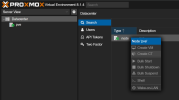
Can't look at logs. Is it dead/corrupted?
Also, strangely my LXC and VM backups from this morning worked.
Thanks
I can't access anything on the node, but it's the only node i have so obviously it's running somewhere. I tried power cycling, nothing changed. Tried rebooting from cli/ssh, keep getting a bash: reboot: command not found.
Wven from the datacenter, when i click on the node everything is blanked out
Can't look at logs. Is it dead/corrupted?
Also, strangely my LXC and VM backups from this morning worked.
Thanks
Last edited:
