[SOLVED] No /etc/kernel/proxmox-boot-uuids found, skipping ESP sync

Apr 25, 2024
12
4
3
Hi just caught this message after running an adhoc update

Code:
Setting up zfsutils-linux (2.4.1-pve1) ...
Installing new version of config file /etc/default/zfs ...
Installing new version of config file /etc/zfs/zfs-functions ...
Setting up zfs-initramfs (2.4.1-pve1) ...
Setting up corosync (3.1.10-pve2) ...
Setting up ssh (1:10.0p1-7+deb13u2) ...
Setting up zfs-zed (2.4.1-pve1) ...
Processing triggers for libc-bin (2.41-12+deb13u2) ...
Processing triggers for man-db (2.13.1-1) ...
Processing triggers for initramfs-tools (0.148.3) ...
update-initramfs: Generating /boot/initrd.img-6.17.13-2-pve
Running hook script 'zz-proxmox-boot'..
Re-executing '/etc/kernel/postinst.d/zz-proxmox-boot' in new private mount namespace..
No /etc/kernel/proxmox-boot-uuids found, skipping ESP sync.

Your System is up-to-date

A message similar to this got me into trouble in the upgrade from V8 to V9 and I resolved that by running proxmox-boot-tool init /dev/sda2

Running that this time resulted in

Code:
Re-executing '/usr/sbin/proxmox-boot-tool' in new private mount namespace..
UUID="305F-1418" SIZE="1073741824" FSTYPE="vfat" PARTTYPE="c12a7328-f81f-11d2-ba4b-00a0c93ec93b" PKNAME="sda" MOUNTPOINT="/boot/efi"
E: '/dev/sda2' is mounted on '/boot/efi' - exiting.

but rerunning /etc/kernel/postinst.d/zz-proxmox-boot
produces

Code:
Re-executing '/etc/kernel/postinst.d/zz-proxmox-boot' in new private mount namespace..
No /etc/kernel/proxmox-boot-uuids found, skipping ESP sync.

How do I proceed from here?
 
How do I proceed from here?
Not sure. Touching the boot process is always... delicate. (Make sure to have a "plan b", where "b" stands for "backup" ;-) )

E: '/dev/sda2' is mounted on '/boot/efi' - exiting.
On my systems "/boot/efi" is not mounted. That makes sense as the content is not relevant after a successful boot and there are "fitting" partitions on multiple devices - so which one should be mounted? (It is difficult to keep the content in sync if a random one is mounted and possibly modified.)

So... I would just unmount it...

Take a look at proxmox-boot-tool status , does it tell something helpful?

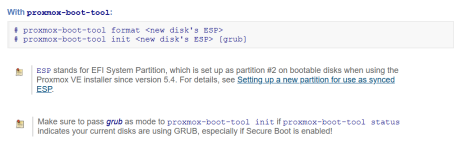
To re-create the ESP look at https://pve.proxmox.com/pve-docs/pve-admin-guide.html#_zfs_administration :
Code:
With proxmox-boot-tool:
# proxmox-boot-tool format <new disk's ESP>
# proxmox-boot-tool init <new disk's ESP> [grub]

Good luck!

PS: when posting console output please post also the initiated and complete command you used, as options and parameters may be relevant
 
Last edited:
  • Like
Reactions: TrevorW
Not sure. Touching the boot process is always... delicate. (Make sure to have a "plan b", where "b" stands for "backup" ;-) )


On my systems "/boot/efi" is not mounted. That makes sense as the content is not relevant after a successful boot and there are "fitting" partitions on multiple devices - so which one should be mounted? (It is difficult to keep the content in sync if a random one is mounted and possibly modified.)

So... I would just unmount it...

Take a look at proxmox-boot-tool status , does it tell something helpful?

To re-create the ESP look at https://pve.proxmox.com/pve-docs/pve-admin-guide.html#_zfs_administration :
Code:
With proxmox-boot-tool:
# proxmox-boot-tool format <new disk's ESP>
# proxmox-boot-tool init <new disk's ESP> [grub]

Good luck!

PS: when posting console output please post also the initiated and complete command you used, as options and parameters may be relevant
Thanks UdoB

I've unmounted /boot/efi and proxmox-boot-tool status says nothing of interest - it just takes me back to no boot uuids existing.

Code:
root@Proxb2:~# umount /dev/sda2
root@Proxb2:~# proxmox-boot-tool status
Re-executing '/usr/sbin/proxmox-boot-tool' in new private mount namespace..
E: /etc/kernel/proxmox-boot-uuids does not exist.

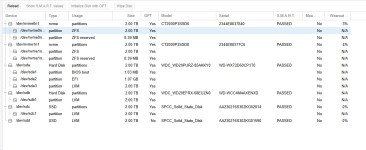
The zfs pool isn't the boot disk it's just a mirrored pool for vms. This is my disk setup - /dev/sda is the boot disk

Screenshot 2026-04-11 235439.png

The only reason I noticed was the 2 other nodes that I updated both did the grub update of the kernels, this one didn't and it was saying no boot uuids existed - which all 3 nodes reported when upgraded from v8 to v9 - this first node I updated I missed that message and I could only get it to boot with the proxmox install usb in rescue mode, that was when I worked out I had to use the the proxmox-boot-tool to init /dev/sda2 - after carrying that out rebooting was ok, when I upodated the remaining 2 nodes the saame error popped up but I caught it before rebooting them and again fixed it by running the proxmox-boot-tool. I posted all the details here https://forum.proxmox.com/threads/pve-8-to-9-in-place-upgrade.170013/page-4#post-846756

That's why it surprised me that this node again showed the same behaviour after just doing a normal software update.
 
Ok looks I like I got it solved and the trick was to unmount /dev/sda2 and then run the proxmox-boot-tool init command.

Code:
root@Proxb2:~# umount /dev/sda2
root@Proxb2:~# proxmox-boot-tool status
Re-executing '/usr/sbin/proxmox-boot-tool' in new private mount namespace..
E: /etc/kernel/proxmox-boot-uuids does not exist.
root@Proxb2:~# ls /etc/kernel/
install.d  postinst.d  postrm.d  preinst.d
root@Proxb2:~# proxmox-boot-tool init /dev/sda2
Re-executing '/usr/sbin/proxmox-boot-tool' in new private mount namespace..
UUID="305F-1418" SIZE="1073741824" FSTYPE="vfat" PARTTYPE="c12a7328-f81f-11d2-ba4b-00a0c93ec93b" PKNAME="sda" MOUNTPOINT=""
Mounting '/dev/sda2' on '/var/tmp/espmounts/305F-1418'.
Installing grub x86_64 target..
Installing for x86_64-efi platform.
Installation finished. No error reported.
Installing grub x86_64 target (removable)..
Installing for x86_64-efi platform.
Installation finished. No error reported.
Unmounting '/dev/sda2'.
Adding '/dev/sda2' to list of synced ESPs..
Refreshing kernels and initrds..
Running hook script 'proxmox-auto-removal'..
Running hook script 'zz-proxmox-boot'..
No /etc/kernel/cmdline found - falling back to /proc/cmdline
Copying and configuring kernels on /dev/disk/by-uuid/305F-1418
        Copying kernel 6.17.13-2-pve
        Copying kernel 6.8.12-20-pve
Generating grub configuration file ...
Found linux image: /boot/vmlinuz-6.17.13-2-pve
Found initrd image: /boot/initrd.img-6.17.13-2-pve
Found linux image: /boot/vmlinuz-6.8.12-20-pve
Found initrd image: /boot/initrd.img-6.8.12-20-pve
Adding boot menu entry for UEFI Firmware Settings ...
done
root@Proxb2:~# ls /etc/kernel/
install.d  postinst.d  postrm.d  preinst.d  proxmox-boot-uuids

Thanks UdoB
 

Attachments

  • 1775969401416.png
    1775969401416.png
    40.1 KB · Views: 1
  • Like
Reactions: UdoB