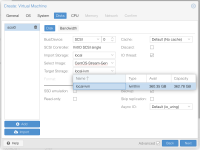
Hello, I recently installed Proxmox VE 9.1.4 on a 2012 Mac mini and have been trying to deploy a new VM based on a qcow2 cloud image. I've mainly been trying to use the latest CentOS Stream 10 image, but have also tried others, including Ubuntu Server 24.04.
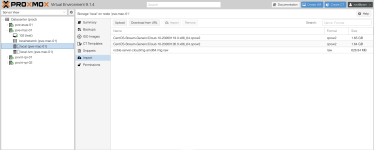
In each case, I have downloaded the qcow2 image into local storage from the import view:
The configuration that I'm most convinced should be correct is:
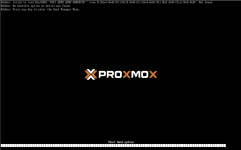
Each time I try to boot the image, I'm greeted with the same message:
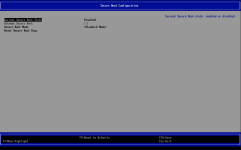
In my research, I've found that the most common problem usually is that secure boot is enabled, but it is not:
I also tried following advice from this Wiki to modify UEFI boot entries, but I don't see anything in the file explorer:
I also tried manually importing the qcow2 image per the advice here: https://forum.proxmox.com/threads/f...age-disk-uefi-access-denied.99892/post-832900
I've also tried what feels like every combination of the configuration options for SCSI controller, disk device type, machine type, boot order, processor type, etc. etc.
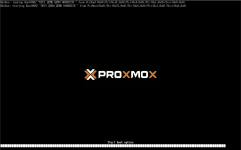
I also tried using the default SeaBIOS type but that put the VM into a boot loop showing the Proxmox splash screen and the screen to pick the device to boot.
I was also able to reproduce the same issue on a different (also newly installed) Proxmox host on an Asus motherboard, so pretty different host hardware.
Any suggestion would be appreciated, I'm pretty stumped here!
In each case, I have downloaded the qcow2 image into local storage from the import view:
The configuration that I'm most convinced should be correct is:
Code:
agent: 1
bios: ovmf
boot: order=scsi0;ide2;net0
cores: 4
cpu: x86-64-v2-AES
efidisk0: local-lvm:vm-102-disk-0,efitype=4m,size=4M
ide2: none,media=cdrom
machine: q35
memory: 8192
meta: creation-qemu=10.1.2,ctime=1769699803
name: test
net0: virtio=BC:24:11:BA:DD:2D,bridge=vmbr0,firewall=1
numa: 0
ostype: l26
scsi0: local-lvm:vm-102-disk-1,discard=on,iothread=1,size=10G,ssd=1
scsihw: virtio-scsi-single
smbios1: uuid=c822c3ed-1b74-4cd3-a673-558c42e7ce77
sockets: 1
vmgenid: c74cbff6-b454-4439-8c6c-aa7eef67cf41
Each time I try to boot the image, I'm greeted with the same message:
Failed to load Boot0002 "UEIF QEMU QEMU HARDDISK " from PciRoot (0x0)/Pci(0x1E,0x0)/Pci(0x4,0x0)/Pci(0x1,0x0)/Scsi(0x0,0x0) : Not Found
No bootable option or device was found
In my research, I've found that the most common problem usually is that secure boot is enabled, but it is not:
I also tried following advice from this Wiki to modify UEFI boot entries, but I don't see anything in the file explorer:
I also tried manually importing the qcow2 image per the advice here: https://forum.proxmox.com/threads/f...age-disk-uefi-access-denied.99892/post-832900
I've also tried what feels like every combination of the configuration options for SCSI controller, disk device type, machine type, boot order, processor type, etc. etc.
I also tried using the default SeaBIOS type but that put the VM into a boot loop showing the Proxmox splash screen and the screen to pick the device to boot.
I was also able to reproduce the same issue on a different (also newly installed) Proxmox host on an Asus motherboard, so pretty different host hardware.
Any suggestion would be appreciated, I'm pretty stumped here!