NFS backup fails after a bit

nerd

Member
Nov 4, 2021
15
0
21
47
INFO: include disk 'ide0' 'local-lvm:vm-103-disk-0' 45G
INFO: include disk 'ide1' 'local-lvm:vm-103-disk-1' 400G
INFO: include disk 'efidisk0' 'local-lvm:vm-103-disk-2' 4M
INFO: stopping virtual guest
INFO: creating vzdump archive '/mnt/pve/syno1821/dump/vzdump-qemu-103-2025_07_28-19_10_11.vma.zst'
INFO: starting kvm to execute backup task
INFO: started backup task '063e77d3-c61e-45f7-bac9-b18f311c9a0d'
INFO: resuming VM again after 186 seconds
INFO: 0% (2.2 GiB of 445.0 GiB) in 3s, read: 763.0 MiB/s, write: 682.1 MiB/s
INFO: 1% (4.5 GiB of 445.0 GiB) in 12s, read: 256.0 MiB/s, write: 239.4 MiB/s

and then nothing anymore for foreverTrying a backup of another VM also fails, just further down (percentage wise).
NFS is a simply synology with wildcard permits and nnfs v4.1

system logs shows this:
Jul 28 21:12:39 pve pvestatd[1256]: got timeout
Jul 28 21:12:39 pve pvestatd[1256]: unable to activate storage 'syno1821' - directory '/mnt/pve/syno1821' does not exist or is unreachable
Jul 28 21:12:39 pve pvestatd[1256]: status update time (10.177 seconds)
Jul 28 21:12:39 pve pvedaemon[1284]: VM 103 qmp command failed - VM 103 qmp command 'query-proxmox-support' failed - unable to connect to VM 103 qmp socket - timeout after 51 retries

What could be causing this?
 
Last edited:
failing to resolve this nsf issue.. can I somehow copy the VMs directly from old PVE #1 to new PVE #2?
 
What could be causing this?
For NFS backups, you should try setting a tmpdir in /etc/vzdump.conf as outlined in the docs. This will cause the backup to temporarily be created locally & only then be transferred to the backup storage. This is also recommended when target is NFS/CIFS under certain conditions - see those docs.
 
  • Like
Reactions: bl1mp
How is the behavior of the network between the pve and the synology?
Does other traffic to the synology pass with the expected speeds?

For interactive monitoring you could utelize the sar command from sysstat package:

Code:
sudo apt install sysstat

# watch all
sar -n DEV 3

# watch only specific
sar -n DEV 3 | egrep <interface_names_of_interest_as_pipe(|)_separated_list>


And how does the load of the synology station behave?
Do you utelize the synology for other workloads? Do similar situations occure?

BR, Lucas
 
much appreciated..
Nothing wrong with the NAS NFS I think. weekly backups run just fine.
Backing it up locally was not possible because of disk size vs VM size.

So first I messed up my new replacement host by trying to cluster-join it with the new -already configured- OPNsense firewall VM already installed by following https://forum.proxmox.com/threads/joining-a-cluster-with-already-created-guests-vm.81064/
A bunch of permission issues later, I now have the other -to be replaced hosts' machines- on the new host but in a state I can't use or even delete them. :eek:

Then I discovered I had an external USB disk laying around and found a way to mount and use that to push my backups too.
So I went and backed up the new hosts FW to the USB drive (also took a backup from within the VM itself), recovered it on the old host and now everything is running on the old host.

Next I will backup all the old hosts VMs to the USB disk and start the new host from scratch again.
Then hopefully I'll be using the backups from the USB disk to recover everything on the new host once more.

Yup.. lessons learned... :(
 
Hi,
For NFS backups, you should try setting a tmpdir in /etc/vzdump.conf as outlined in the docs. This will cause the backup to temporarily be created locally & only then be transferred to the backup storage. This is also recommended when target is NFS/CIFS under certain conditions - see those docs.
the tmpdir setting mostly applies to containers with suspend mode backup. For VM backups, only the configuration files are placed in the tmpdir, but never the full backup.
 
the tmpdir setting mostly applies to containers with suspend mode backup. For VM backups, only the configuration files are placed in the tmpdir, but never the full backup.
Thanks fiona for your input. I'm aware of this - but it still seems that some users are helped with the tmpdir addition correcting their NFS/CIFS issues.

Maybe Proxmox should consider an optional local save of a complete vzdump & only then subsequently rsyncing/writing to a remote NFS share? I believe this could prove useful for many NFS/CIFS users. I do realize that local space-constraints would have to be considered.
 
  • Like
Reactions: nerd
Managed to get my VMs restored to the new server by using the harddisk as a go-between.
Now taking my first backup on the new server, but failing to understand backup stop mode.

https://pve.proxmox.com/wiki/Backup_and_Restore#_backup_modes says stop mode will "orderly shutdown the VM, run a background QEMU process to backup the VM data and after the backup is started, the VM goes to full operation mode".

Twenty minutes (50%) into a stop mode backup, my machine hasn't gone back to full operation yet.
Is that wiki badly worded? Should that be finished instead of started maybe?

Above "--tmpdir" was also mentioned but all I can find for where to use/set that option is in cli: /etc/vzdump.conf:. Is there no gui option to set this? And is it useful to speed up the NFS backup for VMs or not? With my NAS only being connected at 1Gbps my VM is down for way too long.
The NFS backup also uses a single session I suppose? So no use creating an LACP on my NAS/switch? (proxmox does have 10Gbps).

PS, this NFS backup (on the new server) is, slowly (capped at ~980Mbps), running without problems.. not sure why I had the issues that started this topic.
 
Should that be finished instead of started maybe?
No the wording is correct. It initially stops the VM & then starts the actual backup & at that time restarts the VM.

my machine hasn't gone back to full operation yet.
Not sure what this means.

Is there no gui option to set this?
I believe there is no GUI for this - so only CLI.
If you look at those above linked docs, you'll see just before the "Hook Scripts" section an "Example vzdump.conf Configuration" which the first line of that contains the entry for a tmpdir:
tmpdir: /mnt/fast_local_disk
(adjust to the directory you choose to use).

And is it useful to speed up the NFS backup for VMs or not?
Give it a try!
 
No the wording is correct. It initially stops the VM & then starts the actual backup & at that time restarts the VM.
Not sure what this means.

Someone care to explain that to me? My VM was down until the entire file was sent across to the NFS storage.
Transfer took 2034 seconds and thats how long I was without my VM.

I believe there is no GUI for this - so only CLI.
If you look at those above linked docs, you'll see just before the "Hook Scripts" section an "Example vzdump.conf Configuration" which the first line of that contains the entry for a tmpdir:
tmpdir: /mnt/fast_local_disk
(adjust to the directory you choose to use).
Give it a try!

Trying
Code:
tmpdir: /mnt/tmpdir
storage: syno_1821
mode: stop

pre-tmpdir:
INFO: 15% (66.9 GiB of 445.0 GiB) in 4m 51s, read: 116.3 MiB/s, write: 114.0 MiB/s
INFO: transferred 445.00 GiB in 2034 seconds (224.0 MiB/s)

post-tmpdir: does not appear to be any faster
INFO: 15% (66.8 GiB of 445.0 GiB) in 4m 52s, read: 114.1 MiB/s, write: 111.8 MiB/s


Edit hang on, does that stop mode need QEMU Guest Agent perhaps? I am testing with a Clearpass appliance, I cannot install any guest agents on that.
 
Last edited:
My VM was down until the entire file was sent across to the NFS storage.
I suspect some type of conflict? Does that VM rely itself on the NFS? Does it rely heavily on the NW?
Do you see the VM as active in the GUI?

transferred 445.00 GiB in 2034 seconds (224.0 MiB/s)
How long does the backup take - if you first actually manually shutdown that VM?
 
1753818359441.png

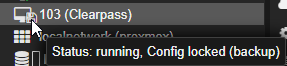
Does not appear active to me.. that screenshot is from with backup ~25%/~11mins in.
But again.. does this stop mechanism require a guest agent? Because again, I am testing with a Clearpass appliance, I cannot install any guest agents on that.
 
Does not appear active to me.
It does appear active - it has just locked its config during the actual backup. Where else do you see the VM as being inactive during the backup?

does this stop mechanism require a guest agent?
No the stop mode backup does not require GA. (Other modes may).

Clearpass appliance
So that is a NAC device. Could this be the reason the VM is unresponsive. Try a backup on a different VM for testing.
 
  • Like
Reactions: nerd
It does appear active - it has just locked its config during the actual backup. Where else do you see the VM as being inactive during the backup?
So that is a NAC device. Could this be the reason the VM is unresponsive. Try a backup on a different VM for testing.
NAC server indeed. Server did respond so was somewhat alive, but neither the GUI would load and all authentications failed aswel.

No the stop mode backup does not require GA. (Other modes may).
So that is a NAC device. Could this be the reason the VM is unresponsive. Try a backup on a different VM for testing.
Good to know, but no other servers running with backups that take long enough to care. So I'll leave it at this for today.
Much appreciated for your help!
 
But again.. does this stop mechanism require a guest agent? Because again, I am testing with a Clearpass appliance, I cannot install any guest agents on that.

But it might help, otherwise the shutdown will trigger ACPI and after a timeout hard kill the VM. (Might be poor for Databases etc.)
The timeout should default to 180 seconds and can be configured in the VM Options -> Start/Shutdown order -> Shutdown delay.

To see if this affects your backup, you can just try how long a manually triggert shutdown takes.
 
Last edited:
INFO: include disk 'ide0' 'local-lvm:vm-103-disk-0' 45G
INFO: include disk 'ide1' 'local-lvm:vm-103-disk-1' 400G
INFO: include disk 'efidisk0' 'local-lvm:vm-103-disk-2' 4M
INFO: stopping virtual guest
INFO: creating vzdump archive '/mnt/pve/syno1821/dump/vzdump-qemu-103-2025_07_28-19_10_11.vma.zst'
INFO: starting kvm to execute backup task
INFO: started backup task '063e77d3-c61e-45f7-bac9-b18f311c9a0d'
INFO: resuming VM again after 186 seconds
INFO: 0% (2.2 GiB of 445.0 GiB) in 3s, read: 763.0 MiB/s, write: 682.1 MiB/s
INFO: 1% (4.5 GiB of 445.0 GiB) in 12s, read: 256.0 MiB/s, write: 239.4 MiB/s

and then nothing anymore for foreverTrying a backup of another VM also fails, just further down (percentage wise).
NFS is a simply synology with wildcard permits and nnfs v4.1

system logs shows this:
Jul 28 21:12:39 pve pvestatd[1256]: got timeout
Jul 28 21:12:39 pve pvestatd[1256]: unable to activate storage 'syno1821' - directory '/mnt/pve/syno1821' does not exist or is unreachable
Jul 28 21:12:39 pve pvestatd[1256]: status update time (10.177 seconds)
Jul 28 21:12:39 pve pvedaemon[1284]: VM 103 qmp command failed - VM 103 qmp command 'query-proxmox-support' failed - unable to connect to VM 103 qmp socket - timeout after 51 retries
It could point to the storage or network being overloaded. You could try configuring a bandwidth limit and see if that helps. Using backup fleecing is also recommended when backing up to a network storage. Both can be found and configured in the Advanced tab of the backup job in the UI.
 
The timeout should default to 60 seconds
From the Proxmox qm(1) manpage:
Shutdown timeout: Defines the duration in seconds Proxmox VE should wait for the VM to be offline after issuing a shutdown command. By default this value is set to 180, which means that Proxmox VE will issue a shutdown request and wait 180 seconds for the machine to be offline. If the machine is still online after the timeout it will be stopped forcefully.