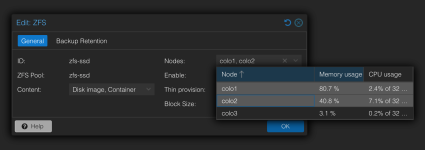
I guess it is my mistake, but maybe there is a way to rectify it without removing the 3rd new node from the cluster and reinstall?
The goal is replication and to have the same ZFS mounting points on every node....
This 3 node cluster have the same disk layouts. I did forget to create on the new 3rd node the ZFS-HDD mount before joining this last new node to the cluster!
Now the ZFS-HDD exist with a question mark, as the ZFS pool is not ready created. And it can not be created anymore from the GUI or CLI
On Node3:
zpool create -f -o ashift=12 zfs-ssd raidz /dev/disk/by-id/wwn-0x500a07514f3263de /dev/disk/by-id/wwn-0x500a07514f3262fc /dev/disk/by-id/wwn-0x500a07514f32669f /dev/disk/by-id/wwn-0x500a07514f326636
mountpoint '/zfs-ssd' exists and is not empty
zpool list
NAME SIZE ALLOC FREE CKPOINT EXPANDSZ FRAG CAP DEDUP HEALTH ALTROOT
rpool 370G 2.86G 367G - - 0% 0% 1.00x ONLINE -
Important is its a production system with runnings VMs on the other 2 nodes, so I like really careful
Thanks in advance!
The goal is replication and to have the same ZFS mounting points on every node....
This 3 node cluster have the same disk layouts. I did forget to create on the new 3rd node the ZFS-HDD mount before joining this last new node to the cluster!
Now the ZFS-HDD exist with a question mark, as the ZFS pool is not ready created. And it can not be created anymore from the GUI or CLI
On Node3:
zpool create -f -o ashift=12 zfs-ssd raidz /dev/disk/by-id/wwn-0x500a07514f3263de /dev/disk/by-id/wwn-0x500a07514f3262fc /dev/disk/by-id/wwn-0x500a07514f32669f /dev/disk/by-id/wwn-0x500a07514f326636
mountpoint '/zfs-ssd' exists and is not empty
zpool list
NAME SIZE ALLOC FREE CKPOINT EXPANDSZ FRAG CAP DEDUP HEALTH ALTROOT
rpool 370G 2.86G 367G - - 0% 0% 1.00x ONLINE -
Important is its a production system with runnings VMs on the other 2 nodes, so I like really careful
Thanks in advance!

 All fine for me, hope the next struggling benefit from the posts. Technical i'm not sure why the folder was still replicated/recreated...