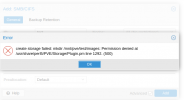
J jam the sentient berry New Member Feb 5, 2022 3 0 1 23 Feb 5, 2022 #1 Has anyone seen this before because i cant find anything about this on duckduckgo
gurubert Distinguished Member Mar 12, 2015 1,305 460 153 Berlin, Germany www.heinlein-consulting.de Feb 5, 2022 #2 Proxmox is creating a default directory structure in every storage you configure. It looks like the account you are using to access the SMB share does not have enough rights on the file server to do that.
Proxmox is creating a default directory structure in every storage you configure. It looks like the account you are using to access the SMB share does not have enough rights on the file server to do that.
J jam the sentient berry New Member Feb 5, 2022 3 0 1 23 Feb 6, 2022 #3 gurubert said: Proxmox is creating a default directory structure in every storage you configure. It looks like the account you are using to access the SMB share does not have enough rights on the file server to do that. Click to expand... but im useing the root acc ?
gurubert said: Proxmox is creating a default directory structure in every storage you configure. It looks like the account you are using to access the SMB share does not have enough rights on the file server to do that. Click to expand... but im useing the root acc ?
Dunuin Distinguished Member Jun 30, 2020 14,793 4,880 290 Germany Feb 6, 2022 #4 That doesn't matter. You should check the permission options of your NAS and for example set rights to 777 and check that the IP isn't blocked.
That doesn't matter. You should check the permission options of your NAS and for example set rights to 777 and check that the IP isn't blocked.
J jam the sentient berry New Member Feb 5, 2022 3 0 1 23 Feb 11, 2022 #5 Dunuin said: That doesn't matter. You should check the permission options of your NAS and for example set rights to 777 and check that the IP isn't blocked. Click to expand... oh the nas i though you meant the server its self tho im am confused because when login in to LinuxMint it seems fine but ill look in to my truenas setup
Dunuin said: That doesn't matter. You should check the permission options of your NAS and for example set rights to 777 and check that the IP isn't blocked. Click to expand... oh the nas i though you meant the server its self tho im am confused because when login in to LinuxMint it seems fine but ill look in to my truenas setup