

Hi everyone,
I am very new to all this and have come across Proxmox recently, apologies for any dumbness on my part with anything I am saying. But thank you for your help.
So i have a
Dell PowerEdge R6515 10 x 2.5" (NVMe)
1 x AMD EPYC 7H12 2.60GHz 64-Core CPU
8 x 128GB PC4-2666V-L DDR4 2S4Rx4 2666MHz ECC
PERC S150 Software RAID Controller for NVMe drives
2 x Dell NVIDIA Tesla T4 16GB HH Graphics Accelerator
1 x Dell Broadcom 57416 10Gb SFP+ DP Mezz
1 x Embedded NIC 1: Broadcom NetXtreme Gigabit Ethernet
4 x Dell 1.92TB SSD NVMe PCle Gen4 2.5"
2 x Dell 960GB NVMe SSD 2.5" Gen3
2 x 550W Hot-Swap Power Supplies (13th & 14th Gen)
iDRAC9 Enterprise License
Network is currently my home office, switch straight in to the router, 900 up and down, no out of the ordinary setup.
I have setup the server since receiving it and done all the firmware updates, i was able to do this through Lifecycle Controller over the internet, so I know my network ports / cables etc are all working ok.
I have been through a number of iterations of installing Proxmox on here, and each time trying to work through what the issue could be, I have looked up the issue but haven’t found any answer that seems to match with the problem I am facing, so hopefully it is me being stupid.
The Issue
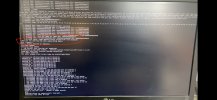
So on the initial install I have now noticed that it starts the install and then hangs for about 1-2 minutes, then suddenly carries on installing, and from recording the install I can now see that straight after the hanging it says ‘Timed out for waiting the dev queue being empty’ then does the final section of the install. I have attached an image for you to see.
I then go through the rest of the setup, it says rebooting, but never actually does that so have to do that manually through iDRAC.
When it loads up I can log in to Proxmox directly on the server with Command Line access, but the web GUI doesn’t work.
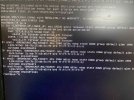
I have tried pinging other systems on the network and it says ‘Network is unreachable’, when I look at ip a I can see that the ‘state’ is DOWN on all connections even though I know there are cables connected and working. Image below.
I have a few other errors that I have found in the logs so I have put these down as well to hopefully give the best picture of what is going on.
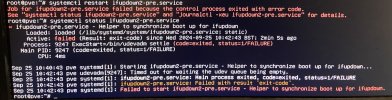
The main one is the ifupdown2 service not being able to start.
Any help will be greatly appreciated.
Thanks.
I am very new to all this and have come across Proxmox recently, apologies for any dumbness on my part with anything I am saying. But thank you for your help.
So i have a
Dell PowerEdge R6515 10 x 2.5" (NVMe)
1 x AMD EPYC 7H12 2.60GHz 64-Core CPU
8 x 128GB PC4-2666V-L DDR4 2S4Rx4 2666MHz ECC
PERC S150 Software RAID Controller for NVMe drives
2 x Dell NVIDIA Tesla T4 16GB HH Graphics Accelerator
1 x Dell Broadcom 57416 10Gb SFP+ DP Mezz
1 x Embedded NIC 1: Broadcom NetXtreme Gigabit Ethernet
4 x Dell 1.92TB SSD NVMe PCle Gen4 2.5"
2 x Dell 960GB NVMe SSD 2.5" Gen3
2 x 550W Hot-Swap Power Supplies (13th & 14th Gen)
iDRAC9 Enterprise License
Network is currently my home office, switch straight in to the router, 900 up and down, no out of the ordinary setup.
I have setup the server since receiving it and done all the firmware updates, i was able to do this through Lifecycle Controller over the internet, so I know my network ports / cables etc are all working ok.
I have been through a number of iterations of installing Proxmox on here, and each time trying to work through what the issue could be, I have looked up the issue but haven’t found any answer that seems to match with the problem I am facing, so hopefully it is me being stupid.
The Issue
So on the initial install I have now noticed that it starts the install and then hangs for about 1-2 minutes, then suddenly carries on installing, and from recording the install I can now see that straight after the hanging it says ‘Timed out for waiting the dev queue being empty’ then does the final section of the install. I have attached an image for you to see.
I then go through the rest of the setup, it says rebooting, but never actually does that so have to do that manually through iDRAC.
When it loads up I can log in to Proxmox directly on the server with Command Line access, but the web GUI doesn’t work.
I have tried pinging other systems on the network and it says ‘Network is unreachable’, when I look at ip a I can see that the ‘state’ is DOWN on all connections even though I know there are cables connected and working. Image below.
I have a few other errors that I have found in the logs so I have put these down as well to hopefully give the best picture of what is going on.
The main one is the ifupdown2 service not being able to start.
Any help will be greatly appreciated.
Thanks.