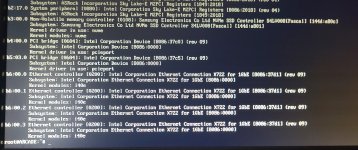
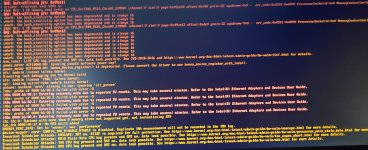
Hi folks, any help would be amazing here.
I had a power outage this past weekend and ever since my PVE server has been unable to get an IP address on my local network. I also noticed that instead of the usual 4 network devices, I only have 3. I'm concerned that something may have shocked a malfunction into a network card.
I've so far tried the following
- rebooting
- ifreload -a
- updating /etc/network/interfaces to match the new names of the network devices (tried all 3 available network devices but none of them worked)
- Removing the IP Reservation on my router that previously existed for this device, then forcing /etc/network/interfaces to use DHCP (no response)
- Removing/Reseating/Replacing network cables (switch doesn't recognized the cables as plugged in - no activity lights on the port)
- Replacing the switch the computer's plugged into (IPMI Interface connects, but server's network cards don't.
- Plugging server directly into router as oppoosed to switch (switch is a TP-Link Festa FS328G, router is a TP-Link Deco M5)
- Updating firmware on Motherboard as well as IPMI interface (mobo is an ASRock RACK EP2C621D12 WS)
Up next is to try an ethernet dongle in one of the USB ports, see if I can get an IP that way. I need to buy one of those though
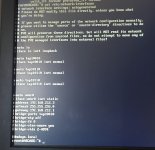
Attached is contents of /etc/network/interfaces
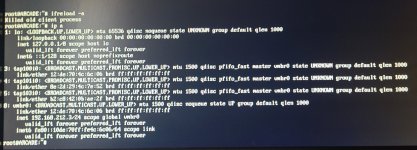
ip a
and /etc/hosts
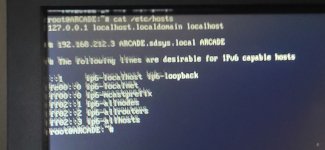
All the conventional wisdom I found from searching hasn't been able to help me. Additionally I've never seen device names like this, nor have I seen one of the 4 ethernet ports on the motherboard just disappear like this. I can't find anything with the prefix tap10x anywhere
If anyone's got ideas please share them. Thank you for reading all this and I hope you have a lovely day
I had a power outage this past weekend and ever since my PVE server has been unable to get an IP address on my local network. I also noticed that instead of the usual 4 network devices, I only have 3. I'm concerned that something may have shocked a malfunction into a network card.
I've so far tried the following
- rebooting
- ifreload -a
- updating /etc/network/interfaces to match the new names of the network devices (tried all 3 available network devices but none of them worked)
- Removing the IP Reservation on my router that previously existed for this device, then forcing /etc/network/interfaces to use DHCP (no response)
- Removing/Reseating/Replacing network cables (switch doesn't recognized the cables as plugged in - no activity lights on the port)
- Replacing the switch the computer's plugged into (IPMI Interface connects, but server's network cards don't.
- Plugging server directly into router as oppoosed to switch (switch is a TP-Link Festa FS328G, router is a TP-Link Deco M5)
- Updating firmware on Motherboard as well as IPMI interface (mobo is an ASRock RACK EP2C621D12 WS)
Up next is to try an ethernet dongle in one of the USB ports, see if I can get an IP that way. I need to buy one of those though
Attached is contents of /etc/network/interfaces
ip a
and /etc/hosts
All the conventional wisdom I found from searching hasn't been able to help me. Additionally I've never seen device names like this, nor have I seen one of the 4 ethernet ports on the motherboard just disappear like this. I can't find anything with the prefix tap10x anywhere
If anyone's got ideas please share them. Thank you for reading all this and I hope you have a lovely day