Network config after initial install

giddle

New Member
Jan 2, 2025
6
1
3
Hi All,
Kind of embarrassed to be posting this but I've been stuck for too long on this so hopeful a second set of eyes will point me down the right path. I've installed the latest VE ISO on my host (8.3-1) and installed on one of the hard drives without issue. The host boots after install and asks me to browse to https://<management-ip>:8006 which doesn't work.

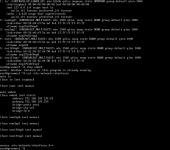
I had to choose an interface during the pre install configuration and I selected eno1 and entered an IP/netmask gateway etc but when i run ip a on the host there is no IP assigned to the eno1 interface. When I look at /etc/network/interfaces it seems to have created a bridge (vmbr0) and assigned the network configuration I entered to that and allocated eno1 as a bridge port. e.g.

auto vmbr0
iface vmbr0 inet static
address 192.168.x.y/24
gateway 192.168.x.254
bridge-ports eno1
bridge-stp off
bridge-fd 0

Should I expect to see vmbr0 in the ip a output with an ip address assigned or should I see this detail elsewhere?
 
That is the expected result, the (physical) network interface has on configured IP, but is referenced by the bridge device.

„ip a s“ should print vmbr0 using the configured IP.

However, it may happen that due to Kernel updates the network interface eno1 has changed it‘s name (like enp2s0). In that case you must update/etc/network/interfaces to reflect that change.
 
Thanks for the quick response Maxim. I see eno1 in ip a and the interfaces file so it doesnt appear to have changed its name although it does have an alternate name. Are you saying I need to update the bridge-ports line in interfaces to the altname for eno1?

Thanks in advance.
Screenshot 2025-01-02 172813.png
 
Something is not right about your config. ip a should show the vmbr0 that has been created with the IP address that has been assigned to it.

Things to consider:

Do you physically know which port is eno1 - does it have the correct cables connected, lights showing etc.
Maybe eno1 is the built in NIC for remote server management. (If this is the case you must choose a different one).
Are you sure about the /24 netmask.
Are you sure about the GW address.

I'm not sure why you hide your local IP addresses, they are inaccessible by others, but may provide info in order to help you.
 
Something is not right about your config. ip a should show the vmbr0 that has been created with the IP address that has been assigned to it.

Things to consider:

Do you physically know which port is eno1 - does it have the correct cables connected, lights showing etc.
Maybe eno1 is the built in NIC for remote server management. (If this is the case you must choose a different one).
Are you sure about the /24 netmask.
Are you sure about the GW address.

I'm not sure why you hide your local IP addresses, they are inaccessible by others, but may provide info in order to help you.
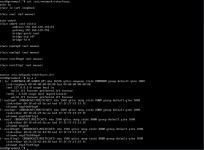
Thanks for the tips. Good to know that vmbr0 should show the IPScreenshot 2025-01-02 201422.png I allocated.

All ports on this host are connected to a switch (different switches) I believe the green circle next to each interface in the initial setup screen confirms this? I have confirmed eno1 is connected to the right port by validating the mac address the switch end is seeing matches the mac in the ip a output.

I am sure about the /24 and the gateway as it's the same IP, mask, and GW as I was using on this same physical host when it was running redhat last week.

Wasnt trying to hide the IP. I'm aware these are in the private range. You'll note the screenshot has the IP shown.
 
Thats an interesting one "error: Another instance of this program is already running"

Screenshot 2025-01-02 213420.png
 
Your system appears unable to make a NW connection on that NIC. Maybe you have some type of IPMI/management port that might be using that eno1 NIC? Try using a different NIC in the install & see what happens.
 
Hi All, Thanks for the help. Turns out I needed to disable RDMA in the BIOS on 2 of the NICS (two that I wasn't using or trying to use). All working now.
 
  • Like
Reactions: mr44er