Network Boot Proxmox Automated Install with ipxe?

Snoop

New Member
Mar 9, 2025
5
0
1
Context:
I want to perform a network boot using the proxmox-auto-install-assistant package specifically through IPXE. I'm trying to avoid complicated or unreliable workarounds like netscan/netboot or memdisk, as I've tested these without success.

Questions:
  1. Does the standard Proxmox installation kernel and initrd (provided by proxmox-auto-install-assistant) automatically listen for or attempt to fetch an external answer.toml file when network booting via IPXE, or must this answer.toml file be bundled directly into the ISO beforehand?
  2. If network booting directly from the Proxmox installer isn't feasible, would it be practical to:
    • Perform a minimal Debian OS network install first, and then install Proxmox packages afterward?
    • Is there a recommended approach or documentation/example demonstrating this process?

Concerns:
I'm cautious about installing Debian first and layering Proxmox afterward. My main worry is potential stability or compatibility issues down the line (e.g., things breaking after a few months) due to Proxmox not fully integrating with an existing Debian installation.

Any guidance, recommended practices, or examples would be greatly appreciated!
 
This is nonsense. ^^^

I ended up going with debian preseed with proxmox layered on top. Works great!
 
I have to agree with the above. I'm trying to get our otherwise-perfectly-working PXE servers working for Proxmox specifically, and it appears somebody has actually _removed_ the components needed from the Proxmox ISO. So... WHY??? Good grief this is nonsense indeed.

Proxmox folks, if you really truly want to compete in the enterprise space and not just stomped on by other players such as RHEL, make provisioning better. Much better.
 
Last edited:
This is nonsense. ^^^

I ended up going with debian preseed with proxmox layered on top. Works great!
How were you able to get ZFS root partition working with that? I've found there's a catch-22: proxmox installer does zfsroot fine but won't PXE boot into UEFI, and debian installer does PXE boot into UEFI just fine, but I haven't yet figured out how to get it to accept zfsroot.
 
How were you able to get ZFS root partition working with that? I've found there's a catch-22: proxmox installer does zfsroot fine but won't PXE boot into UEFI, and debian installer does PXE boot into UEFI just fine, but I haven't yet figured out how to get it to accept zfsroot.
I've only been homelabbing 10 months so take all of this with a grain of salt.
I'm still trying to setup my CI/CD pipeline. :/

But to answer your question, I create the ZFS after the fact. There's also some setup of the "folders" or "disks" run by a script. And then I use ansible after to create the ZFS. I haven't had time to refactor anything because I'm just trying to get a MVP for my fun little homelab. :)

For pxe network booting, here is my partitioning within the preseed.cfg:
Code:
#######################################################################
# 5 PARTITIONING  minimal: ESP + root
#######################################################################

##### clean up any old LVM #####
d-i partman-lvm/device_remove_lvm       boolean true
d-i partman-lvm/confirm                 boolean true
d-i partman-lvm/confirm_nooverwrite     boolean true

##### force GPT #####
d-i partman-partitioning/choose_label   select gpt
d-i partman-partitioning/default_label  string gpt

##### explicit PV / VG / LV definition #####
d-i partman-auto/method                 string lvm
d-i partman-auto/disk                   string /dev/nvme0n1
d-i partman-auto/choose_recipe          select pve-full
d-i partman-auto-lvm/new_vg_name pve
d-i partman/alignment string "optimal"
d-i partman-auto-lvm/guided_size string max

d-i partman-auto/expert_recipe string pve-full :: \
    512 512 512 fat32 $primary{ } $bootable{ } method{ efi } format{ } . \
    512 512 512 ext2 $primary{ } method{ format } format{ } use_filesystem{ } filesystem{ ext2 } mountpoint{ /boot } . \
    8 8 -1 lvm $primary{ } method{ lvm } pv_name{ pve-pv } vg_name{ pve } . \
    32768 32768 32768 ext4 $lvmok{ } in_vg{ pve } lv_name{ root } method{ format } format{ } use_filesystem{ } filesystem{ ext4 } mountpoint{ / } . \
    4096 4096 4096 linux-swap $lvmok{ } in_vg{ pve } lv_name{ swap } method{ swap } format{ } . \
    102400 102400 102400 ext4 $lvmok{ } in_vg{ pve } lv_name{ localdir } method{ format } format{ } use_filesystem{ } filesystem{ ext4 } mountpoint{ /var/lib/vz } . \
    512 512 -2G ext4 $lvmok{ } in_vg{ pve } lv_name{ data } method{ keep } .

##### finish non-interactively #####
d-i partman/confirm_write_new_label     boolean true
d-i partman/choose_partition            select finish
d-i partman/confirm                     boolean true
d-i partman/confirm_nooverwrite         boolean true

Here is the script that runs after proxmox is fully provisioned:
Bash:
#!/usr/bin/env bash
set -euo pipefail

# ─── Tunables ────────────────────────────────────────────────
readonly VG_NAME="pve"
readonly THINPOOL_NAME="data"
readonly LOCAL_DIR="/var/lib/vz"

readonly BIG_MIN_TIB=10 # first ≥10 TiB blank disk → big-storage
readonly BIG_VG="bigvg"
readonly BIG_LV="backup"
readonly BIG_MOUNT="/mnt/backup"

readonly TOKEN_ID="redacted"
readonly TOKEN_FILE="redacted"

# ─── Helpers ─────────────────────────────────────────────────
log()  { printf '\e[32m[+] %s\e[0m\n' "$*" >&2; }
warn() { printf '\e[33m[!] %s\e[0m\n' "$*" >&2; }
die() {
  printf '\e[31m[x] %s\e[0m\n' "$*"
  exit 1
}
run() {
  log "Running: $*"
  "$@"
}

[[ $EUID -eq 0 ]] || die "Must run as root"

# ─── 1. local dir store (/var/lib/vz) ────────────────────────
ensure_local_dir() {
  pvesm status --storage local &>/dev/null && {
    log "'local' exists – skipping"
    return
  }
  run pvesm add dir local --path "$LOCAL_DIR" --content iso,vztmpl,snippets,backup
}

# ─── 2. make sure pve/data is a thin-pool ────────────────────
ensure_space_for_metadata() {
  local need=32 free
  free=$(vgs --noheadings -o vg_free_count "$VG_NAME" | tr -d ' ')
  while ((free < need)); do
    run lvresize -y -L-256M "/dev/${VG_NAME}/${THINPOOL_NAME}"
    free=$(vgs --noheadings -o vg_free_count "$VG_NAME" | tr -d ' ')
  done
}

ensure_thinpool() {
  lvs --noheadings "${VG_NAME}/${THINPOOL_NAME}" &>/dev/null || {
    warn "data LV missing"
    return
  }

  if lvs --noheadings -o lv_attr "${VG_NAME}/${THINPOOL_NAME}" | grep -q '^[[:space:]]*t'; then
    log "Thin-pool already present – skipping conversion"
    return
  fi

  log "Converting ${VG_NAME}/${THINPOOL_NAME} to thin-pool"
  umount -q "/dev/${VG_NAME}/${THINPOOL_NAME}" 2>/dev/null || true
  wipefs -af "/dev/${VG_NAME}/${THINPOOL_NAME}" 2>/dev/null || true
  ensure_space_for_metadata
  run lvconvert -y --type thin-pool "/dev/${VG_NAME}/${THINPOOL_NAME}"
}

# ─── 3. register local-lvm storage in Proxmox ────────────────
ensure_local_lvm() {
  if pvesm status --storage local-lvm &>/dev/null; then
    pvesm set local-lvm --vgname "$VG_NAME" --thinpool "$THINPOOL_NAME" --content rootdir,images || warn "pvesm set failed"
  else
    run pvesm add lvmthin local-lvm --vgname "$VG_NAME" --thinpool "$THINPOOL_NAME" --content rootdir,images
  fi
}

# ─── 4. automatically create big-storage if a blank ≥10 TiB disk exists ──
ensure_big_storage() {
  # skip if bigvg already present
  vgdisplay "$BIG_VG" &>/dev/null && {
    log "bigvg already exists – keeping"
    return
  }

  local disk=''
  while read -r size name; do
    blkid -p "/dev/$name" &>/dev/null && continue # has signature
    ((size / 1024 / 1024 / 1024 / 1024 >= BIG_MIN_TIB)) && {
      disk="/dev/$name"
      break
    }
  done < <(lsblk -dnbo SIZE,NAME)

  [[ -z $disk ]] && {
    log "No blank ≥${BIG_MIN_TIB} TiB disk found – skipping"
    return
  }

  log "Creating big-storage on $disk"
  run pvcreate "$disk"
  run vgcreate "$BIG_VG" "$disk"
  run lvcreate -n "$BIG_LV" -l 100%FREE "$BIG_VG"
  run mkfs.ext4 -F "/dev/${BIG_VG}/${BIG_LV}"
  mkdir -p "$BIG_MOUNT"
  echo "/dev/${BIG_VG}/${BIG_LV} $BIG_MOUNT ext4 defaults 0 2" >>/etc/fstab
  mount "$BIG_MOUNT"
}

Here is the ansible code that creates the ZFS:
YAML:
---
- name: Ensure ZFS utilities are installed
  apt:
    name: zfsutils-linux
    state: present
    update_cache: yes

- name: Check if ZFS pool exists
  command: zpool list -H -o name
  register: zfs_pools
  changed_when: false

- name: Create ZFS pool if not present
  command: zpool create -f tank /dev/sda
  when: "'tank' not in zfs_pools.stdout_lines"

- name: Check if ZFS dataset exists
  shell: zfs list -H -o name tank/media
  register: zfs_dataset_check
  failed_when: false
  changed_when: false

- name: Create a ZFS dataset for media
  command: zfs create tank/media
  when: "'tank/media' not in zfs_dataset_check.stdout_lines"

- name: Check if ZFS dataset is mounted
  shell: zfs get -H -o value mounted tank/media
  register: zfs_mount_status
  changed_when: false
  failed_when: false

- name: Ensure ZFS dataset is mounted
  command: zfs mount tank/media
  when: zfs_mount_status.stdout != "yes"

- name: Create directory if ZFS mount is missing
  file:
    path: /tank/media
    state: directory
    mode: '0755'
  when: "'/tank/media' not in zfs_mount_status.stdout"

- name: Ensure media directories exist in ZFS dataset
  file:
    path: '/tank/media/{{ item }}'
    state: directory
    mode: '0755'
  with_items:
    - movies
    - shows


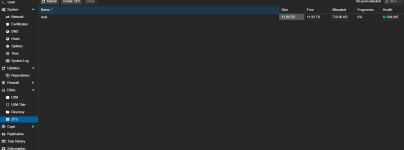
I haven't done extensive testing. It's 100% a ZFS pool and I can put data into it and access it from other machines using NFS. I haven't tried more complicated ZFS stuff like raid. I'm planning on just mirroring ZFS for Prod and Dev and trying to keep things "simple".

1753758969305.png
 
Last edited:
I have to agree with the above. I'm trying to get our otherwise-perfectly-working PXE servers working for Proxmox specifically, and it appears somebody has actually _removed_ the components needed from the Proxmox ISO. So... WHY??? Good grief this is nonsense indeed.

Proxmox folks, if you really truly want to compete in the enterprise space and not just stomped on by other players such as RHEL, make provisioning better. Much better.
Y'all hiring? :)

I got tired of the job market treating people like shit. So I'm just doing delivery driving for my job which is super cushy, relaxing, stress-free, and no responsiblities. Pay is aight. When not playing video games with friends, I'm coding in the evenings / weekends.

But yeah, I gave up applying. I'd rather make worse pay then apply for 6 months and maybe get a job. I can also build a video game, app, or homelab in that same span of time. It's not worth wasting the time to apply ("right now within this 2024-2025 job market").
 
Last edited:
I've only been homelabbing 10 months so take all of this with a grain of salt.
I'm still trying to setup my CI/CD pipeline. :/

But to answer your question, I create the ZFS after the fact. There's also some setup of the "folders" or "disks" run by a script. And then I use ansible after to create the ZFS. I haven't had time to refactor anything because I'm just trying to get a MVP for my fun little homelab. :)

For pxe network booting, here is my partitioning within the preseed.cfg:
Code:
#######################################################################
# 5 PARTITIONING  minimal: ESP + root
#######################################################################

##### clean up any old LVM #####
d-i partman-lvm/device_remove_lvm       boolean true
d-i partman-lvm/confirm                 boolean true
d-i partman-lvm/confirm_nooverwrite     boolean true

##### force GPT #####
d-i partman-partitioning/choose_label   select gpt
d-i partman-partitioning/default_label  string gpt

##### explicit PV / VG / LV definition #####
d-i partman-auto/method                 string lvm
d-i partman-auto/disk                   string /dev/nvme0n1
d-i partman-auto/choose_recipe          select pve-full
d-i partman-auto-lvm/new_vg_name pve
d-i partman/alignment string "optimal"
d-i partman-auto-lvm/guided_size string max

d-i partman-auto/expert_recipe string pve-full :: \
    512 512 512 fat32 $primary{ } $bootable{ } method{ efi } format{ } . \
    512 512 512 ext2 $primary{ } method{ format } format{ } use_filesystem{ } filesystem{ ext2 } mountpoint{ /boot } . \
    8 8 -1 lvm $primary{ } method{ lvm } pv_name{ pve-pv } vg_name{ pve } . \
    32768 32768 32768 ext4 $lvmok{ } in_vg{ pve } lv_name{ root } method{ format } format{ } use_filesystem{ } filesystem{ ext4 } mountpoint{ / } . \
    4096 4096 4096 linux-swap $lvmok{ } in_vg{ pve } lv_name{ swap } method{ swap } format{ } . \
    102400 102400 102400 ext4 $lvmok{ } in_vg{ pve } lv_name{ localdir } method{ format } format{ } use_filesystem{ } filesystem{ ext4 } mountpoint{ /var/lib/vz } . \
    512 512 -2G ext4 $lvmok{ } in_vg{ pve } lv_name{ data } method{ keep } .

##### finish non-interactively #####
d-i partman/confirm_write_new_label     boolean true
d-i partman/choose_partition            select finish
d-i partman/confirm                     boolean true
d-i partman/confirm_nooverwrite         boolean true

Here is the script that runs after proxmox is fully provisioned:
Bash:
#!/usr/bin/env bash
set -euo pipefail

# ─── Tunables ────────────────────────────────────────────────
readonly VG_NAME="pve"
readonly THINPOOL_NAME="data"
readonly LOCAL_DIR="/var/lib/vz"

readonly BIG_MIN_TIB=10 # first ≥10 TiB blank disk → big-storage
readonly BIG_VG="bigvg"
readonly BIG_LV="backup"
readonly BIG_MOUNT="/mnt/backup"

readonly TOKEN_ID="redacted"
readonly TOKEN_FILE="/root/.proxmox_api_token"

# ─── Helpers ─────────────────────────────────────────────────
log()  { printf '\e[32m[+] %s\e[0m\n' "$*" >&2; }
warn() { printf '\e[33m[!] %s\e[0m\n' "$*" >&2; }
die() {
  printf '\e[31m[x] %s\e[0m\n' "$*"
  exit 1
}
run() {
  log "Running: $*"
  "$@"
}

[[ $EUID -eq 0 ]] || die "Must run as root"

# ─── 1. local dir store (/var/lib/vz) ────────────────────────
ensure_local_dir() {
  pvesm status --storage local &>/dev/null && {
    log "'local' exists – skipping"
    return
  }
  run pvesm add dir local --path "$LOCAL_DIR" --content iso,vztmpl,snippets,backup
}

# ─── 2. make sure pve/data is a thin-pool ────────────────────
ensure_space_for_metadata() {
  local need=32 free
  free=$(vgs --noheadings -o vg_free_count "$VG_NAME" | tr -d ' ')
  while ((free < need)); do
    run lvresize -y -L-256M "/dev/${VG_NAME}/${THINPOOL_NAME}"
    free=$(vgs --noheadings -o vg_free_count "$VG_NAME" | tr -d ' ')
  done
}

ensure_thinpool() {
  lvs --noheadings "${VG_NAME}/${THINPOOL_NAME}" &>/dev/null || {
    warn "data LV missing"
    return
  }

  if lvs --noheadings -o lv_attr "${VG_NAME}/${THINPOOL_NAME}" | grep -q '^[[:space:]]*t'; then
    log "Thin-pool already present – skipping conversion"
    return
  fi

  log "Converting ${VG_NAME}/${THINPOOL_NAME} to thin-pool"
  umount -q "/dev/${VG_NAME}/${THINPOOL_NAME}" 2>/dev/null || true
  wipefs -af "/dev/${VG_NAME}/${THINPOOL_NAME}" 2>/dev/null || true
  ensure_space_for_metadata
  run lvconvert -y --type thin-pool "/dev/${VG_NAME}/${THINPOOL_NAME}"
}

# ─── 3. register local-lvm storage in Proxmox ────────────────
ensure_local_lvm() {
  if pvesm status --storage local-lvm &>/dev/null; then
    pvesm set local-lvm --vgname "$VG_NAME" --thinpool "$THINPOOL_NAME" --content rootdir,images || warn "pvesm set failed"
  else
    run pvesm add lvmthin local-lvm --vgname "$VG_NAME" --thinpool "$THINPOOL_NAME" --content rootdir,images
  fi
}

# ─── 4. automatically create big-storage if a blank ≥10 TiB disk exists ──
ensure_big_storage() {
  # skip if bigvg already present
  vgdisplay "$BIG_VG" &>/dev/null && {
    log "bigvg already exists – keeping"
    return
  }

  local disk=''
  while read -r size name; do
    blkid -p "/dev/$name" &>/dev/null && continue # has signature
    ((size / 1024 / 1024 / 1024 / 1024 >= BIG_MIN_TIB)) && {
      disk="/dev/$name"
      break
    }
  done < <(lsblk -dnbo SIZE,NAME)

  [[ -z $disk ]] && {
    log "No blank ≥${BIG_MIN_TIB} TiB disk found – skipping"
    return
  }

  log "Creating big-storage on $disk"
  run pvcreate "$disk"
  run vgcreate "$BIG_VG" "$disk"
  run lvcreate -n "$BIG_LV" -l 100%FREE "$BIG_VG"
  run mkfs.ext4 -F "/dev/${BIG_VG}/${BIG_LV}"
  mkdir -p "$BIG_MOUNT"
  echo "/dev/${BIG_VG}/${BIG_LV} $BIG_MOUNT ext4 defaults 0 2" >>/etc/fstab
  mount "$BIG_MOUNT"
}

Here is the ansible code that creates the ZFS:
YAML:
---
- name: Ensure ZFS utilities are installed
  apt:
    name: zfsutils-linux
    state: present
    update_cache: yes

- name: Check if ZFS pool exists
  command: zpool list -H -o name
  register: zfs_pools
  changed_when: false

- name: Create ZFS pool if not present
  command: zpool create -f tank /dev/sda
  when: "'tank' not in zfs_pools.stdout_lines"

- name: Check if ZFS dataset exists
  shell: zfs list -H -o name tank/media
  register: zfs_dataset_check
  failed_when: false
  changed_when: false

- name: Create a ZFS dataset for media
  command: zfs create tank/media
  when: "'tank/media' not in zfs_dataset_check.stdout_lines"

- name: Check if ZFS dataset is mounted
  shell: zfs get -H -o value mounted tank/media
  register: zfs_mount_status
  changed_when: false
  failed_when: false

- name: Ensure ZFS dataset is mounted
  command: zfs mount tank/media
  when: zfs_mount_status.stdout != "yes"

- name: Create directory if ZFS mount is missing
  file:
    path: /tank/media
    state: directory
    mode: '0755'
  when: "'/tank/media' not in zfs_mount_status.stdout"

- name: Ensure media directories exist in ZFS dataset
  file:
    path: '/tank/media/{{ item }}'
    state: directory
    mode: '0755'
  with_items:
    - movies
    - shows


I do not know if this "works" in the sense that I haven't done extensive testing. It's 100% a ZFS pool and I can put data into it and access it from other machines using NFS. I haven't tried more complicated ZFS stuff like raid. I'm planning on just mirroring ZFS for Prod and Dev and trying to keep things "simple".

View attachment 88592

For future readers, when messing with pxe network boot specifically "partman" expert recipe. Omg. If you have one whitespace that is after a \ or just anywhere in the expert_recipe, the developers (for whatever reason) didn't code having whitespaces striped out. It is impossibly hard to debug and figure out why things are breaking. Or that 90% of your partitions are being created but not 100%. I spent 2-3 days trying to debug this problem and it was one whitespace after a \ that was breaking everything. So if you copy and paste anything, make sure that the expert recipe doesn't have weird encodings or extra spaces. Also chatGPT probably isn't reliable at stripping those out. May want to use another program.