

Hi all,
in our company we will use ProxMox to manage a not so small amount of Virtual Machines with ProxMox.
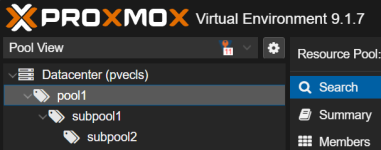
Therefore it was essential to have some kind of nested tree view in the Gui to keep an overview.
I created a js file, which can be implemented to overwrite some methods in the pvemanager to get it working.
So, if you define Poolnames with a Slash, they will be then treated as a "Sub"-Pool in the GUI e.g.
MyProject
-> MyProject/Test
-> MyProject/Dev
To get it working, just copy the content of attached zip (custom.js and NestedTreePool.js) to /usr/share/pve-manager/js
Add in the file index.html.tpl (which is located at /usr/share/pve-manager/) <script type="text/javascript" src="/pve2/js/custom.js"></script> inside the <head> Tag.
Thats all.
@proxmox Team. Would be great if this solution will find the way in the next releases. thx.
in our company we will use ProxMox to manage a not so small amount of Virtual Machines with ProxMox.
Therefore it was essential to have some kind of nested tree view in the Gui to keep an overview.
I created a js file, which can be implemented to overwrite some methods in the pvemanager to get it working.
So, if you define Poolnames with a Slash, they will be then treated as a "Sub"-Pool in the GUI e.g.
MyProject
-> MyProject/Test
-> MyProject/Dev
To get it working, just copy the content of attached zip (custom.js and NestedTreePool.js) to /usr/share/pve-manager/js
Add in the file index.html.tpl (which is located at /usr/share/pve-manager/) <script type="text/javascript" src="/pve2/js/custom.js"></script> inside the <head> Tag.
Thats all.
@proxmox Team. Would be great if this solution will find the way in the next releases. thx.



 )
)