Hallo an alle Proxmox Spezialisten,
Heute habe ich Update/Upgrade an meinem Proxmox durchgeführt. Nach den das System neu gestartet ist bekam ich den Fehler: activating LV 'pve/data' failed: Check of pool pve/data failed (status:64). Manual repair required! (500) von meiner local-lvm.
Nach dem ich den Beitrag hier gelesen habe: https://forum.proxmox.com/threads/t...iled-status-64-manual-repair-required.169356/
habe ich versucht mit: lvconvert --repair pve/data meine lvm zu reparieren. Leider ohne Erfolg. Mit: vgchange -ay data ebenfalls nicht.
#vgchange -ay data
Volume group "data" not found
Cannot process volume group data
#lvs -a data:
Volume group "data" not found
Cannot process volume group data
# pvs
PV VG Fmt Attr PSize PFree
/dev/nvme0n1p3 pve lvm2 a-- <930,51g 16,00g
#vgs
VG #PV #LV #SN Attr VSize VFree
pve 1 9 0 wz--n- <930,51g 16,00g
#lvs
LV VG Attr LSize Pool Origin Data% Meta% Move Log Cpy%Sync Convert
data pve twi---tz-- 794,30g
root pve -wi-ao---- 96,00g
swap pve -wi-ao---- 8,00g
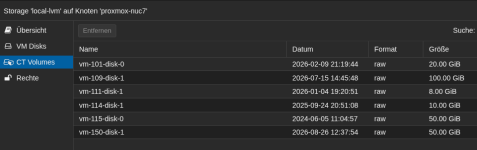
vm-101-disk-0 pve Vwi---tz-- 20,00g data
vm-109-disk-1 pve Vwi---tz-- 100,00g data
vm-111-disk-1 pve Vwi---tz-- 8,00g data
vm-114-disk-1 pve Vwi---tz-- 10,00g data
vm-115-disk-0 pve Vwi---tz-- 50,00g data
vm-150-disk-1 pve Vwi---tz-- 50,00g data
#pvesm status
activating LV 'pve/data' failed: Check of pool pve/data failed (status:64). Manual repair required!
Name Type Status Total (KiB) Used (KiB) Available (KiB) %
QNAP_Backup_NUC7 nfs active 2917062688 1880474240 1036588448 64.46%
SSD_CTVM zfspool active 967618968 183727772 783891196 18.99%
local dir active 98497780 51490332 41957900 52.28%
local-lvm lvmthin inactive 0 0 0 0.00%
# cat /etc/pve/storage.cfg
dir: local
path /var/lib/vz
content backup,iso,vztmpl,import
shared 0
lvmthin: local-lvm
thinpool data
vgname pve
content rootdir,images
zfspool: SSD_CTVM
pool SSD_CTVM
content images,rootdir
mountpoint /SSD_CTVM
nodes proxmox-nuc7
nfs: QNAP_Backup_NUC7
export /PVE_NUC7
path /mnt/pve/QNAP_Backup_NUC7
server 192.168.158.100
content backup
prune-backups keep-all=1
Wenn gar nichts mehr klappt kann ich zum Not aus mein Backup die fehlerhaften Dateien überschreiben aber welcher sin das genau?:
/etc/pve
/var/lib/pve-cluster/config.db
/etc/network/interfaces
/etc/network/interfaces.d
/etc/hostname
/etc/hosts
/etc/resolv.conf
/etc/fstab
/etc/ssh
/etc/apt
/etc/default/grub
/etc/kernel/cmdline
/etc/modules
/etc/modprobe.d
/etc/systemd/system
/etc/systemd/network
/etc/cron.d
/etc/crontab
/var/spool/cron
/etc/passwd
/etc/shadow
/etc/group
noch neine:
#lsblk
NAME MAJ:MIN RM SIZE RO TYPE MOUNTPOINTS
sda 8:0 0 953,9G 0 disk
├─sda1 8:1 0 953,9G 0 part
└─sda9 8:9 0 8M 0 part
zd0 230:0 0 48G 0 disk
├─zd0p1 230:1 0 32M 0 part
├─zd0p2 230:2 0 24M 0 part
├─zd0p3 230:3 0 256M 0 part
├─zd0p4 230:4 0 24M 0 part
├─zd0p5 230:5 0 256M 0 part
├─zd0p6 230:6 0 8M 0 part
├─zd0p7 230:7 0 96M 0 part
└─zd0p8 230:8 0 47,3G 0 part
zd16 230:16 0 50G 0 disk
├─zd16p1 230:17 0 1M 0 part
├─zd16p2 230:18 0 2G 0 part
└─zd16p3 230:19 0 48G 0 part
nvme0n1 259:0 0 931,5G 0 disk
├─nvme0n1p1 259:1 0 1007K 0 part
├─nvme0n1p2 259:2 0 1G 0 part /boot/efi
└─nvme0n1p3 259:3 0 930,5G 0 part
├─pve-swap 252:0 0 8G 0 lvm [SWAP]
└─pve-root 252:1 0 96G 0 lvm /
Kann mir vielleicht jemand von Euch dabei helfen?
Danke schon im voraus.
Heute habe ich Update/Upgrade an meinem Proxmox durchgeführt. Nach den das System neu gestartet ist bekam ich den Fehler: activating LV 'pve/data' failed: Check of pool pve/data failed (status:64). Manual repair required! (500) von meiner local-lvm.
Nach dem ich den Beitrag hier gelesen habe: https://forum.proxmox.com/threads/t...iled-status-64-manual-repair-required.169356/
habe ich versucht mit: lvconvert --repair pve/data meine lvm zu reparieren. Leider ohne Erfolg. Mit: vgchange -ay data ebenfalls nicht.
#vgchange -ay data
Volume group "data" not found
Cannot process volume group data
#lvs -a data:
Volume group "data" not found
Cannot process volume group data
# pvs
PV VG Fmt Attr PSize PFree
/dev/nvme0n1p3 pve lvm2 a-- <930,51g 16,00g
#vgs
VG #PV #LV #SN Attr VSize VFree
pve 1 9 0 wz--n- <930,51g 16,00g
#lvs
LV VG Attr LSize Pool Origin Data% Meta% Move Log Cpy%Sync Convert
data pve twi---tz-- 794,30g
root pve -wi-ao---- 96,00g
swap pve -wi-ao---- 8,00g
vm-101-disk-0 pve Vwi---tz-- 20,00g data
vm-109-disk-1 pve Vwi---tz-- 100,00g data
vm-111-disk-1 pve Vwi---tz-- 8,00g data
vm-114-disk-1 pve Vwi---tz-- 10,00g data
vm-115-disk-0 pve Vwi---tz-- 50,00g data
vm-150-disk-1 pve Vwi---tz-- 50,00g data
#pvesm status
activating LV 'pve/data' failed: Check of pool pve/data failed (status:64). Manual repair required!
Name Type Status Total (KiB) Used (KiB) Available (KiB) %
QNAP_Backup_NUC7 nfs active 2917062688 1880474240 1036588448 64.46%
SSD_CTVM zfspool active 967618968 183727772 783891196 18.99%
local dir active 98497780 51490332 41957900 52.28%
local-lvm lvmthin inactive 0 0 0 0.00%
# cat /etc/pve/storage.cfg
dir: local
path /var/lib/vz
content backup,iso,vztmpl,import
shared 0
lvmthin: local-lvm
thinpool data
vgname pve
content rootdir,images
zfspool: SSD_CTVM
pool SSD_CTVM
content images,rootdir
mountpoint /SSD_CTVM
nodes proxmox-nuc7
nfs: QNAP_Backup_NUC7
export /PVE_NUC7
path /mnt/pve/QNAP_Backup_NUC7
server 192.168.158.100
content backup
prune-backups keep-all=1
Wenn gar nichts mehr klappt kann ich zum Not aus mein Backup die fehlerhaften Dateien überschreiben aber welcher sin das genau?:
/etc/pve
/var/lib/pve-cluster/config.db
/etc/network/interfaces
/etc/network/interfaces.d
/etc/hostname
/etc/hosts
/etc/resolv.conf
/etc/fstab
/etc/ssh
/etc/apt
/etc/default/grub
/etc/kernel/cmdline
/etc/modules
/etc/modprobe.d
/etc/systemd/system
/etc/systemd/network
/etc/cron.d
/etc/crontab
/var/spool/cron
/etc/passwd
/etc/shadow
/etc/group
noch neine:
#lsblk
NAME MAJ:MIN RM SIZE RO TYPE MOUNTPOINTS
sda 8:0 0 953,9G 0 disk
├─sda1 8:1 0 953,9G 0 part
└─sda9 8:9 0 8M 0 part
zd0 230:0 0 48G 0 disk
├─zd0p1 230:1 0 32M 0 part
├─zd0p2 230:2 0 24M 0 part
├─zd0p3 230:3 0 256M 0 part
├─zd0p4 230:4 0 24M 0 part
├─zd0p5 230:5 0 256M 0 part
├─zd0p6 230:6 0 8M 0 part
├─zd0p7 230:7 0 96M 0 part
└─zd0p8 230:8 0 47,3G 0 part
zd16 230:16 0 50G 0 disk
├─zd16p1 230:17 0 1M 0 part
├─zd16p2 230:18 0 2G 0 part
└─zd16p3 230:19 0 48G 0 part
nvme0n1 259:0 0 931,5G 0 disk
├─nvme0n1p1 259:1 0 1007K 0 part
├─nvme0n1p2 259:2 0 1G 0 part /boot/efi
└─nvme0n1p3 259:3 0 930,5G 0 part
├─pve-swap 252:0 0 8G 0 lvm [SWAP]
└─pve-root 252:1 0 96G 0 lvm /
Kann mir vielleicht jemand von Euch dabei helfen?
Danke schon im voraus.
Attachments

Last edited: