

I cannot get network access past the default gateway. I cannot ping the default gateway.
I can ping and make connections within the network cluster, so that works ok.
Version:
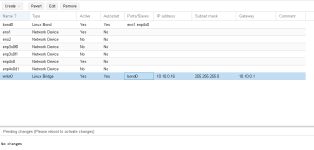
Network Configuration:
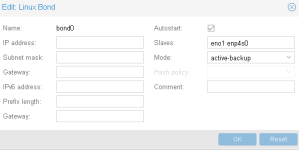
I have an active-backup bond. The fail over works, as I have tested it.
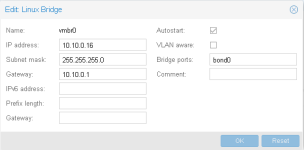
I have a virtual bridge with the gateway set up:
Also, since Proxmox no longer includes net-tools, what is the replacement for the route command?
I can't install net-tools because of networking problem seen above.
edit: I forgot to add one of the link is 10G fiber using these:
Mellanox Connectx-3 Pro - Network Adapter - PCI Express 3.0 X8 - 10 Gigabit Ethernet (MCX312B-XCCT)
The other link is just a mobo network adapter.
I can ping and make connections within the network cluster, so that works ok.
Version:
Code:
proxmox-ve: 5.1-25 (running kernel: 4.13.4-1-pve)
pve-manager: 5.1-36 (running version: 5.1-36/131401db)
pve-kernel-4.13.4-1-pve: 4.13.4-25
libpve-http-server-perl: 2.0-6
lvm2: 2.02.168-pve6
corosync: 2.4.2-pve3
libqb0: 1.0.1-1
pve-cluster: 5.0-15
qemu-server: 5.0-17
pve-firmware: 2.0-3
libpve-common-perl: 5.0-20
libpve-guest-common-perl: 2.0-13
libpve-access-control: 5.0-7
libpve-storage-perl: 5.0-16
pve-libspice-server1: 0.12.8-3
vncterm: 1.5-2
pve-docs: 5.1-12
pve-qemu-kvm: 2.9.1-2
pve-container: 2.0-17
pve-firewall: 3.0-3
pve-ha-manager: 2.0-3
ksm-control-daemon: 1.2-2
glusterfs-client: 3.8.8-1
lxc-pve: 2.1.0-2
lxcfs: 2.0.7-pve4
criu: 2.11.1-1~bpo90
novnc-pve: 0.6-4
smartmontools: 6.5+svn4324-1
zfsutils-linux: 0.7.2-pve1~bpo90
Network Configuration:
I have an active-backup bond. The fail over works, as I have tested it.
I have a virtual bridge with the gateway set up:
Code:
auto lo
iface lo inet loopback

iface eno1 inet manual

iface eno2 inet manual

iface enp3s0f0 inet manual

iface enp3s0f1 inet manual

iface enp4s0 inet manual

iface enp4s0d1 inet manual

auto bond0
iface bond0 inet manual
        slaves enp4s0 eno1
        bond-primary enp4s0
        bond_miimon 100
        bond_mode active-backup

auto vmbr0
iface vmbr0 inet static
        address  10.10.0.16
        netmask  255.255.255.0
        gateway  10.10.0.1
        bridge_ports bond0
        bridge_stp off
        bridge_fd 0
Also, since Proxmox no longer includes net-tools, what is the replacement for the route command?
I can't install net-tools because of networking problem seen above.
edit: I forgot to add one of the link is 10G fiber using these:
Mellanox Connectx-3 Pro - Network Adapter - PCI Express 3.0 X8 - 10 Gigabit Ethernet (MCX312B-XCCT)
The other link is just a mobo network adapter.
Last edited: