Multipath Configuration

lowerym

Member
Feb 17, 2021
35
2
8
41
Having issues with Multipath configuration.

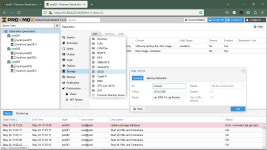
I have A Dell Unity that im connecting to on 4 targets

1626106517046.png
But when i look at my Volume groups i get errors

1626106466985.png

I have the following in my /etc/multipath.conf
cat /etc/multipath.conf
Code:
defaults {
        polling_interval        2
        path_selector           "round-robin 0"
        path_grouping_policy    multibus
        rr_min_io               100
        failback                immediate
        no_path_retry           queue
        user_friendly_names     yes
}
blacklist  {
        wwid .*
}
blacklist_exceptions {
        wwid "3600601601e914e00d391266038b8e2f6"
    property "(ID_SCSI_VPD|ID_WWN|ID_SERIAL)"
}
multipaths {
  multipath  {
        wwid "3600601601e914e00d391266038b8e2f6"
        alias ElasticSearchSAN
  }
}


And im not sure if its related but all 4 of my targets have the same WWID. im not quiet sure how to resolve this .
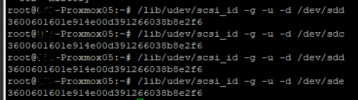

1626106674063.png
 
Yes i have, but i still appear to be stuck. i think the issue might be the all 4 targets share the same wwid, but again the documentation seems straight forward but doesnt quiet work even when it appears to match up.
 
did you run

# multipath -a <WWID>

as well as

# systemctl restart multipath-tools.service

?

did you check if your san vendors has any additional multipath instructions for linux?

i think the issue might be the all 4 targets share the same wwid
no thats normal if it is only one disk (one disk = one wwid)
 
Running Multipath -v3 i get the following wonder if this might be part of the issue? not in wwids file, skipping sde


===== paths list =====
uuid hcil dev dev_t pri dm_st chk_st vend/pro
362cea7f099dce7002850e7f79912a523 0:2:0:0 sda 8:0 1 undef undef DELL,PER
3600601601e914e00d391266038b8e2f6 15:0:0:0 sdb 8:16 50 undef undef DGC,VRAI
3600601601e914e00d391266038b8e2f6 16:0:0:0 sdc 8:32 10 undef undef DGC,VRAI
3600601601e914e00d391266038b8e2f6 17:0:0:0 sdd 8:48 50 undef undef DGC,VRAI
3600601601e914e00d391266038b8e2f6 18:0:0:0 sde 8:64 10 undef undef DGC,VRAI
Jul 14 10:29:31 | libdevmapper version 1.02.155 (2018-12-18)
Jul 14 10:29:31 | DM multipath kernel driver v1.13.0
Jul 14 10:29:31 | sda: udev property ID_WWN whitelisted
Jul 14 10:29:31 | sda: wwid 362cea7f099dce7002850e7f79912a523 blacklisted
Jul 14 10:29:31 | sda: orphan path, blacklisted
Jul 14 10:29:31 | const prioritizer refcount 1
Jul 14 10:29:31 | sdb: udev property ID_WWN whitelisted
Jul 14 10:29:31 | sdb: wwid 3600601601e914e00d391266038b8e2f6 whitelisted
Jul 14 10:29:31 | wwid 3600601601e914e00d391266038b8e2f6 not in wwids file, skipping sdb
Jul 14 10:29:31 | sdb: orphan path, only one path
Jul 14 10:29:31 | sysfs prioritizer refcount 4
Jul 14 10:29:31 | sdc: udev property ID_WWN whitelisted
Jul 14 10:29:31 | sdc: wwid 3600601601e914e00d391266038b8e2f6 whitelisted
Jul 14 10:29:31 | wwid 3600601601e914e00d391266038b8e2f6 not in wwids file, skipping sdc
Jul 14 10:29:31 | sdc: orphan path, only one path
Jul 14 10:29:31 | sysfs prioritizer refcount 3
Jul 14 10:29:31 | sdd: udev property ID_WWN whitelisted
Jul 14 10:29:31 | sdd: wwid 3600601601e914e00d391266038b8e2f6 whitelisted
Jul 14 10:29:31 | wwid 3600601601e914e00d391266038b8e2f6 not in wwids file, skipping sdd
Jul 14 10:29:31 | sdd: orphan path, only one path
Jul 14 10:29:31 | sysfs prioritizer refcount 2
Jul 14 10:29:31 | sde: udev property ID_WWN whitelisted
Jul 14 10:29:31 | sde: wwid 3600601601e914e00d391266038b8e2f6 whitelisted
Jul 14 10:29:31 | wwid 3600601601e914e00d391266038b8e2f6 not in wwids file, skipping sde
Jul 14 10:29:31 | sde: orphan path, only one path
Jul 14 10:29:31 | sysfs prioritizer refcount 1
Jul 14 10:29:31 | unloading sysfs prioritizer
Jul 14 10:29:31 | unloading const prioritizer
Jul 14 10:29:31 | unloading tur checker
 
Piggybacking this topic: I am setting up a new environment. Single proxmox server, connected to Unity over iSCSI. Everything is up, and running, but when checking the logs, I'm getting constant kernel sd logs. Should I be worried? See:
Dec 04 16:11:28 SERVERNAME kernel: sd 9:0:0:0: alua: supports implicit and explicit TPGS
Dec 04 16:11:28 SERVERNAME kernel: sd 9:0:0:0: alua: device naa.60060160c9575100fbd92e693d22a297 port group 1 rel port 5
Dec 04 16:11:39 SERVERNAME kernel: sd 9:0:0:0: alua: supports implicit and explicit TPGS
Dec 04 16:11:39 SERVERNAME kernel: sd 9:0:0:0: alua: device naa.60060160c9575100fbd92e693d22a297 port group 1 rel port 5
Dec 04 16:11:58 SERVERNAME kernel: sd 9:0:0:0: alua: supports implicit and explicit TPGS
Dec 04 16:11:58 SERVERNAME kernel: sd 9:0:0:0: alua: device naa.60060160c9575100fbd92e693d22a297 port group 1 rel port 5
Dec 04 16:12:18 SERVERNAME kernel: sd 10:0:0:0: alua: supports implicit and explicit TPGS
Dec 04 16:12:18 SERVERNAME kernel: sd 10:0:0:0: alua: device naa.60060160c9575100fbd92e693d22a297 port group 2 rel port d
Dec 04 16:12:38 SERVERNAME kernel: sd 9:0:0:0: alua: supports implicit and explicit TPGS
Dec 04 16:12:38 SERVERNAME kernel: sd 9:0:0:0: alua: device naa.60060160c9575100fbd92e693d22a297 port group 1 rel port 5
Dec 04 16:12:49 SERVERNAME kernel: sd 9:0:0:0: alua: supports implicit and explicit TPGS
Dec 04 16:12:49 SERVERNAME kernel: sd 9:0:0:0: alua: device naa.60060160c9575100fbd92e693d22a297 port group 1 rel port 5
Dec 04 16:13:08 SERVERNAME kernel: sd 9:0:0:0: alua: supports implicit and explicit TPGS
Dec 04 16:13:08 SERVERNAME kernel: sd 9:0:0:0: alua: device naa.60060160c9575100fbd92e693d22a297 port group 1 rel port 5
Dec 04 16:13:28 SERVERNAME kernel: sd 10:0:0:0: alua: supports implicit and explicit TPGS
Dec 04 16:13:28 SERVERNAME kernel: sd 10:0:0:0: alua: device naa.60060160c9575100fbd92e693d22a297 port group 2 rel port d
Dec 04 16:13:49 SERVERNAME kernel: sd 9:0:0:0: alua: supports implicit and explicit TPGS
Dec 04 16:13:49 SERVERNAME kernel: sd 9:0:0:0: alua: device naa.60060160c9575100fbd92e693d22a297 port group 1 rel port 5
Dec 04 16:14:08 SERVERNAME kernel: sd 9:0:0:0: alua: supports implicit and explicit TPGS
Dec 04 16:14:08 SERVERNAME kernel: sd 9:0:0:0: alua: device naa.60060160c9575100fbd92e693d22a297 port group 1 rel port 5
Dec 04 16:14:28 SERVERNAME kernel: sd 10:0:0:0: alua: supports implicit and explicit TPGS
Dec 04 16:14:28 SERVERNAME kernel: sd 10:0:0:0: alua: device naa.60060160c9575100fbd92e693d22a297 port group 2 rel port d
Dec 04 16:14:48 SERVERNAME kernel: sd 10:0:0:0: alua: supports implicit and explicit TPGS
Dec 04 16:14:48 SERVERNAME kernel: sd 10:0:0:0: alua: device naa.60060160c9575100fbd92e693d22a297 port group 2 rel port d
Dec 04 16:15:08 SERVERNAME kernel: sd 10:0:0:0: alua: supports implicit and explicit TPGS
Dec 04 16:15:08 SERVERNAME kernel: sd 10:0:0:0: alua: device naa.60060160c9575100fbd92e693d22a297 port group 2 rel port d
Dec 04 16:15:28 SERVERNAME kernel: sd 10:0:0:0: alua: supports implicit and explicit TPGS
Dec 04 16:15:28 SERVERNAME kernel: sd 10:0:0:0: alua: device naa.60060160c9575100fbd92e693d22a297 port group 2 rel port d
Dec 04 16:15:48 SERVERNAME kernel: sd 10:0:0:0: alua: supports implicit and explicit TPGS
Dec 04 16:15:48 SERVERNAME kernel: sd 10:0:0:0: alua: device naa.60060160c9575100fbd92e693d22a297 port group 2 rel port d
Dec 04 16:15:59 SERVERNAME kernel: sd 10:0:0:0: alua: supports implicit and explicit TPGS
Dec 04 16:15:59 SERVERNAME kernel: sd 10:0:0:0: alua: device naa.60060160c9575100fbd92e693d22a297 port group 2 rel port d
Dec 04 16:16:18 SERVERNAME kernel: sd 9:0:0:0: alua: supports implicit and explicit TPGS
Dec 04 16:16:18 SERVERNAME kernel: sd 9:0:0:0: alua: device naa.60060160c9575100fbd92e693d22a297 port group 1 rel port 5
Dec 04 16:16:38 SERVERNAME kernel: sd 10:0:0:0: alua: supports implicit and explicit TPGS
Dec 04 16:16:38 SERVERNAME kernel: sd 10:0:0:0: alua: device naa.60060160c9575100fbd92e693d22a297 port group 2 rel port d
Dec 04 16:16:58 SERVERNAME kernel: sd 10:0:0:0: alua: supports implicit and explicit TPGS
Dec 04 16:16:58 SERVERNAME kernel: sd 10:0:0:0: alua: device naa.60060160c9575100fbd92e693d22a297 port group 2 rel port d
Dec 04 16:17:09 SERVERNAME kernel: sd 9:0:0:0: alua: supports implicit and explicit TPGS
Dec 04 16:17:09 SERVERNAME kernel: sd 9:0:0:0: alua: device naa.60060160c9575100fbd92e693d22a297 port group 1 rel port 5
Dec 04 16:17:28 SERVERNAME kernel: sd 10:0:0:0: alua: supports implicit and explicit TPGS
Dec 04 16:17:28 SERVERNAME kernel: sd 10:0:0:0: alua: device naa.60060160c9575100fbd92e693d22a297 port group 2 rel port d
Dec 04 16:17:39 SERVERNAME kernel: sd 9:0:0:0: alua: supports implicit and explicit TPGS
Dec 04 16:17:39 SERVERNAME kernel: sd 9:0:0:0: alua: device naa.60060160c9575100fbd92e693d22a297 port group 1 rel port 5

root@SERVERNAME:~# multipath -ll
Unity_LUN_01 (360060160c9575100fbd92e693d22a297) dm-5 DGC,VRAID
size=2.0T features='1 queue_if_no_path' hwhandler='1 alua' wp=rw
|-+- policy='service-time 0' prio=50 status=active
| `- 10:0:0:0 sdc 8:32 active ready running
`-+- policy='service-time 0' prio=10 status=enabled
`- 9:0:0:0 sdb 8:16 active ready running

multipath.conf:
defaults {
user_friendly_names yes
find_multipaths yes
}

devices {
device {
vendor "DELL"
product "Unity"
path_grouping_policy group_by_prio
prio alua
path_checker tur
failback immediate
no_path_retry queue
rr_min_io 100
}
}

multipaths {
multipath {
wwid 360060160c9575100fbd92e693d22a297
alias Unity_LUN_0
}
}
 
Have you checked with Dell (if the unity is from Dell) or their manual if you set everything correctly? You can also contact them and that about the message.
 
cat /etc/multipath.conf
defaults {
user_friendly_names yes
find_multipaths yes
}

blacklist {
wwid .*
}

blacklist_exceptions {
wwid **********************************
}

multipaths {
multipath {
wwid *******************************
alias *********

multipath {
wwid ********************************
alias **********
}
}


that was my working file for multipath.conf.
 
i found the issue. the file for wwid did not have th leading and trailing / /

View attachment 27744
@lowerym, I think your above file's (/etc/multipath/wwids) contain is correct. following is the file in my production proxmox ve FYR.
Code:
root@pve201:/var/cache/apt/archives# multipath -a 36589cfc000000eb6cb7efdb389b53510
wwid '36589cfc000000eb6cb7efdb389b53510' added
root@pve201:/var/cache/apt/archives# cat /etc/multipath/wwids
# Multipath wwids, Version : 1.0
# NOTE: This file is automatically maintained by multipath and multipathd.
# You should not need to edit this file in normal circumstances.
#
# Valid WWIDs:
/36589cfc000000eb6cb7efdb389b53510/

For the /etc/multipath.conf file, you can use command multipath -T to let multipathd automatic generate for you, following is /etc/multipath.conf generated by the command.

Code:
root@pve201:/var/cache/apt/archives# multipath -T > /etc/multipath.conf
root@pve201:/var/cache/apt/archives# cat /etc/multipath.conf
defaults {
    rr_weight "uniform"
    retain_attached_hw_handler yes
    detect_prio yes
}
devices {
        device {
                vendor "^DGC"
                product "^(RAID|DISK|VRAID)"
                product_blacklist "LUNZ"
                path_grouping_policy "group_by_prio"
                path_checker "emc_clariion"
                hardware_handler "1 emc"
                prio "emc"
                failback "immediate"
                no_path_retry 60
        }
}
# add following lines, use alias to specify the device name
multipaths {
  multipath {
        wwid "36589cfc000000eb6cb7efdb389b53510"
        alias vol-pve
}

After restart multipath-tools.service, you can use command multipath -ll to check the MD device, it will named to vol-pve as it defined in /etc/multipath.conf, you should use the device name /dev/mapper/vol-pve to create LVM for you, instead of use original /dev/sda or /dev/sdb to let multipath works correctly.

Code:
root@pve201:/var/cache/apt/archives# systemctl restart multipath-tools.service
root@pve201:/var/cache/apt/archives# multipath -ll
vol-pve (36589cfc000000eb6cb7efdb389b53510) dm-5 DGC,VRAID
size=14T features='1 queue_if_no_path' hwhandler='1 emc' wp=rw
|-+- policy='service-time 0' prio=50 status=active
| `- 13:0:0:0 sdb 8:16 active ready running
`-+- policy='service-time 0' prio=1 status=enabled
  `- 15:0:0:0 sdc 8:32 active ready running
root@pve201:/var/cache/apt/archives# lsblk
NAME               MAJ:MIN RM    SIZE RO TYPE  MOUNTPOINT
sda                  8:0    0     64G  0 disk
├─sda1               8:1    0   1007K  0 part
├─sda2               8:2    0    512M  0 part
└─sda3               8:3    0   63.5G  0 part
  ├─pve-swap       253:0    0    7.9G  0 lvm   [SWAP]
  ├─pve-root       253:1    0   15.8G  0 lvm   /
  ├─pve-data_tmeta 253:2    0      1G  0 lvm
  │ └─pve-data     253:4    0     30G  0 lvm
  └─pve-data_tdata 253:3    0     30G  0 lvm
    └─pve-data     253:4    0     30G  0 lvm
sdb                  8:16   0     14T  0 disk
└─vol-pve          253:5    0     14T  0 mpath
sdc                  8:32   0     14T  0 disk
└─vol-pve          253:5    0     14T  0 mpath
sr0                 11:0    1 1004.3M  0 rom
1764859480399.png
 
Last edited: