Hello all!
Let me explain my situation. I have a server with two spinning HDDs (hardware RAID, so they show as a single drive to the system) where I installed Proxmox. So this drive is a boot drive, it has root file system as well as all my virtual machines and containers.
Now I added a pair of SSDs. I unplugged the old drives, not to corrupt them. I installed Proxmox on these new SSDs and used ZFS RAID1 option during the installation. The installation went well and I can log into the web GUI of the new deployment. I connected back the old spinning drives and I want to access VMs from the old drives. However, I was not successful.
I used the solution provided by the original author of this reddit post https://www.reddit.com/r/Proxmox/comments/w8o7va/import_old_lvm_storage_drive_to_new_proxmox/
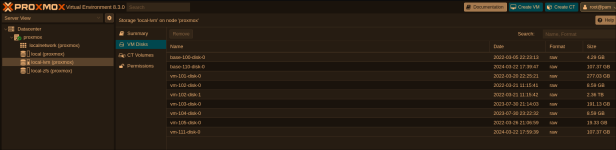
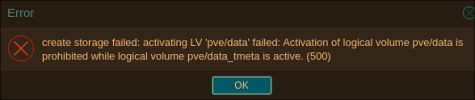
I got so far as to add the LVM, however, that's where my luck ended here:
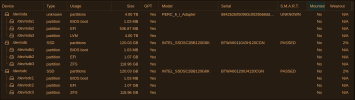
(sda1 is the old drive I want to access)
Supporting outputs:
New storage:
Old storage:
My goal is to mount the local-lvm from the old drive to be able to access VMs stored there
Has anyone dealt with anything similar before and managed to solve it?
Let me explain my situation. I have a server with two spinning HDDs (hardware RAID, so they show as a single drive to the system) where I installed Proxmox. So this drive is a boot drive, it has root file system as well as all my virtual machines and containers.
Now I added a pair of SSDs. I unplugged the old drives, not to corrupt them. I installed Proxmox on these new SSDs and used ZFS RAID1 option during the installation. The installation went well and I can log into the web GUI of the new deployment. I connected back the old spinning drives and I want to access VMs from the old drives. However, I was not successful.
I used the solution provided by the original author of this reddit post https://www.reddit.com/r/Proxmox/comments/w8o7va/import_old_lvm_storage_drive_to_new_proxmox/
I got so far as to add the LVM, however, that's where my luck ended here:
(sda1 is the old drive I want to access)
Supporting outputs:
Code:
root@proxmox:~# lsblk
NAME               MAJ:MIN RM   SIZE RO TYPE MOUNTPOINTS
sda                  8:0    0   3.6T  0 disk
├─sda1               8:1    0  1007K  0 part
├─sda2               8:2    0   512M  0 part
└─sda3               8:3    0   3.6T  0 part
  ├─pve-swap       252:0    0     4G  0 lvm
  ├─pve-root       252:1    0    96G  0 lvm
  ├─pve-data_tmeta 252:2    0  15.8G  0 lvm
  └─pve-data_tdata 252:3    0   3.5T  0 lvm
sdb                  8:16   0 111.8G  0 disk
├─sdb1               8:17   0  1007K  0 part
├─sdb2               8:18   0     1G  0 part
└─sdb3               8:19   0 110.8G  0 part
sdc                  8:32   0 111.8G  0 disk
├─sdc1               8:33   0  1007K  0 part
├─sdc2               8:34   0     1G  0 part
└─sdc3               8:35   0 110.8G  0 part

root@proxmox:~# pvscan
  PV /dev/sda3   VG pve             lvm2 [<3.64 TiB / <16.38 GiB free]
  Total: 1 [<3.64 TiB] / in use: 1 [<3.64 TiB] / in no VG: 0 [0   ]
root@proxmox:~# lvs
  LV                                 VG  Attr       LSize   Pool Origin        Data%  Meta%  Move Log Cpy%Sync Convert
  base-100-disk-0                    pve Vri---tz-k   4.00g data
  base-110-disk-0                    pve Vri---tz-k 100.00g data
  data                               pve twi---tz--   3.49t
  root                               pve -wi-a-----  96.00g
  snap_vm-101-disk-0_vzdump          pve Vri---tz-k 258.00g data vm-101-disk-0
  snap_vm-101-disk-0_zakladni_config pve Vri---tz-k 258.00g data vm-101-disk-0
  snap_vm-102-disk-0_vzdump          pve Vri---tz-k   8.00g data vm-102-disk-0
  snap_vm-102-disk-1_vzdump          pve Vri---tz-k  <2.15t data vm-102-disk-1
  snap_vm-103-disk-0_vzdump          pve Vri---tz-k 178.00g data vm-103-disk-0
  snap_vm-105-disk-0_vzdump          pve Vri---tz-k  18.00g data vm-105-disk-0
  swap                               pve -wi-a-----   4.00g
  vm-101-disk-0                      pve Vwi---tz-- 258.00g data
  vm-102-disk-0                      pve Vwi---tz--   8.00g data
  vm-102-disk-1                      pve Vwi---tz--  <2.15t data
  vm-103-disk-0                      pve Vwi---tz-- 178.00g data
  vm-104-disk-0                      pve Vwi---tz--   8.00g data
  vm-105-disk-0                      pve Vwi---tz--  18.00g data
  vm-111-disk-0                      pve Vwi---tz-- 100.00g data
root@proxmox:~# lvscan
  inactive          '/dev/pve/data' [3.49 TiB] inherit
  ACTIVE            '/dev/pve/swap' [4.00 GiB] inherit
  ACTIVE            '/dev/pve/root' [96.00 GiB] inherit
  inactive          '/dev/pve/base-100-disk-0' [4.00 GiB] inherit
  inactive          '/dev/pve/vm-101-disk-0' [258.00 GiB] inherit
  inactive          '/dev/pve/snap_vm-101-disk-0_zakladni_config' [258.00 GiB] inherit
  inactive          '/dev/pve/vm-102-disk-0' [8.00 GiB] inherit
  inactive          '/dev/pve/vm-102-disk-1' [<2.15 TiB] inherit
  inactive          '/dev/pve/vm-105-disk-0' [18.00 GiB] inherit
  inactive          '/dev/pve/vm-103-disk-0' [178.00 GiB] inherit
  inactive          '/dev/pve/vm-104-disk-0' [8.00 GiB] inherit
  inactive          '/dev/pve/base-110-disk-0' [100.00 GiB] inherit
  inactive          '/dev/pve/vm-111-disk-0' [100.00 GiB] inherit
  inactive          '/dev/pve/snap_vm-102-disk-0_vzdump' [8.00 GiB] inherit
  inactive          '/dev/pve/snap_vm-102-disk-1_vzdump' [<2.15 TiB] inherit
  inactive          '/dev/pve/snap_vm-105-disk-0_vzdump' [18.00 GiB] inherit
  inactive          '/dev/pve/snap_vm-101-disk-0_vzdump' [258.00 GiB] inherit
  inactive          '/dev/pve/snap_vm-103-disk-0_vzdump' [178.00 GiB] inherit

root@proxmox:~# lvdisplay
  --- Logical volume ---
  LV Name                data
  VG Name                pve
  LV UUID                iV8GQF-hZZc-1OfI-KN28-0x57-DexZ-5kfVkd
  LV Write Access        read/write
  LV Creation host, time proxmox, 2022-03-05 21:34:04 +0100
  LV Pool metadata       data_tmeta
  LV Pool data           data_tdata
  LV Status              NOT available
  LV Size                3.49 TiB
  Current LE             915583
  Segments               1
  Allocation             inherit
  Read ahead sectors     auto

  --- Logical volume ---
  LV Path                /dev/pve/swap
  LV Name                swap
  VG Name                pve
  LV UUID                hdg7oU-T1tY-7SNS-BlTZ-Cns9-T1W5-UcNlPH
  LV Write Access        read/write
  LV Creation host, time proxmox, 2022-03-05 21:31:44 +0100
  LV Status              available
  # open                 0
  LV Size                4.00 GiB
  Current LE             1024
  Segments               1
  Allocation             inherit
  Read ahead sectors     auto
  - currently set to     256
  Block device           252:0

  --- Logical volume ---
  LV Path                /dev/pve/root
  LV Name                root
  VG Name                pve
  LV UUID                Hcbnwe-lzlF-nMXc-eInI-Wxku-hJVK-7e1x9A
  LV Write Access        read/write
  LV Creation host, time proxmox, 2022-03-05 21:31:45 +0100
  LV Status              available
  # open                 0
  LV Size                96.00 GiB
  Current LE             24576
  Segments               1
  Allocation             inherit
  Read ahead sectors     auto
  - currently set to     256
  Block device           252:1

  --- Logical volume ---
  LV Path                /dev/pve/base-100-disk-0
  LV Name                base-100-disk-0
  VG Name                pve
  LV UUID                VtcVcj-pJdG-OeFk-2rDQ-qkta-CMuw-v56B4t
  LV Write Access        read only
  LV Creation host, time valinor, 2022-03-05 22:23:13 +0100
  LV Pool name           data
  LV Status              NOT available
  LV Size                4.00 GiB
  Current LE             1024
  Segments               1
  Allocation             inherit
  Read ahead sectors     auto

  --- Logical volume ---
  LV Path                /dev/pve/vm-101-disk-0
  LV Name                vm-101-disk-0
  VG Name                pve
  LV UUID                LnVsYt-nlVq-fbGL-9QsX-T6mt-8QDO-4JnGG2
  LV Write Access        read/write
  LV Creation host, time valinor, 2022-03-20 22:25:21 +0100
  LV Pool name           data
  LV Status              NOT available
  LV Size                258.00 GiB
  Current LE             66048
  Segments               1
  Allocation             inherit
  Read ahead sectors     auto

  --- Logical volume ---
  LV Path                /dev/pve/snap_vm-101-disk-0_zakladni_config
  LV Name                snap_vm-101-disk-0_zakladni_config
  VG Name                pve
  LV UUID                iJ30Oi-hfrf-wzjH-PD3Q-sHEw-f0Xe-lvhgcg
  LV Write Access        read only
  LV Creation host, time valinor, 2022-03-21 10:27:04 +0100
  LV Pool name           data
  LV Thin origin name    vm-101-disk-0
  LV Status              NOT available
  LV Size                258.00 GiB
  Current LE             66048
  Segments               1
  Allocation             inherit
  Read ahead sectors     auto

  --- Logical volume ---
  LV Path                /dev/pve/vm-102-disk-0
  LV Name                vm-102-disk-0
  VG Name                pve
  LV UUID                f6Z80S-3R0X-zgxp-Q2MZ-QBiT-BmIq-ihe3kr
  LV Write Access        read/write
  LV Creation host, time valinor, 2022-03-21 11:15:41 +0100
  LV Pool name           data
  LV Status              NOT available
  LV Size                8.00 GiB
  Current LE             2048
  Segments               1
  Allocation             inherit
  Read ahead sectors     auto

  --- Logical volume ---
  LV Path                /dev/pve/vm-102-disk-1
  LV Name                vm-102-disk-1
  VG Name                pve
  LV UUID                uLeRMg-nIdT-Vc15-cYfp-vOWO-aimD-d0Ka0G
  LV Write Access        read/write
  LV Creation host, time valinor, 2022-03-21 11:15:42 +0100
  LV Pool name           data
  LV Status              NOT available
  LV Size                <2.15 TiB
  Current LE             563200
  Segments               1
  Allocation             inherit
  Read ahead sectors     auto

  --- Logical volume ---
  LV Path                /dev/pve/vm-105-disk-0
  LV Name                vm-105-disk-0
  VG Name                pve
  LV UUID                m1HuRG-mrXD-cLzB-cHDj-0sPz-wcwf-i2VlRn
  LV Write Access        read/write
  LV Creation host, time valinor, 2022-03-26 21:06:59 +0100
  LV Pool name           data
  LV Status              NOT available
  LV Size                18.00 GiB
  Current LE             4608
  Segments               1
  Allocation             inherit
  Read ahead sectors     auto

  --- Logical volume ---
  LV Path                /dev/pve/vm-103-disk-0
  LV Name                vm-103-disk-0
  VG Name                pve
  LV UUID                i7PBNZ-FJeH-z3ET-AGVB-98Um-RvNI-lLHIxD
  LV Write Access        read/write
  LV Creation host, time valinor, 2023-07-30 21:14:03 +0200
  LV Pool name           data
  LV Status              NOT available
  LV Size                178.00 GiB
  Current LE             45568
  Segments               1
  Allocation             inherit
  Read ahead sectors     auto

  --- Logical volume ---
  LV Path                /dev/pve/vm-104-disk-0
  LV Name                vm-104-disk-0
  VG Name                pve
  LV UUID                YHpfMP-d3nW-odbS-hF2Y-hx6m-pzAr-SBc2DX
  LV Write Access        read/write
  LV Creation host, time valinor, 2023-07-30 23:22:32 +0200
  LV Pool name           data
  LV Status              NOT available
  LV Size                8.00 GiB
  Current LE             2048
  Segments               1
  Allocation             inherit
  Read ahead sectors     auto

  --- Logical volume ---
  LV Path                /dev/pve/base-110-disk-0
  LV Name                base-110-disk-0
  VG Name                pve
  LV UUID                iJvBxi-ewc8-051V-WuYW-ZuRQ-bhwL-g3zcir
  LV Write Access        read only
  LV Creation host, time valinor, 2024-03-22 17:39:47 +0100
  LV Pool name           data
  LV Status              NOT available
  LV Size                100.00 GiB
  Current LE             25600
  Segments               1
  Allocation             inherit
  Read ahead sectors     auto

  --- Logical volume ---
  LV Path                /dev/pve/vm-111-disk-0
  LV Name                vm-111-disk-0
  VG Name                pve
  LV UUID                YGkIBc-MOqf-Wgm3-v8an-AVCq-jgqP-Be2BxH
  LV Write Access        read/write
  LV Creation host, time valinor, 2024-03-22 17:59:39 +0100
  LV Pool name           data
  LV Status              NOT available
  LV Size                100.00 GiB
  Current LE             25600
  Segments               1
  Allocation             inherit
  Read ahead sectors     auto

  --- Logical volume ---
  LV Path                /dev/pve/snap_vm-102-disk-0_vzdump
  LV Name                snap_vm-102-disk-0_vzdump
  VG Name                pve
  LV UUID                DLWSS1-YZue-9Ym5-GUVe-0Ovp-RJt6-K1HOLW
  LV Write Access        read only
  LV Creation host, time valinor, 2025-01-09 20:26:55 +0100
  LV Pool name           data
  LV Thin origin name    vm-102-disk-0
  LV Status              NOT available
  LV Size                8.00 GiB
  Current LE             2048
  Segments               1
  Allocation             inherit
  Read ahead sectors     auto

  --- Logical volume ---
  LV Path                /dev/pve/snap_vm-102-disk-1_vzdump
  LV Name                snap_vm-102-disk-1_vzdump
  VG Name                pve
  LV UUID                tMZpO8-lcch-lom6-TTso-75VH-0Em1-jW9qrU
  LV Write Access        read only
  LV Creation host, time valinor, 2025-01-09 20:26:55 +0100
  LV Pool name           data
  LV Thin origin name    vm-102-disk-1
  LV Status              NOT available
  LV Size                <2.15 TiB
  Current LE             563200
  Segments               1
  Allocation             inherit
  Read ahead sectors     auto

  --- Logical volume ---
  LV Path                /dev/pve/snap_vm-105-disk-0_vzdump
  LV Name                snap_vm-105-disk-0_vzdump
  VG Name                pve
  LV UUID                Xbh03z-WsF5-Mo7o-TOl9-2cZk-zuXG-8N85JN
  LV Write Access        read only
  LV Creation host, time valinor, 2025-01-09 20:59:57 +0100
  LV Pool name           data
  LV Thin origin name    vm-105-disk-0
  LV Status              NOT available
  LV Size                18.00 GiB
  Current LE             4608
  Segments               1
  Allocation             inherit
  Read ahead sectors     auto

  --- Logical volume ---
  LV Path                /dev/pve/snap_vm-101-disk-0_vzdump
  LV Name                snap_vm-101-disk-0_vzdump
  VG Name                pve
  LV UUID                Qx421F-N4s1-QyoL-S2hj-mdgO-OGVa-eIxqO6
  LV Write Access        read only
  LV Creation host, time valinor, 2025-01-11 11:00:01 +0100
  LV Pool name           data
  LV Thin origin name    vm-101-disk-0
  LV Status              NOT available
  LV Size                258.00 GiB
  Current LE             66048
  Segments               1
  Allocation             inherit
  Read ahead sectors     auto

  --- Logical volume ---
  LV Path                /dev/pve/snap_vm-103-disk-0_vzdump
  LV Name                snap_vm-103-disk-0_vzdump
  VG Name                pve
  LV UUID                bgs8Nq-97Jz-ZtYf-wyX1-K2Tp-jYhQ-S1f7EZ
  LV Write Access        read only
  LV Creation host, time valinor, 2025-01-11 11:05:47 +0100
  LV Pool name           data
  LV Thin origin name    vm-103-disk-0
  LV Status              NOT available
  LV Size                178.00 GiB
  Current LE             45568
  Segments               1
  Allocation             inherit
  Read ahead sectors     auto
New storage:
Code:
root@proxmox:~# cat /etc/pve/storage.cfg
dir: local
        path /var/lib/vz
        content vztmpl,backup,iso

zfspool: local-zfs
        pool rpool/data
        content images,rootdir
        sparse 1
Code:
dir: local
        path /var/lib/vz
        content iso,vztmpl,backup

lvmthin: local-lvm
        thinpool data
        vgname pve
content rootdir,imagesHas anyone dealt with anything similar before and managed to solve it?