

Hey guys,
I'm trying to passthrough the whole USB/Thunderbolt Controller to a VM to use eGPU and other Type-C Dock.. I don't want to passthrough the eGPU as it is AMD and I want to avoid GPU Reset Issues.. Also I want to be able to boot the VM, when the eGPU is not connected..
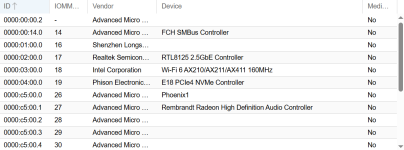
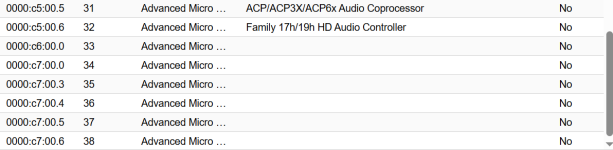
I already passed the 0000:c7:00.5 & 0000:c7:00.6 and the USB4 Controller shows up in the VM (Windows 10)..
But what about:
05:00.0 PCI bridge [0604]: Intel Corporation JHL6340 Thunderbolt 3 Bridge (C step) [Alpine Ridge 2C 2016] [8086:15da] (rev 02)
06:01.0 PCI bridge [0604]: Intel Corporation JHL6340 Thunderbolt 3 Bridge (C step) [Alpine Ridge 2C 2016] [8086:15da] (rev 02)
I cannot see them in the list when adding a PCI Device to the VM?
If I connect the eGPU it shows up on the Proxmox Host..
I'm trying to passthrough the whole USB/Thunderbolt Controller to a VM to use eGPU and other Type-C Dock.. I don't want to passthrough the eGPU as it is AMD and I want to avoid GPU Reset Issues.. Also I want to be able to boot the VM, when the eGPU is not connected..
00:00.0 Host bridge [0600]: Advanced Micro Devices, Inc. [AMD] Phoenix Root Complex [1022:14e8]
00:00.2 IOMMU [0806]: Advanced Micro Devices, Inc. [AMD] Phoenix IOMMU [1022:14e9]
00:01.0 Host bridge [0600]: Advanced Micro Devices, Inc. [AMD] Phoenix Dummy Host Bridge [1022:14ea]
00:01.2 PCI bridge [0604]: Advanced Micro Devices, Inc. [AMD] Phoenix GPP Bridge [1022:14ed]
00:02.0 Host bridge [0600]: Advanced Micro Devices, Inc. [AMD] Phoenix Dummy Host Bridge [1022:14ea]
00:02.1 PCI bridge [0604]: Advanced Micro Devices, Inc. [AMD] Phoenix GPP Bridge [1022:14ee]
00:02.3 PCI bridge [0604]: Advanced Micro Devices, Inc. [AMD] Phoenix GPP Bridge [1022:14ee]
00:02.4 PCI bridge [0604]: Advanced Micro Devices, Inc. [AMD] Phoenix GPP Bridge [1022:14ee]
00:03.0 Host bridge [0600]: Advanced Micro Devices, Inc. [AMD] Phoenix Dummy Host Bridge [1022:14ea]
00:03.1 PCI bridge [0604]: Advanced Micro Devices, Inc. [AMD] Family 19h USB4/Thunderbolt PCIe tunnel [1022:14ef]
00:04.0 Host bridge [0600]: Advanced Micro Devices, Inc. [AMD] Phoenix Dummy Host Bridge [1022:14ea]
00:04.1 PCI bridge [0604]: Advanced Micro Devices, Inc. [AMD] Family 19h USB4/Thunderbolt PCIe tunnel [1022:14ef]
00:08.0 Host bridge [0600]: Advanced Micro Devices, Inc. [AMD] Phoenix Dummy Host Bridge [1022:14ea]
00:08.1 PCI bridge [0604]: Advanced Micro Devices, Inc. [AMD] Phoenix Internal GPP Bridge to Bus [C:A] [1022:14eb]
00:08.2 PCI bridge [0604]: Advanced Micro Devices, Inc. [AMD] Phoenix Internal GPP Bridge to Bus [C:A] [1022:14eb]
00:08.3 PCI bridge [0604]: Advanced Micro Devices, Inc. [AMD] Phoenix Internal GPP Bridge to Bus [C:A] [1022:14eb]
00:14.0 SMBus [0c05]: Advanced Micro Devices, Inc. [AMD] FCH SMBus Controller [1022:790b] (rev 71)
00:14.3 ISA bridge [0601]: Advanced Micro Devices, Inc. [AMD] FCH LPC Bridge [1022:790e] (rev 51)
00:18.0 Host bridge [0600]: Advanced Micro Devices, Inc. [AMD] Phoenix Data Fabric; Function 0 [1022:14f0]
00:18.1 Host bridge [0600]: Advanced Micro Devices, Inc. [AMD] Phoenix Data Fabric; Function 1 [1022:14f1]
00:18.2 Host bridge [0600]: Advanced Micro Devices, Inc. [AMD] Phoenix Data Fabric; Function 2 [1022:14f2]
00:18.3 Host bridge [0600]: Advanced Micro Devices, Inc. [AMD] Phoenix Data Fabric; Function 3 [1022:14f3]
00:18.4 Host bridge [0600]: Advanced Micro Devices, Inc. [AMD] Phoenix Data Fabric; Function 4 [1022:14f4]
00:18.5 Host bridge [0600]: Advanced Micro Devices, Inc. [AMD] Phoenix Data Fabric; Function 5 [1022:14f5]
00:18.6 Host bridge [0600]: Advanced Micro Devices, Inc. [AMD] Phoenix Data Fabric; Function 6 [1022:14f6]
00:18.7 Host bridge [0600]: Advanced Micro Devices, Inc. [AMD] Phoenix Data Fabric; Function 7 [1022:14f7]
01:00.0 Non-Volatile memory controller [0108]: Shenzhen Longsys Electronics Co., Ltd. Lexar NM790 NVME SSD (DRAM-less) [1d97:1602] (rev 01)
02:00.0 Ethernet controller [0200]: Realtek Semiconductor Co., Ltd. RTL8125 2.5GbE Controller [10ec:8125] (rev 05)
03:00.0 Network controller [0280]: Intel Corporation Wi-Fi 6 AX210/AX211/AX411 160MHz [8086:2725] (rev 1a)
04:00.0 Non-Volatile memory controller [0108]: Phison Electronics Corporation E18 PCIe4 NVMe Controller [1987:5018] (rev 01)
05:00.0 PCI bridge [0604]: Intel Corporation JHL6340 Thunderbolt 3 Bridge (C step) [Alpine Ridge 2C 2016] [8086:15da] (rev 02)
06:01.0 PCI bridge [0604]: Intel Corporation JHL6340 Thunderbolt 3 Bridge (C step) [Alpine Ridge 2C 2016] [8086:15da] (rev 02)
07:00.0 PCI bridge [0604]: Advanced Micro Devices, Inc. [AMD] Vega 10 PCIe Bridge [1022:1470] (rev c1)
08:00.0 PCI bridge [0604]: Advanced Micro Devices, Inc. [AMD] Vega 10 PCIe Bridge [1022:1471]
09:00.0 VGA compatible controller [0300]: Advanced Micro Devices, Inc. [AMD/ATI] Vega 10 XL/XT [Radeon RX Vega 56/64] [1002:687f] (rev c1)
09:00.1 Audio device [0403]: Advanced Micro Devices, Inc. [AMD/ATI] Vega 10 HDMI Audio [Radeon Vega 56/64] [1002:aaf8]
c5:00.0 VGA compatible controller [0300]: Advanced Micro Devices, Inc. [AMD/ATI] Phoenix1 [1002:15bf] (rev c1)
c5:00.1 Audio device [0403]: Advanced Micro Devices, Inc. [AMD/ATI] Rembrandt Radeon High Definition Audio Controller [1002:1640]
c5:00.2 Encryption controller [1080]: Advanced Micro Devices, Inc. [AMD] Phoenix CCP/PSP 3.0 Device [1022:15c7]
c5:00.3 USB controller [0c03]: Advanced Micro Devices, Inc. [AMD] Device [1022:15b9]
c5:00.4 USB controller [0c03]: Advanced Micro Devices, Inc. [AMD] Device [1022:15ba]
c5:00.5 Multimedia controller [0480]: Advanced Micro Devices, Inc. [AMD] ACP/ACP3X/ACP6x Audio Coprocessor [1022:15e2] (rev 63)
c5:00.6 Audio device [0403]: Advanced Micro Devices, Inc. [AMD] Family 17h/19h HD Audio Controller [1022:15e3]
c6:00.0 Non-Essential Instrumentation [1300]: Advanced Micro Devices, Inc. [AMD] Phoenix Dummy Function [1022:14ec]
c7:00.0 Non-Essential Instrumentation [1300]: Advanced Micro Devices, Inc. [AMD] Phoenix Dummy Function [1022:14ec]
c7:00.3 USB controller [0c03]: Advanced Micro Devices, Inc. [AMD] Device [1022:15c0]
c7:00.4 USB controller [0c03]: Advanced Micro Devices, Inc. [AMD] Device [1022:15c1]
c7:00.5 USB controller [0c03]: Advanced Micro Devices, Inc. [AMD] Pink Sardine USB4/Thunderbolt NHI controller [1022:1668]
c7:00.6 USB controller [0c03]: Advanced Micro Devices, Inc. [AMD] Pink Sardine USB4/Thunderbolt NHI controller [1022:1669]
I already passed the 0000:c7:00.5 & 0000:c7:00.6 and the USB4 Controller shows up in the VM (Windows 10)..
But what about:
05:00.0 PCI bridge [0604]: Intel Corporation JHL6340 Thunderbolt 3 Bridge (C step) [Alpine Ridge 2C 2016] [8086:15da] (rev 02)
06:01.0 PCI bridge [0604]: Intel Corporation JHL6340 Thunderbolt 3 Bridge (C step) [Alpine Ridge 2C 2016] [8086:15da] (rev 02)
I cannot see them in the list when adding a PCI Device to the VM?
If I connect the eGPU it shows up on the Proxmox Host..