Minimal permission required to work with sync job

f4242

Renowned Member
Dec 19, 2016
114
5
83
Quebec, QC
Hello,

I'm trying to setup minimal required permission to our everyday account. I would like to be able to launch or edit a sync job, but not allow deleting data from the data store. Seem like this is not possible ?

I tried to give theses permissions :

Code:
acl:1:/:myuser@ldap:Audit
acl:1:/system:myuser@ldap:Admin
acl:1:/datastore:myuser@ldap:DatastoreReader
acl:1:/remote:myuser@ldap:RemoteSyncOperator

Seem like the permission DatastoreAdmin on /datastore is required to do what I want, but this also give access to file deletion I would like to avoid.
 
i don't think you need DatatstoreAdmin, but you need at least the Datastore.Backup privilege (e.g. this is also in the DatastoreBackup or DatastorePoweruser roles)
since you need to have write access to pull backups
 
Hum, I tried to add DatastoreBackup but I still get permission denied when trying to manually launch a sync job.

Code:
{% for utilisateur in proxmoxbs_utilisateurs_ldap %}
acl:1:/:{{ utilisateur.id }}@ldap:Audit
acl:1:/system:{{ utilisateur.id }}@ldap:Admin
acl:1:/datastore:{{ utilisateur.id }}@ldap:DatastoreReader
acl:1:/datastore:{{ utilisateur.id }}@ldap:DatastoreBackup
acl:1:/remote:{{ utilisateur.id }}@ldap:RemoteSyncOperator
{% endfor %}
 
can you post the actual config for which you believe it should work but doesn't?

i just tested a new user gave him

DatastoreBackup on /datastore/target
RemoteSyncOperator on /remote/source

and could create new jobs (probably could edit them via api too)

to see them i needed

Audit on /datastore/target

too, but then was able to view/create/update/delete the sync-jobs
 
Hello,

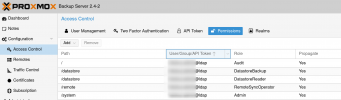
I pasted the ACL in my previous post. It seem similar to what you tested. The only difference I see is I don't set permission for a specific remote or datastore url but I set the permission on /datastore and /remote with the propagate flag. Here a screenshot:

1686926005357.png

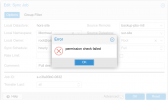
When trying to edit (same thing if I click the "Run now" button):

1686926631265.png
 
ok now it makes sense, you try to set the local owner to root@pam which you can only do if you have datastore modify privileges, otherwise the local owner must be the user (or token of them) that edits the job...
 
The local owner is already root@pam and I'm trying to edit as an ldap user account. Because there is no group support I could set as owner of the job, I suppose there is no way to give access to more than one user w/o giving the datastore modify privileges?
 
not for a job already defined by other users

a user without datastore modify can only edit his own sync jobs