

Memory Units!?!

DocMAX

Member
Jan 30, 2023
233
18
23
Bremen
Hello,

could you please add unit selection to the memory window? Like entering 64GB (or GB/MB in a drop down menu).
Each time i have to calculate the MiB in my head which produces headaches!
I wonder why this is not allready included all the years - can't believe this.
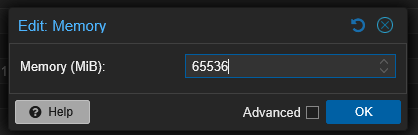
1739744532997.png

Thanks,
DocMAX
 
Last edited:
The difference between 65536 MB and 64000 MB lies in the fact that 65536 MB (64 GiB) is a power of 2, while 64000 MB is a slightly rounded value closer to 63.28 GiB.
  • 65536 MB (64 GiB) is a more "native" value in computing, especially when working with systems and virtual machines (VMs), because it aligns with powers of 2, which is how memory is typically allocated and managed in most systems.
  • 64000 MB is a non-binary value, and it doesn’t align neatly with powers of 2, which might result in some inefficiencies when used in virtual machines, as it can cause the system to waste memory due to non-alignment in memory paging.
When setting memory for VMs, it's generally better to stick with binary values like 65536 MB (64 GiB), as they work more efficiently with the way memory is handled at a low level by the operating system and virtualized environments.

...and that's just a chatbot!
 
Last edited:
I know that.
as they work more efficiently with the way memory is handled at a low level by the operating system and virtualized environments
Have you benchmarked it? Is it true for proxmox?
 
> Each time i have to calculate the MiB in my head which produces headaches!

If you have a mac, use Cmd+Spacebar.
If you have anything else, ' bc ' or a handy physical calculator is your friend.

Or just use echo at the commandline, why complicate your life?


echo $[64 * 1024]
65536
 
  • Like
Reactions: LnxBil