

Hi !
I'm facing an issue with my Windows Server virtual machines in Proxmox. All of these VMs constantly consume around 85% of RAM, as shown in the htop :
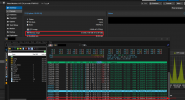
However, when I check the RAM usage through the Proxmox client, it indicates only 10% usage, which is quite confusing.
We have attempted to patch this problem by installing Ballooning, but unfortunately, it hasn't resolved the issue.
Is it possible to release this ram from the dedication in a way I haven't found?
Thanks
I'm facing an issue with my Windows Server virtual machines in Proxmox. All of these VMs constantly consume around 85% of RAM, as shown in the htop :
However, when I check the RAM usage through the Proxmox client, it indicates only 10% usage, which is quite confusing.
We have attempted to patch this problem by installing Ballooning, but unfortunately, it hasn't resolved the issue.
Is it possible to release this ram from the dedication in a way I haven't found?
Thanks
