Making root volume live in the lvm thin pool ?

shodan

Active Member
Sep 1, 2022
231
63
33
Hi,

I am using a space constrained system.
Fresh install of proxmox uses 70GB, thick provisioned and it's difficult to reclaim this space for use by the thin pool while also not risking to run out.

So I think the solution would be that root should be a thin volume.

However, grub can't access a thin volume, as far as I can tell there are no linux bootloader that can boot thin volumes.

But I think that MOST of the root filesystem, can still live in the thin pool, just not the contents of /boot ?

So far I've attempted this

booted to the proxmox installer, hit ctrl+alt+F3

Code:
# enable ssh with root login
apt update ; apt install -y openssh-server ; echo "permitrootlogin yes" >> /etc/ssh/sshd_config ; /etc/init.d/ssh restart ; passwd root
# mount remote folder
mount //192.168.1.3/guest /mnt/ -o username=nobody,password=
# check sha256 hash
sha256sum /dev/pve/root
# create a file containing all of the root volume
xz -9e -T0 < /dev/pve/root > /mnt/proxmox-root-server1.lan.img.xz
# get exact byte size of root volume
blockdev --getsize64 /dev/pve/root
# remove root volume
lvremove -y /dev/pve/root
# re-create root volume
lvcreate --size 74570530816b -n root pve
# restore contents of the root volume
xz -dc /mnt/proxmox.root.lvm.2025-12-14.img.xz | dd of=/dev/pve/root bs=16M status=progress
# check that partition UUID still good
blkid /dev/pve/root
# check filesystem hash
sha256sum /dev/pve/root
# check filesystem
e2fsck -f /dev/pve/root

Rebooted and the system still works without issues

So next step, I tried the same thing again, but I created the root volume in the thin pool instead

Code:
lvcreate -V 74570530816b -T pve/data -n root

Now grub doesn't boot, confirm that it's not going to be this easy !

Now I am going to investigate just HOW MUCH of the root partition really has to be thick provisioned to boot

In my next attempt, I will put only the contents of the /boot folder into a thick volume and try to boot that in a way that does not break anything else in proxmox.
In particular I want to avoid breaking kernel update and the commands like

Code:
update-initramfs -u
update-grub

Which do hocus-pocus things to mess with kernel modules and graphic cards drivers and if I can avoid having to learn that I would die happier ! Which is probably not going to happen but I'm going to try anyway
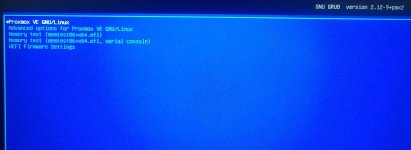
 
Continuing attempt to make root mostly a thin volume

Code:
root@proxmox:/# lvcreate -L 512M -n boot pve
  Logical volume "boot" created.
  WARNING: This metadata update is NOT backed up.
root@proxmox:/# mkfs.ext4 /dev/pve/boot
mke2fs 1.47.2 (1-Jan-2025)
Discarding device blocks: done
Creating filesystem with 131072 4k blocks and 32768 inodes
Filesystem UUID: 2cd8c128-1d26-4861-ba84-1b59f54867c6
Superblock backups stored on blocks:
        32768, 98304

Allocating group tables: done
Writing inode tables: done
Creating journal (4096 blocks): done
Writing superblocks and filesystem accounting information: done

root@proxmox:/# mkdir /mnt/boot
root@proxmox:/# mkdir /mnt/root
root@proxmox:/# mount /dev/pve/root /mnt/root
root@proxmox:/# mount /dev/pve/boot /mnt/boot
root@proxmox:/# cd /mnt/boot/
root@proxmox:/mnt/boot# cp -a /mnt/root/boot/* ./
root@proxmox:/mnt/boot# nano /mnt/root/etc/fstab
root@proxmox:/mnt/boot# cat /mnt/root/etc/fstab
# <file system> <mount point> <type> <options> <dump> <pass>
/dev/pve/root / ext4 errors=remount-ro 0 1
/dev/pve/boot /boot ext4 defaults 0 2
UUID=13F0-E261 /boot/efi vfat defaults 0 1
/dev/pve/swap none swap sw 0 0
proc /proc proc defaults 0 0
root@proxmox:/mnt/boot# ls -lsh
total 217M
8.8M -rw-r--r-- 1 root root 8.8M Oct 21 11:55 System.map-6.17.2-1-pve
8.8M -rw-r--r-- 1 root root 8.8M Nov 26 12:33 System.map-6.17.2-2-pve
296K -rw-r--r-- 1 root root 296K Oct 21 11:55 config-6.17.2-1-pve
296K -rw-r--r-- 1 root root 296K Nov 26 12:33 config-6.17.2-2-pve
4.0K drwxr-xr-x 2 root root 4.0K Dec  8 23:37 efi
4.0K drwxr-xr-x 6 root root 4.0K Dec  8 23:51 grub
 85M -rw-r--r-- 1 root root  85M Dec  8 23:50 initrd.img-6.17.2-1-pve
 85M -rw-r--r-- 1 root root  85M Dec  8 23:51 initrd.img-6.17.2-2-pve
 16K drwx------ 2 root root  16K Dec 15 04:50 lost+found
148K -rw-r--r-- 1 root root 148K Nov 17  2024 memtest86+ia32.bin
152K -rw-r--r-- 1 root root 149K Nov 17  2024 memtest86+ia32.efi
156K -rw-r--r-- 1 root root 153K Nov 17  2024 memtest86+x64.bin
156K -rw-r--r-- 1 root root 154K Nov 17  2024 memtest86+x64.efi
4.0K drwxr-xr-x 2 root root 4.0K Dec  8 23:51 pve
 15M -rw-r--r-- 1 root root  15M Oct 21 11:55 vmlinuz-6.17.2-1-pve
 15M -rw-r--r-- 1 root root  15M Nov 26 12:33 vmlinuz-6.17.2-2-pve
root@proxmox:/mnt/boot#

So I kept the thin volume, but just created a new thick volume called boot

Now, I suspect that grub is still setup to boot from pve-root or (lvm/pve-root) or whatever, in some file somewhere, so I need to find that

And after some looking around I think the file

Code:
/etc/grub.d/10_linux

Is going to be the one that needs to be modified, maybe ??

After more looking around

Code:
root@proxmox:/mnt/boot#  grep 'set root' /mnt/boot/grub/grub.cfg


Something in those commands

Code:
update-initramfs -u -k all
update-grub
grub-install --target=x86_64-efi --efi-directory=/boot/efi --bootloader-id=proxmox --recheck

Will find the device that contains /boot and apply the correct identifiers to id

On my system it's, for root, something like

Code:
root@proxmox:/mnt/boot#  grep 'set root' /mnt/boot/grub/grub.cfg
set root='lvmid/Sccbk2-bTCA-fkwi-45dK-Bxfe-T5yi-zM50yH/k9gKak-GH6p-y421-YJuZ-gkMz-hxDV-6WTVGP'

So apparently, running the 3 above commands, after changing fstab, all I might need to do is, re-mount my full filesystem, chroot into it and run the 3 commands

So trying that

Code:
root@proxmox:/mnt/boot# cd /mnt/root
root@proxmox:/mnt/root# mount --bind /dev dev
root@proxmox:/mnt/root# mount --bind /proc proc
root@proxmox:/mnt/root# mount --bind /sys sys
root@proxmox:/mnt/root# mount --bind /run run
root@proxmox:/mnt/root# mkdir /mnt/efi
root@proxmox:/mnt/root# mount /dev/sda2  /mnt/efi
root@proxmox:/mnt/root# ls /mnt/efi
EFI
root@proxmox:/mnt/root# mount --bind /mnt/efi /mnt/root/boot/efi
root@proxmox:/mnt/root# chroot /mnt/root
root@proxmox:/# update-initramfs -u -k all
update-initramfs: Generating /boot/initrd.img-6.17.2-2-pve
Running hook script 'zz-proxmox-boot'..
Re-executing '/etc/kernel/postinst.d/zz-proxmox-boot' in new private mount namespace..
No /etc/kernel/proxmox-boot-uuids found, skipping ESP sync.
update-initramfs: Generating /boot/initrd.img-6.17.2-1-pve
Running hook script 'zz-proxmox-boot'..
Re-executing '/etc/kernel/postinst.d/zz-proxmox-boot' in new private mount namespace..
No /etc/kernel/proxmox-boot-uuids found, skipping ESP sync.
root@proxmox:/# ls  /boot/efi/
EFI
root@proxmox:/# grub-install --target=x86_64-efi --efi-directory=/boot/efi --bootloader-id=proxmox --recheck
Installing for x86_64-efi platform.
grub-install.real: warning: EFI variables cannot be set on this system.
grub-install.real: warning: You will have to complete the GRUB setup manually.
Installation finished. No error reported.
root@proxmox:/#
 
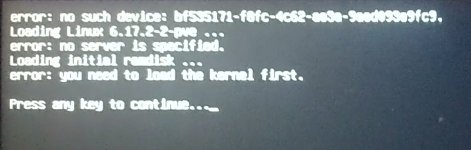
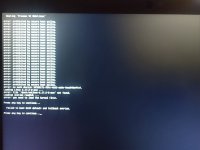
Unfortunately, that did not work apparently,

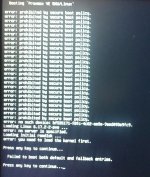
Here is what booting looks like

1765777625185.jpeg

1765777657241.jpeg
1765777684108.jpeg


So I rebooted into the installed, and chrooted again into the system


Code:
root@proxmox:/# mkdir /mnt/root
root@proxmox:/# mkdir /mnt/boot
root@proxmox:/# mkdir /mnt/efi
root@proxmox:/# mount /dev/pve/boot /mnt/boot
root@proxmox:/# mount /dev/pve/root /mnt/root
root@proxmox:/# mount /dev/sda2 /mnt/efi/
root@proxmox:/# mount --bind /dev /mnt/root/dev
root@proxmox:/# mount --bind /proc /mnt/root/proc
root@proxmox:/# mount --bind /sys /mnt/root/sys
root@proxmox:/# mount --bind /run /mnt/root/run
root@proxmox:/# mount --bind /mnt/boot /mnt/root/boot/
root@proxmox:/# mount --bind /mnt/efi /mnt/root/boot/efi/
root@proxmox:/# chroot /mnt/root
root@proxmox:/# cat /boot/grub/grub.cfg | grep "set root"
set root='lvmid/Sccbk2-bTCA-fkwi-45dK-Bxfe-T5yi-zM50yH/k9gKak-GH6p-y421-YJuZ-gkMz-hxDV-6WTVGP'
        set root='lvmid/Sccbk2-bTCA-fkwi-45dK-Bxfe-T5yi-zM50yH/k9gKak-GH6p-y421-YJuZ-gkMz-hxDV-6WTVGP'


So the file /boot/grub/grub.cfg did not get updated because the LVM UUID are still the old ones from the thick root

Code:
root@proxmox:/# lvdisplay pve/root
  --- Logical volume ---
  LV Path                /dev/pve/root
  LV Name                root
  VG Name                pve
  LV UUID                AC7dei-Plz5-Iqvb-LRaA-DKu7-XxBp-fD6Hgc
  LV Write Access        read/write
  LV Creation host, time proxmox, 2025-12-14 22:27:41 -0500
  LV Pool name           data
  LV Status              available
  # open                 1
  LV Size                <69.45 GiB
  Mapped size            100.00%
  Current LE             17779
  Segments               1
  Allocation             inherit
  Read ahead sectors     auto
  - currently set to     256
  Block device           252:5

root@proxmox:/# vgdisplay pve
  --- Volume group ---
  VG Name               pve
  System ID
  Format                lvm2
  Metadata Areas        1
  Metadata Sequence No  13
  VG Access             read/write
  VG Status             resizable
  MAX LV                0
  Cur LV                4
  Open LV               2
  Max PV                0
  Cur PV                1
  Act PV                1
  VG Size               237.47 GiB
  PE Size               4.00 MiB
  Total PE              60793
  Alloc PE / Size       39045 / <152.52 GiB
  Free  PE / Size       21748 / 84.95 GiB
  VG UUID               Sccbk2-bTCA-fkwi-45dK-Bxfe-T5yi-zM50yH

root@proxmox:/# lvdisplay pve/boot
  --- Logical volume ---
  LV Path                /dev/pve/boot
  LV Name                boot
  VG Name                pve
  LV UUID                TdTMmm-i2fV-tecE-YXNJ-JttD-SxfA-4q4tL3
  LV Write Access        read/write
  LV Creation host, time proxmox, 2025-12-14 23:50:03 -0500
  LV Status              available
  # open                 1
  LV Size                512.00 MiB
  Current LE             128
  Segments               1
  Allocation             inherit
  Read ahead sectors     auto
  - currently set to     256
  Block device           252:6

root@proxmox:/#

So I think, "set root" should point to
Sccbk2-bTCA-fkwi-45dK-Bxfe-T5yi-zM50yH/TdTMmm-i2fV-tecE-YXNJ-JttD-SxfA-4q4tL3

So since the automatic tool didn't work, I'll try modifying the file /boot/grub/grub.cfg manually

As a last ditch attempt after a day of this I ask the LLM

Code:
give me the command to change, in the file /boot/grub/grub.cfg
Sccbk2-bTCA-fkwi-45dK-Bxfe-T5yi-zM50yH/k9gKak-GH6p-y421-YJuZ-gkMz-hxDV-6WTVGP
into
Sccbk2-bTCA-fkwi-45dK-Bxfe-T5yi-zM50yH/TdTMmm-i2fV-tecE-YXNJ-JttD-SxfA-4q4tL3

result


Code:
root@proxmox:/# cat /boot/grub/grub.cfg | grep "set root"
set root='lvmid/       [more results omitted]
root@proxmox:/# sed -i \
's|Sccbk2-bTCA-fkwi-45dK-Bxfe-T5yi-zM50yH/k9gKak-GH6p-y421-YJuZ-gkMz-hxDV-6WTVGP|Sccbk2-bTCA-fkwi-45dK-Bxfe-T5yi-zM50yH/TdTMmm-i2fV-tecE-YXNJ-JttD-SxfA-4q4tL3|g' \
/boot/grub/grub.cfg
root@proxmox:/# cat /boot/grub/grub.cfg | grep "set root"
set root='lvmid/Sccbk2-bTCA-fkwi-45dK-Bxfe-T5yi-zM50yH/TdTMmm-i2fV-tecE-YXNJ-JttD-SxfA-4q4tL3'
       [more results omitted]
root@proxmox:/#
 
Can grub boot ZFS stores but not lvm thin pools ?
How does that work ?

But for my purpose, I have to make it work with LVM2 so it's not an option.

Thanks, I didn't know there was a variable to change the allocated space, but if possible I would like to have the needed space allocated as needed, rather than reserve an amount of space that would be difficult to increase later on. Putting root in the thin pool makes a lot more sense to me.
 
Last edited: