Main NVME PVE host resource mapped - cant boot anymore

mario4949

New Member
Feb 13, 2026
4
0
1
Italy
Hello guys,

in a desperate attempt to make a vm with PBS installed be able to read vm disks location to back them up I might have done a stupid thing; I wanted to PCI-E passtrough main nvme ssd (2 of them mirrored) so first attempt was to pass raw ssd, which results in the vm not starting, then I wanted to try resource mapping to map those ssd and pass them to the vm. So I did.

Long story short: I cannot boot up anymore my PVE host, no operative system detected; I did manage to launch a Proxmox advanced installation from USB to have the CLI but I have no idea how to recover this... Can you guys help me?

Thanks a lot
 
This PCI passthrough thing gave me grief three days ago, but on another front.
What I did is to boot in to Single User Mode and did:
cd /var/lib/vz/images/
mv VM_ID VM_IDXX # this makes the VM's disks unavailable to it so it wouldn't get started if onstart=1. It also means the PCI passthrough config doesn't take effect, right?
I then rebooted the PVE host successfully.
After that, I edited the VM's config to remove the passthrough configs, and finally moved VM_IDXX back to VM_ID (restored it's disks).
It worked for me. YMMV
 
to make a vm with PBS installed be able to read vm disks location to back them up
This is not necessary. A PBS does not need to read the storage of the virtual disks. PVE does the backup and reads the virtual disks and sends the data to the PBS.
If you want a PBS to use the same drives as PVE to store backups then run it in a container instead and use a mountpoint. And sync to another PBS on another system in another location to follow good backup principles.
I might have done a stupid thing; I wanted to PCI-E passtrough main nvme ssd (2 of them mirrored) so first attempt was to pass raw ssd, which results in the vm not starting, then I wanted to try resource mapping to map those ssd and pass them to the vm. So I did.

Long story short: I cannot boot up anymore my PVE host, no operative system detected
It's weird that the drive or the other drive no longer works on PVE. If your VM starts automatically with PCIe passthrough then just distable IOMMU or VT-d in the motherboard BIOS and the VM won't start anymore. You can then change the VM configuration file to prevent it from starting at boot.
 
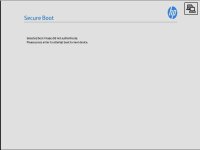
The main problem is that no boot menu appears for my PVE, It just fails, showing this image

Immagine 2026-02-13 155616.jpg.

I can only run CLI from Proxmox live installation but I don't know what do with that...
I tried also to disable VT-d but no luck
I also noticed that my main nvme is not listed in bootable devices... only the mirrored disk is...
 
The main problem is that no boot menu appears for my PVE, It just fails, showing this image

View attachment 95802.
I'm guessing secure boot is on. Maybe it can be disabled? But it might just be because that one drive is corrupted and therefore not relevant to the problem.
I also noticed that my main nvme is not listed in bootable devices... only the mirrored disk is...
That's the nice part of having redundancy like a mirror: try booting from the other one. Maybe you can resilver the broken half of the mirror after that.

EDIT: Since this did not help, I don't know how to further troubleshoot this effectively. Maybe just reinstall and restore your VMs from backups?
 
Last edited:
I'm guessing secure boot is on. Maybe it can be disabled? But it might just be because that one drive is corrupted and therefore not relevant to the problem.

That's the nice part of having redundancy like a mirror: try booting from the other one. Maybe you can resilver the broken half of the mirror after that.

With Secure Boot disabled It just reboot with black screen...
Selecting the other disk results in "start pxe over ipv4" text just stuck there...

EDIT: Thank you for trying to help me, I ended up with reinstalling PVE and restoring backups. Sadly I lost PVE host settings but nothing I can't do again with some time.
 
Last edited:
With Secure Boot disabled It just reboot with black screen...
Selecting the other disk results in "start pxe over ipv4" text just stuck there...

EDIT: Thank you for trying to help me, I ended up with reinstalling PVE and restoring backups. Sadly I lost PVE host settings but nothing I can't do again with some time.
I know this is too late, but it is a good idea to backup your PVE configuration, not just the VMs and containers.