

Hallo,
ich habe Ubuntu 24.04 mit dem Template "ubuntu-24.04-standard" als LXC-Container installiert.
Der LXC-Container hat eine statische IP erhalten.
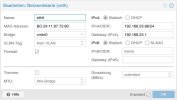
Aber wo findet man im LXC-Container die Netzwerkkonfiguration?
Der Order
Normalerweise müsste doch dort eine yaml-Datei liegen.
Oder wurde das in Ubuntu 24.04 wieder geändert?
Außerdem kann man von Ubuntu aus nur mit sudo pingen.
Warum?
Von Debian 12 aus kann man auch ohne sudo pingen.
VG
ich habe Ubuntu 24.04 mit dem Template "ubuntu-24.04-standard" als LXC-Container installiert.
Der LXC-Container hat eine statische IP erhalten.
Aber wo findet man im LXC-Container die Netzwerkkonfiguration?
Der Order
/etc/netplan/ ist leer.Normalerweise müsste doch dort eine yaml-Datei liegen.
Oder wurde das in Ubuntu 24.04 wieder geändert?
Code:
$ sudo ls -lha /etc/netplan/
total 8,0K
drwxr-xr-x  2 root root 4,0K Apr 18  2024 .
drwxr-xr-x 92 root root 4,0K Dez 26 10:22 ..
Außerdem kann man von Ubuntu aus nur mit sudo pingen.
Warum?
Code:
$ sudo ping 8.8.8.8
PING 8.8.8.8 (8.8.8.8) 56(84) bytes of data.
64 bytes from 8.8.8.8: icmp_seq=1 ttl=119 time=11.6 ms
64 bytes from 8.8.8.8: icmp_seq=2 ttl=119 time=9.17 ms
Code:
$ ping 8.8.8.8
ping: socktype: SOCK_RAW
ping: socket: Operation not permitted
ping: => missing cap_net_raw+p capability or setuid?
Von Debian 12 aus kann man auch ohne sudo pingen.
Code:
$ ping 8.8.8.8
PING 8.8.8.8 (8.8.8.8) 56(84) bytes of data.
64 bytes from 8.8.8.8: icmp_seq=1 ttl=119 time=11.6 ms
64 bytes from 8.8.8.8: icmp_seq=2 ttl=119 time=9.17 ms
VG
