

LVM Showing full
- Thread starter unhappyverse
- Start date
You are using an out of date browser. It may not display this or other websites correctly.
You should upgrade or use an alternative browser.
You should upgrade or use an alternative browser.
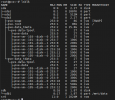


How about moving some Guest-Disks to other drives?
Also check if TRIM is enabled in your guests and configured in VM-Disks "Discard"...
Also check if TRIM is enabled in your guests and configured in VM-Disks "Discard"...
All disks are occupied and spaces is no available. Is there anything I can remove to get more spaces. I am new so that I cant understand what to do.How about moving some Guest-Disks to other drives?
Also check if TRIM is enabled in your guests and configured in VM-Disks "Discard"...
Get an external USB-Harddrive configure it and migrate some Disks there.... FULL is FULL if you need all Disks/Data.... then you can not delete anything...
If you have enough RAM you may disable/release SWAP-Partition. But if 8GB is enough is the question.....
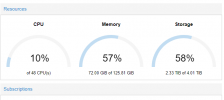
There is free storage. Can I use it to extend or I have to make new disk to migrate.
Attachments
Last edited:
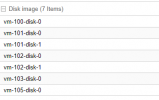
Post you Storage/Disk-View please.
You are throwing small pieces, which makes it hard to give recommendations.
You are throwing small pieces, which makes it hard to give recommendations.