

Hi there, im an absolute beginner in the world of proxmox/virtualization/linux. Just learning to host a file server for personal uses/media streaming.
I have a mini pc and a nas machine, both installed proxmox 8.2 and in the same network.
I just recently create a cluster in the mini pc (let's call it A) and the NAS machine (B) joined the cluster somewhat "successfully"
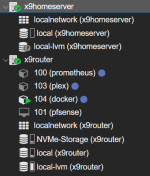
After joining the cluster I immediately saw that the local-lvm was unavailable. This machine has 02 nvme 512gb drives running in raid1 (I set this from beginning at the start of proxmox install). This is what it shows when I try to recreate the LVM in the B node
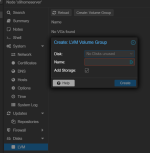
Done myself some research and I very vaguely got the idea of what's going on, but still I kinda need a hand to walk me thru this step by step if possible.
This is what
I can resort to reinstalling the whole NAS machine but if there's any way to resolve this in the webui I'd be more than grateful to hear.
Thank you very much!
I have a mini pc and a nas machine, both installed proxmox 8.2 and in the same network.
I just recently create a cluster in the mini pc (let's call it A) and the NAS machine (B) joined the cluster somewhat "successfully"
After joining the cluster I immediately saw that the local-lvm was unavailable. This machine has 02 nvme 512gb drives running in raid1 (I set this from beginning at the start of proxmox install). This is what it shows when I try to recreate the LVM in the B node
Done myself some research and I very vaguely got the idea of what's going on, but still I kinda need a hand to walk me thru this step by step if possible.
This is what
lsblk shown on node B:
Code:
root@x9homeserver:~# lsblk
NAME        MAJ:MIN RM   SIZE RO TYPE MOUNTPOINTS
sda           8:0    0 223.6G  0 disk
└─sda1        8:1    0 223.6G  0 part
sdb           8:16   0  10.9T  0 disk
├─sdb1        8:17   0     8G  0 part
├─sdb2        8:18   0     2G  0 part
└─sdb5        8:21   0   9.1T  0 part
sdc           8:32   0   9.1T  0 disk
├─sdc1        8:33   0     8G  0 part
├─sdc2        8:34   0     2G  0 part
└─sdc5        8:37   0   9.1T  0 part
nvme0n1     259:0    0 476.9G  0 disk
├─nvme0n1p1 259:2    0  1007K  0 part
├─nvme0n1p2 259:3    0     1G  0 part
└─nvme0n1p3 259:4    0 475.9G  0 part
nvme1n1     259:1    0 476.9G  0 disk
├─nvme1n1p1 259:5    0  1007K  0 part
├─nvme1n1p2 259:6    0     1G  0 part
└─nvme1n1p3 259:7    0 475.9G  0 part
fdisk -l shown this
Code:
Disk /dev/nvme0n1: 476.94 GiB, 512110190592 bytes, 1000215216 sectors
Disk model: Colorful CN600 512GB
Units: sectors of 1 * 512 = 512 bytes
Sector size (logical/physical): 512 bytes / 512 bytes
I/O size (minimum/optimal): 512 bytes / 512 bytes
Disklabel type: gpt
Disk identifier: 8BCE8445-3340-4CA3-AC95-A918F99474F8


Device           Start        End   Sectors   Size Type
/dev/nvme0n1p1      34       2047      2014  1007K BIOS boot
/dev/nvme0n1p2    2048    2099199   2097152     1G EFI System
/dev/nvme0n1p3 2099200 1000215182 998115983 475.9G Solaris /usr & Apple ZFS


Disk /dev/nvme1n1: 476.94 GiB, 512110190592 bytes, 1000215216 sectors
Disk model: SSTC E130
Units: sectors of 1 * 512 = 512 bytes
Sector size (logical/physical): 512 bytes / 512 bytes
I/O size (minimum/optimal): 512 bytes / 512 bytes
Disklabel type: gpt
Disk identifier: 559E210F-7872-437C-A066-BB5D555C0EE1


Device           Start        End   Sectors   Size Type
/dev/nvme1n1p1      34       2047      2014  1007K BIOS boot
/dev/nvme1n1p2    2048    2099199   2097152     1G EFI System
/dev/nvme1n1p3 2099200 1000215182 998115983 475.9G Solaris /usr & Apple ZFS
storage.cfg shown this:
Code:
dir: local
        path /var/lib/vz
        content vztmpl,iso,backup


dir: NVMe-Storage
        path /mnt/nvme0/
        content rootdir,vztmpl,iso,images
        nodes x9router
        prune-backups keep-all=1
        shared 1


lvm: local-lvm
        vgname pve
        content rootdir,images
        nodes x9router,x9homeserver
        saferemove 0
        shared 0
I can resort to reinstalling the whole NAS machine but if there's any way to resolve this in the webui I'd be more than grateful to hear.
Thank you very much!

