Live migration from LVM to LVM thin without dataloss?

zefletch

New Member
May 23, 2025
6
0
1
I recently determined that I should be using LVM-Thin instead of LVM for my cluster environment.
As such, I would like to drain and swap the datastores over to be LVM-Thin.

That said, I have some VM's that need minimal downtime. Is it possible to do a live migration from LVM -> LVM Thin without an inherent risk of dataloss? I am fine if it pre-allocates the entire disk, as I'm less concerned about the size of these VMs than I am the benefits of LVM-Thin for snapshot and PBS backup purposes.

I'm suspecting this isn't feasible, but want to check first.
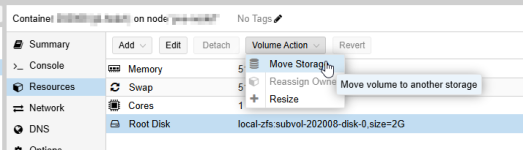
 
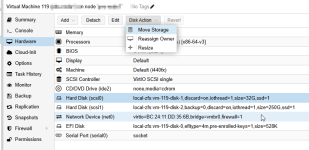
Moving a disc from one storage to another should always work, for this you will need to have both storages.

Let's assume you have two discs (sda and sdb), your vms data lives on sda. Then you should be able to create a lvm/thin-pool on sdb and then you can move your discs from the vms storage configuration to sdb:
1771369826623.png
1771369819683.png


I would be more worried about other things: You mentioned that you want to use this storage in a cluster. Please note ( see https://pve.proxmox.com/pve-docs/chapter-pvesm.html ) that you can't use LVM/thin as shared storage in a cluster. Using it as local storage on the cluster members works though.
 
Moving it between local storage unfortunately doesn't work due to these servers having a single drive available (hardware raid from repurposed vmware hardware)

The latter section is correct, each node in the cluster is using their own local storage for their guests, none of it is shared.


For further clarity, my general plan was to drain a node of guests by live migrating them to another node. Once drained, reconfigure the datastore to be LVM-thin, then migrate the guests back. Repeating the process for each node. Hence my concern is am I likely to have dataloss by doing the live-migration from LVM to LVM-Thin between nodes at that point?
 
Last edited:
No, migrating between nodes and back should work. For the resetup migrating the guests off the node, removing it from the cluster and reinstalling is propably the best course of action: https://pve.proxmox.com/wiki/Cluster_Manager#_remove_a_cluster_node

But I would really check whether you can't reconfigure or reflash the HW-RAID to "IT-Mode/HBA-Mode" or something like this since then you can use ZFS storage replication as a kind of "Pseudo-Shared-Device" and the other ZFS features (see: https://forum.proxmox.com/threads/f...y-a-few-disks-should-i-use-zfs-at-all.160037/ ). It should be noted however, that RAID3/5/6 setups can be faster wit HW RAID if your HW RAID has a working, battery-powered cache.

Another option might be to use ZFS on your HW RAID, but this is normally not done and has some caveats (like that you can't use ZFS RAID capabilities) . I have no experience with that but @Falk R. mentioned several times, that this is possible (allthough often not recommended) if you know what you are doing and can live with not having some of ZFS sw-raid-features (like auto-healing). If I recall correctly you need to ensure that your ZFS pool only consists of your single-device.
 
  • Like
Reactions: UdoB
If I am just removing that datastore, wiping that datastore, and re-adding it, why do I need to worry about the reinstall? The base OS is on a separate mirrored boot drive.

And sure, I understand those considerations, I decided that for warranty and ease of use that I would just keep them as RAID 6 in our environment.

The critical part of this post was just to confirm if there are dataloss concerns moving from thick to thin provisioned via live migration, as I am trying to minimize downtime of guests.
 
If I am just removing that datastore, wiping that datastore, and re-adding it, why do I need to worry about the reinstall? The base OS is on a separate mirrored boot drive.

Then wiping and readding the storage is sufficient, I missed that your OS install is on a seperate boot drive.

And sure, I understand those considerations, I decided that for warranty and ease of use that I would just keep them as RAID 6 in our environment.

Fair enough. Then setting up a ZFS single device pool might still be a valid way to have the ZFS features like replication. After all you won't need SW RAID then. But since this is usually not done I would first do some research and maybe test it. As said: I never done this, so I can't say much about it.
 
Last edited:
you can do this online.
The command qm disk move {vmid} {disk} {target-storage} works while the VM is running. Proxmox uses QEMU's block job mechanism (mirror + pivot) under the hood, which copies the data live and then atomically switches over.

# move VM 100's scsi0 disk from LVM to LVM-Thin
qm disk move 100 scsi0 local-lvm-thin

Original disk is preserved by default. After a successful move, the old disk becomes an "unused" disk in the VM config. It is NOT deleted unless you pass
--delete 1. This gives you a rollback path.
Bandwidth limiting available. Use --bwlimit (KiB/s) if you want to avoid saturating I/O during the copy:
qm disk move 100 scsi0 local-lvm-thin --bwlimit 100000
Digest-based concurrency protection. The --digest parameter prevents race conditions if someone modifies the VM config during the operation.
LVM-Thin only supports raw format. If your LVM disk is qcow2, the move will convert it to raw automatically. LVM-Thin handles snapshots at the storage layer, so qcow2 features aren't needed.

workflow per VM

# 1. Check current disk layout
qm config {vmid} | grep -E 'scsi|virtio|ide|sata|efidisk|tpmstate'
# 2. Move each disk (VM stays running)
qm disk move {vmid} scsi0 {thin-storage-name} --bwlimit 100000
# 3. Verify the move completed
qm config {vmid}
# 4. Once confirmed working, clean up the old unused disk
qm set {vmid} --delete unused0

LVM-Thin is local-only,it can't be shared across nodes. If you're moving from shared LVM (e.g., on iSCSI), the VM becomes pinned to the node with the thin pool. For cluster migration later, you'd use qm migrate --online --with-local-disks.
Pre-allocation: The thin pool will thin-provision by default. The disk won't pre-allocate the full size, it grows as data is written.
Do each disk one at a time and verify before the next. Don't move multiple disks in parallel on the same VM.
its a low-risk operation. No VM downtime required. The original disk is kept as a safety net. You can move your LVM storage to LVM-Thin incrementally, one disk at a time, with VMs running throughout.
 
BTW, ZFS with refreservation=none is the more feature-rich option: you get thin provisioning plus native checksums, self-healing (with RAID-Z), built-in compression (lz4), and very efficient copy-on-write snapshots at no extra cost. The downside is RAM usage, since ZFS ARC can consume a significant amount of memory. Thin LVM is simpler and has slightly less overhead, but lacks data integrity checking and native compression. It makes sense if you want to avoid ZFS's RAM footprint or already have an LVM-based infrastructure.
The shared risk with both: if the pool fills up completely, VMs can crash or corrupt,so monitoring and alerts are essential regardless of which you use.
I myself prefer ZFS with refreservation=none