

Morning,
Ive been playing around with the LE/certbot/lego config built in to PVE. Ive been through the configs at the data centre and host level. I cant seem to make it work and wondered if anyone else had a config that worked.
Here are some captures and outputs of my config:
Data Center config:
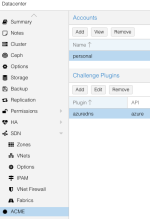 '
'
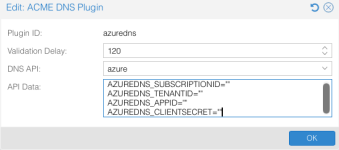
I do actually have values in the environment vars below, they've been removed for this screen cap.
Node config:
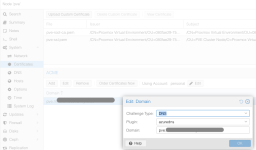
With this configs in place, when I push the Order Certificates Now button, the output says:
Anyone gotten this working? If so, how? Also open to suggestions/tips on how to troubleshoot this further to try and isolate where the issue is.
The Azure credentials (its an app reg) are known good and work elsewhere for this exact some use-case.
Ive been playing around with the LE/certbot/lego config built in to PVE. Ive been through the configs at the data centre and host level. I cant seem to make it work and wondered if anyone else had a config that worked.
Here are some captures and outputs of my config:
Data Center config:
'I do actually have values in the environment vars below, they've been removed for this screen cap.
Node config:
With this configs in place, when I push the Order Certificates Now button, the output says:
Loading ACME account detailsPlacing ACME orderOrder URL: https://acme-v02.api.letsencrypt.org/acme/order/2844340836/479407790006Getting authorization details from 'https://acme-v02.api.letsencrypt.org/acme/authz/2844340836/657418907456'The validation for pve.mydomain.id.au is pending![Sun Feb 15 12:01:33 AEDT 2026] You didn't ask to use Azure managed identity, checking service principal credentials or provided bearer token[Sun Feb 15 12:01:33 AEDT 2026] No acccess token received. Check your Azure settings. See: https://github.com/acmesh-official/acme.sh/wiki/How-to-use-Azure-DNS[Sun Feb 15 12:01:33 AEDT 2026] Invalid domain[Sun Feb 15 12:01:33 AEDT 2026] invalid domain[Sun Feb 15 12:01:33 AEDT 2026] Error add txt for domain:_acme-challenge.pve.mydomain.id.auTASK ERROR: command 'setpriv --reuid nobody --regid nogroup --clear-groups --reset-env -- /bin/bash /usr/share/proxmox-acme/proxmox-acme setup azure pve.mydomain.id.au' failed: exit code 1Anyone gotten this working? If so, how? Also open to suggestions/tips on how to troubleshoot this further to try and isolate where the issue is.
The Azure credentials (its an app reg) are known good and work elsewhere for this exact some use-case.