LDAP Sync syncs every user instead of specified group

twilcox

New Member
Dec 1, 2020
9
0
1
36
I'm trying to set up an ldap source for authentication. I can't seem to get it to sync only one specific group. I've tried adding the name of the group to "group filter" in the sync options tab after double clicking on the authentication source.

How can I just sync one group instead of everyone?
 
Hi,

so just to clarify, you want one group and all of its users to get synced?

This needs a bit support from the LDAP schema, as Proxmox VE cannot really tell else that you only want the user from a specific group.

I'd set a user filter like: memberOf=cn=MyGroup,ou=gon,dc=example,dc=com using the openLDAP memberOf overlay here works out quite nicely (albeit setting it up can have some pitfalls), but another attribute should also work out.
 
  • Like
Reactions: ademirk
Thanks for the reply. I'll try that out. How does syncing work before the version of proxmox that introduced syncing existed? The second box I'm working on is quite old and I need to add a group to that one as well
 
How does syncing work before the version of proxmox that introduced syncing existed?
Manually ;-) Then you had to manually create the user/group, PVE was then mostly just able to use LDAP for doing authentication checks.

The second box I'm working on is quite old and I need to add a group to that one as well

You probably want it to upgrade to 6.x, as older versions are end of life.
 
Well I upgraded to version 6 to get the sync support and now I don't have the filter settings I would expect to see in the filter menu
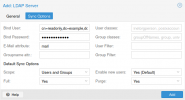
I expect to see this:
1607098299173.png

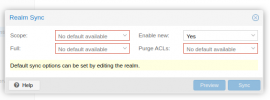
And I got this
1607098324247.png
 
I'd set a user filter like: memberOf=cn=MyGroup,ou=gon,dc=example,dc=com using the openLDAP memberOf overlay here works out quite nicely (albeit setting it up can have some pitfalls), but another attribute should also work out.
So is this supposed to be what I set my base_dn to?
 
I guess I'm not sure what to modify to get the user filter field to show up in the UI
 
Hi,

so just to clarify, you want one group and all of its users to get synced?

This needs a bit support from the LDAP schema, as Proxmox VE cannot really tell else that you only want the user from a specific group.

I'd set a user filter like: memberOf=cn=MyGroup,ou=gon,dc=example,dc=com using the openLDAP memberOf overlay here works out quite nicely (albeit setting it up can have some pitfalls), but another attribute should also work out.
For my intended results I needed to add the memberof= query on users filter AND the (&(objectclass=group)(CN=Administradores)) on Group Filter.
 
I have been making some integration tests and find out that the memberOf=cn=MyGroup,ou=gon,dc=example,dc=com in the User Filter field is enough to make it synchronize only users belonging to the MyGroup.

Keep in mind to run openssl s_client -connect DC.example.com:636 to see if a certificate is being returned in case you use LDAPS (recomended).

A no certificate available in connection can be found in a response is similar to:
Code:
CONNECTED(000001C0)
---
no peer certificate available
---
No client certificate CA names sent
---
SSL handshake has read 0 bytes and written 308 bytes
---
New, (NONE), Cipher is (NONE)
Secure Renegotiation IS NOT supported
Compression: NONE
Expansion: NONE
No ALPN negotiated
SSL-Session:
    Protocol  : TLSv1.3
    Cipher    : 0000
    Session-ID:
    Session-ID-ctx:
    Master-Key:
    Key-Arg   : None
    PSK identity: None
    PSK identity hint: None
    SRP username: None
    Start Time: 1535471188
    Timeout   : 150 (sec)
    Verify return code: 0 (ok)
---
write:errno=10054

If you see similar to above, you have to generate the certificates.

I used this steps on the DC:
  • Run certlm.msc;
  • Right-click Personal > Certificates and select All Tasks > Request New Certificate;
  • Select Active Directory Enrollment Policy and click Next;
  • Choose the Domain Controller or Kerberos Authentication template (which is preconfigured for LDAPS) and click Enroll;
  • The certificate will automatically install in the Local Computer's Personal store and bind to AD DS automatically.

No restart needed!
Try again, everything should work now.