I have three proxmox servers, all with enough cpu and ram.
2 have 2 nvmes at 1TB (making for 2 hosts with 2 TB each)
1 has 2 nvmes at 2TB (making for 1 host with 4 TB)
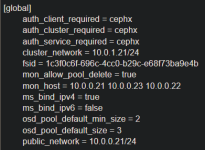
I have ceph enabled on the three hosts and all has been well, until I started digging into cluster-api and proxmox.
Storage has its own nic at 10gb, and another nic for everything else.
I've been setting up kubernetes clusters and watching things progress and have noticed that some pods in running clusters experience liveliness probe failures, across several different apps, whenever I clone a disk. Here for example is the cluster where I'm running cluster-api from:
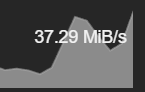
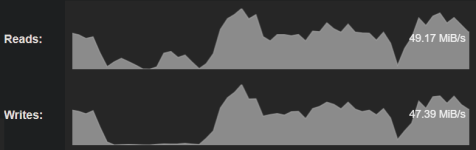
I'm not positive the issue is when cloning a disk. This is what I'm looking for some help on. I thought using nvmes and a dedicated 10gb nic should be ok. Am I not running an ideal scenario? If this is no good then I would guess everyone running kubernetes would be seeing this also. When I do a clone I see cephfs performances showing about 40-50MiB read/write until it finishes. (Does that sound like max speed?)
If this setup really isn't enough, I could see myself buying additional hardware to get 2 10gb nics dedicated on each server for just storage. (each host already has 2 10gb nics, i'm just using one for storage, and one for everything else).
Here are some pods restarting in a cluster stood up via proxmox cluster-api provider:

2 have 2 nvmes at 1TB (making for 2 hosts with 2 TB each)
1 has 2 nvmes at 2TB (making for 1 host with 4 TB)
I have ceph enabled on the three hosts and all has been well, until I started digging into cluster-api and proxmox.
Storage has its own nic at 10gb, and another nic for everything else.
I've been setting up kubernetes clusters and watching things progress and have noticed that some pods in running clusters experience liveliness probe failures, across several different apps, whenever I clone a disk. Here for example is the cluster where I'm running cluster-api from:
Code:
NAMESPACE                           NAME                                                            READY   STATUS    RESTARTS        AGE
capi-ipam-in-cluster-system         capi-ipam-in-cluster-controller-manager-556fb8d5dd-54hrc        1/1     Running   343 (42m ago)   4d21h
capi-kubeadm-bootstrap-system       capi-kubeadm-bootstrap-controller-manager-5df59854d-dtbsr       1/1     Running   290 (42m ago)   16d
capi-system                         capi-controller-manager-8574ccdd5b-5gfd8                        1/1     Running   297 (42m ago)   16d
capmox-system                       capmox-controller-manager-5444b4b979-6zn69                      1/1     Running   240 (42m ago)   3d17h
kube-system                         kube-controller-manager-k-clusterapi                            1/1     Running   417 (42m ago)   17d
kube-system                         kube-scheduler-k-clusterapi                                     1/1     Running   414 (42m ago)   17d
tigera-operator                     tigera-operator-77f994b5bb-kngbd                                1/1     Running   494             17d
I'm not positive the issue is when cloning a disk. This is what I'm looking for some help on. I thought using nvmes and a dedicated 10gb nic should be ok. Am I not running an ideal scenario? If this is no good then I would guess everyone running kubernetes would be seeing this also. When I do a clone I see cephfs performances showing about 40-50MiB read/write until it finishes. (Does that sound like max speed?)
If this setup really isn't enough, I could see myself buying additional hardware to get 2 10gb nics dedicated on each server for just storage. (each host already has 2 10gb nics, i'm just using one for storage, and one for everything else).
Here are some pods restarting in a cluster stood up via proxmox cluster-api provider:
Last edited: