[SOLVED] kaputtes CEPH nach Upgrade auf PROXMOX 9.1.2

McHammer

New Member
Nov 25, 2024
6
0
1
Hallo zusammen,
Mein Homelab bestand aus 3 Clusternodes und lief unter Ceph.
Wie in der Upgrade Anleitung beschrieben, habe ich zuerst PM auf V.8.4.6 angehoben, dann CEPH auf Trixie und anschließend PM auf V.9.
Beim installieren kam es zu ein paar Fehlern und ich bekam nur noch eine weiße Webseite.
Also machete ich auf jedem Node nochmals ein "apt-get dist-upgrade -y"...

Es wurden nochmals einige Sachen installiert und auf den neuen Kernel hingewiesen. Nach dem reboot ging erst mal gar nichts mehr.
Bootloader konnte ich dann mittels diesem Beitrag reparieren. soweit alles gut.

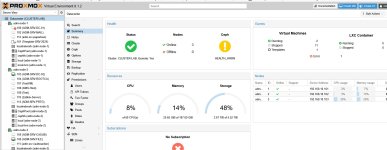
Mein System startete wieder aber mein CEPH ist lt. PROXMOX Webgui weg. Sobald ich im Datacenter auf CEPH klicke, bekomme ich einen 500er. Klicke ich im Node auf CEPH, heisst es, CEPH sei nicht installiert und mir wird die Option zur Installation geboten.

folgende Infos kann ich Euch schon mal geben:

NODE-1:
ceph-volume lvm list
Code:
====== osd.0 =======

  [block]       /dev/ceph-757de783-4bf0-49bd-8620-5ca98426de51/osd-block-c908f817-89da-4f73-b58e-25a03b8a064b

      block device              /dev/ceph-757de783-4bf0-49bd-8620-5ca98426de51/osd-block-c908f817-89da-4f73-b58e-25a03b8a064b
      block uuid                3XsAZw-XFzl-kdD9-5xQC-gpmx-suh7-mLGO6O
      cephx lockbox secret     
      cluster fsid              4aa11746-7295-48c2-a520-325f478549e0
      cluster name              ceph
      crush device class       
      encrypted                 0
      osd fsid                  c908f817-89da-4f73-b58e-25a03b8a064b
      osd id                    0
      osdspec affinity         
      type                      block
      vdo                       0
      devices                   /dev/nvme0n1

ceph-volume lvm activate --all
Code:
Running command: /usr/bin/ceph-authtool --gen-print-key
--> Activating OSD ID 0 FSID c908f817-89da-4f73-b58e-25a03b8a064b
Running command: /usr/bin/chown -R ceph:ceph /var/lib/ceph/osd/ceph-0
Running command: /usr/bin/ceph-bluestore-tool --cluster=ceph prime-osd-dir --dev /dev/ceph-757de783-4bf0-49bd-8620-5ca98426de51/osd-block-c908f817-89da-4f73-b58e-25a03b8a064b --path /var/lib/ceph/osd/ceph-0 --no-mon-config
Running command: /usr/bin/ln -snf /dev/ceph-757de783-4bf0-49bd-8620-5ca98426de51/osd-block-c908f817-89da-4f73-b58e-25a03b8a064b /var/lib/ceph/osd/ceph-0/block
Running command: /usr/bin/chown -h ceph:ceph /var/lib/ceph/osd/ceph-0/block
Running command: /usr/bin/chown -R ceph:ceph /dev/dm-0
Running command: /usr/bin/chown -R ceph:ceph /var/lib/ceph/osd/ceph-0
Running command: /usr/bin/systemctl enable ceph-volume@lvm-0-c908f817-89da-4f73-b58e-25a03b8a064b
Running command: /usr/bin/systemctl enable --runtime ceph-osd@0
Running command: /usr/bin/systemctl start ceph-osd@0
--> ceph-volume lvm activate successful for osd ID: 0

NODE-2:
ceph-volume lvm list

Code:
====== osd.2 =======

  [block]       /dev/ceph-4d0b7f69-0aa9-4da0-929e-2f6e670a2239/osd-block-212a7de4-1cfe-4829-851d-4924bc7912a6

      block device              /dev/ceph-4d0b7f69-0aa9-4da0-929e-2f6e670a2239/osd-block-212a7de4-1cfe-4829-851d-4924bc7912a6
      block uuid                7adWF3-xUBH-CH20-HuE2-PX03-XoB1-P3CpGy
      cephx lockbox secret     
      cluster fsid              4aa11746-7295-48c2-a520-325f478549e0
      cluster name              ceph
      crush device class       
      encrypted                 0
      osd fsid                  212a7de4-1cfe-4829-851d-4924bc7912a6
      osd id                    2
      osdspec affinity         
      type                      block
      vdo                       0
      devices                   /dev/nvme0n1
ceph-volume lvm activate --all
Code:
Running command: /usr/bin/ceph-authtool --gen-print-key
--> Activating OSD ID 2 FSID 212a7de4-1cfe-4829-851d-4924bc7912a6
Running command: /usr/bin/chown -R ceph:ceph /var/lib/ceph/osd/ceph-2
Running command: /usr/bin/ceph-bluestore-tool --cluster=ceph prime-osd-dir --dev /dev/ceph-4d0b7f69-0aa9-4da0-929e-2f6e670a2239/osd-block-212a7de4-1cfe-4829-851d-4924bc7912a6 --path /var/lib/ceph/osd/ceph-2 --no-mon-config
Running command: /usr/bin/ln -snf /dev/ceph-4d0b7f69-0aa9-4da0-929e-2f6e670a2239/osd-block-212a7de4-1cfe-4829-851d-4924bc7912a6 /var/lib/ceph/osd/ceph-2/block
Running command: /usr/bin/chown -h ceph:ceph /var/lib/ceph/osd/ceph-2/block
Running command: /usr/bin/chown -R ceph:ceph /dev/dm-0
Running command: /usr/bin/chown -R ceph:ceph /var/lib/ceph/osd/ceph-2
Running command: /usr/bin/systemctl enable ceph-volume@lvm-2-212a7de4-1cfe-4829-851d-4924bc7912a6
Running command: /usr/bin/systemctl enable --runtime ceph-osd@2
Running command: /usr/bin/systemctl start ceph-osd@2
--> ceph-volume lvm activate successful for osd ID: 2

NODE-3:
ceph-volume lvm list

Code:
====== osd.1 =======

  [block]       /dev/ceph-c7284064-afbb-4cf8-b9b9-368b1dcceb77/osd-block-51ae1400-b170-4e45-b8a8-3b667ff30ff2

      block device              /dev/ceph-c7284064-afbb-4cf8-b9b9-368b1dcceb77/osd-block-51ae1400-b170-4e45-b8a8-3b667ff30ff2
      block uuid                XgTRKG-0jeJ-aYlq-awkV-Gr2y-WCud-1MAvbf
      cephx lockbox secret     
      cluster fsid              4aa11746-7295-48c2-a520-325f478549e0
      cluster name              ceph
      crush device class       
      encrypted                 0
      osd fsid                  51ae1400-b170-4e45-b8a8-3b667ff30ff2
      osd id                    1
      osdspec affinity         
      type                      block
      vdo                       0
      devices                   /dev/nvme0n1

ceph-volume lvm activate --all
Code:
Running command: /usr/bin/ceph-authtool --gen-print-key
--> Activating OSD ID 1 FSID 51ae1400-b170-4e45-b8a8-3b667ff30ff2
Running command: /usr/bin/chown -R ceph:ceph /var/lib/ceph/osd/ceph-1
Running command: /usr/bin/ceph-bluestore-tool --cluster=ceph prime-osd-dir --dev /dev/ceph-c7284064-afbb-4cf8-b9b9-368b1dcceb77/osd-block-51ae1400-b170-4e45-b8a8-3b667ff30ff2 --path /var/lib/ceph/osd/ceph-1 --no-mon-config
Running command: /usr/bin/ln -snf /dev/ceph-c7284064-afbb-4cf8-b9b9-368b1dcceb77/osd-block-51ae1400-b170-4e45-b8a8-3b667ff30ff2 /var/lib/ceph/osd/ceph-1/block
Running command: /usr/bin/chown -h ceph:ceph /var/lib/ceph/osd/ceph-1/block
Running command: /usr/bin/chown -R ceph:ceph /dev/dm-0
Running command: /usr/bin/chown -R ceph:ceph /var/lib/ceph/osd/ceph-1
Running command: /usr/bin/systemctl enable ceph-volume@lvm-1-51ae1400-b170-4e45-b8a8-3b667ff30ff2
Running command: /usr/bin/systemctl enable --runtime ceph-osd@1
Running command: /usr/bin/systemctl start ceph-osd@1
--> ceph-volume lvm activate successful for osd ID: 1

Ich gehe einmal davon aus, daß die OSD's noch in Ordnung sind.

pveceph status
Code:
binary not installed: /usr/bin/ceph-mon

pvecm status
Code:
CLUSTER-LAB
Config Version:   3
Transport:        knet
Secure auth:      on

Quorum information
------------------
Date:             Fri Dec 12 12:28:47 2025
Quorum provider:  corosync_votequorum
Nodes:            3
Node ID:          0x00000001
Ring ID:          1.268
Quorate:          Yes

Votequorum information
----------------------
Expected votes:   3
Highest expected: 3
Total votes:      3
Quorum:           2 
Flags:            Quorate

Membership information
----------------------
    Nodeid      Votes Name
0x00000001          1 192.168.101.101 (local)
0x00000002          1 192.168.101.102
0x00000003          1 192.168.101.103

pveceph status
Code:
binary not installed: /usr/bin/ceph-mon

apt search ceph | grep installed
Code:
WARNING: apt does not have a stable CLI interface. Use with caution in scripts.

ceph-base/stable,now 19.2.3-pve2 amd64 [installed,automatic]
ceph-common/stable,now 19.2.3-pve2 amd64 [installed]
ceph-fuse/stable,now 19.2.3-pve2 amd64 [installed]
ceph-mds/stable,now 19.2.3-pve2 amd64 [installed]
ceph-osd/stable,now 19.2.3-pve2 amd64 [installed,automatic]
ceph-volume/stable,now 19.2.3-pve2 all [installed]
libcephfs2/stable,now 19.2.3-pve2 amd64 [installed]
librados2/stable,now 19.2.3-pve2 amd64 [installed]
librbd1/stable,now 19.2.3-pve2 amd64 [installed]
librgw2/stable,now 19.2.3-pve2 amd64 [installed]
python3-ceph-argparse/stable,now 19.2.3-pve2 all [installed]
python3-ceph-common/stable,now 19.2.3-pve2 all [installed]
python3-cephfs/stable,now 19.2.3-pve2 amd64 [installed]
python3-rados/stable,now 19.2.3-pve2 amd64 [installed]
python3-rbd/stable,now 19.2.3-pve2 amd64 [installed]
python3-rgw/stable,now 19.2.3-pve2 amd64 [installed]

pveceph install --repository no-subscription
Code:
HINT: The no-subscription repository is not the best choice for production setups.
Proxmox recommends using the enterprise repository with a valid subscription.
This will install Ceph 19.2 Squid - continue (y/N)? y
update available package list
start installation
Reading package lists... Done
Building dependency tree... Done
Reading state information... Done
ceph-common is already the newest version (19.2.3-pve2).
ceph-fuse is already the newest version (19.2.3-pve2).
ceph-mds is already the newest version (19.2.3-pve2).
ceph-volume is already the newest version (19.2.3-pve2).
gdisk is already the newest version (1.0.10-2).
nvme-cli is already the newest version (2.13-2).
Solving dependencies... Error!
Some packages could not be installed. This may mean that you have
requested an impossible situation or if you are using the unstable
distribution that some required packages have not yet been created
or been moved out of Incoming.
The following information may help to resolve the situation:

The following packages have unmet dependencies:
 ceph-mgr : Depends: ceph-mgr-modules-core (= 19.2.3-pve2) but it is not going to be installed
            Depends: libpython3.13 (>= 3.13.0~rc3) but it is not installable
E: Unable to correct problems, you have held broken packages.
E: The following information from --solver 3.0 may provide additional context:
   Unable to satisfy dependencies. Reached two conflicting decisions:
   1. python3-pecan:amd64=1.4.1-1 is not selected for install
   2. python3-pecan:amd64=1.4.1-1 is selected for install because:
      1. ceph:amd64=19.2.3-pve2 is selected for install
      2. ceph:amd64=19.2.3-pve2 Depends ceph-mgr (= 19.2.3-pve2)
      3. ceph-mgr:amd64=19.2.3-pve2 Depends ceph-mgr-modules-core (= 19.2.3-pve2)
      4. ceph-mgr-modules-core:amd64 Depends python3-pecan
      5. python3-pecan:amd64 is available in version 1.4.1-1
apt failed during ceph installation (25600)

Hat irgendwer Tipps wie ich aus dem Schlamassel wieder herauskomme ?

Danke Euch,

Gruss Mathias
 
Das klingt alles ein wenig seltsam. Ist evtl ein Repository auf die falsche Version konfiguriert? Kannst du mal apt update laufen lassen und den gesamten Output posten?
 
Hi...

AHA! :(
Code:
Get:1 http://security.debian.org trixie-security InRelease [43.4 kB]
Get:2 http://security.debian.org trixie-security/main amd64 Packages [82.1 kB]
Hit:3 http://ftp.de.debian.org/debian trixie InRelease
Get:4 http://ftp.de.debian.org/debian trixie-updates InRelease [47.3 kB]             
Hit:5 http://download.proxmox.com/debian/pve trixie InRelease                       
Err:6 https://enterprise.proxmox.com/debian/ceph-squid trixie InRelease       
  401  Unauthorized [IP: 212.224.123.70 443]
Error: Failed to fetch https://enterprise.proxmox.com/debian/ceph-squid/dists/trixie/InRelease  401  Unauthorized [IP: 212.224.123.70 443]
Error: The repository 'https://enterprise.proxmox.com/debian/ceph-squid trixie InRelease' is not signed.
Notice: Updating from such a repository can't be done securely, and is therefore disabled by default.
Notice: See apt-secure(8) manpage for repository creation and user configuration details.

komisch ist, daß die Enterprise in meinem Webgui aber deaktiviert ist...

Gruss Mathias
 
komisch ist, daß die Enterprise in meinem Webgui aber deaktiviert ist...
wirklich?
Ist das no-subscription repo aktiv? denn dann wäre es auch trotz der Fehlermeldung nicht so tragisch, da die Pakete dann übers no-subscription kommen können
 
Ich glaube aber, daß ich beim absetzen der sed-Befehle Bockmist gebaut habe.

Kannst Du mir vielleicht korrekte APT-Listen und das was dazugehört für V.9.1.2 inkl. CEPH, beides mit no-subscription geben?
... vielleicht bringt mich das ein Stückchen weiter - es fehlen ja definitiv Sachen.

Aktuell sieht es so aus:


apt update
Code:
root@adm-node-1:~# apt update
Hit:1 http://security.debian.org trixie-security InRelease                          
Hit:2 http://ftp.de.debian.org/debian trixie InRelease                              
Hit:3 http://ftp.de.debian.org/debian trixie-updates InRelease
Hit:4 http://download.proxmox.com/debian/pve trixie InRelease
Hit:5 http://download.proxmox.com/debian/ceph-squid trixie InRelease
All packages are up to date.  
Warning: Target Packages (pve-no-subscription/binary-amd64/Packages) is configured multiple times in /etc/apt/sources.list:8 and /etc/apt/sources.list.d/proxmox.sources:1
Warning: Target Packages (pve-no-subscription/binary-all/Packages) is configured multiple times in /etc/apt/sources.list:8 and /etc/apt/sources.list.d/proxmox.sources:1
Warning: Target Translations (pve-no-subscription/i18n/Translation-en) is configured multiple times in /etc/apt/sources.list:8 and /etc/apt/sources.list.d/proxmox.sources:1
Warning: Target Packages (pve-no-subscription/binary-amd64/Packages) is configured multiple times in /etc/apt/sources.list:8 and /etc/apt/sources.list.d/proxmox.sources:1
Warning: Target Packages (pve-no-subscription/binary-all/Packages) is configured multiple times in /etc/apt/sources.list:8 and /etc/apt/sources.list.d/proxmox.sources:1
Warning: Target Translations (pve-no-subscription/i18n/Translation-en) is configured multiple times in /etc/apt/sources.list:8 and /etc/apt/sources.list.d/proxmox.sources:1
Proxmox_Repos.jpg

Gruss
 
Last edited:
Alles etwas wild durcheinander und das PVE Repo doppelt, aber sollte so alles funktionieren.
Was sagt denn ceph -s auf der CLI?
 
Hi..
Vielen Dank für Deine bisherige Unterstützung..


Ich habe nun apt-get update sowie upgrade auf alles Nodes durchgeführt..

anschliessend auf allen Nodes:

Ergebnis:
Code:
pveceph install --repository no-subscription

HINT: The no-subscription repository is not the best choice for production setups.
Proxmox recommends using the enterprise repository with a valid subscription.
This will install Ceph 19.2 Squid - continue (y/N)? y
update available package list
W: Target Packages (pve-no-subscription/binary-amd64/Packages) is configured multiple times in /etc/apt/sources.list:8 and /etc/apt/sources.list.d/proxmox.sources:1
W: Target Packages (pve-no-subscription/binary-all/Packages) is configured multiple times in /etc/apt/sources.list:8 and /etc/apt/sources.list.d/proxmox.sources:1
W: Target Translations (pve-no-subscription/i18n/Translation-en) is configured multiple times in /etc/apt/sources.list:8 and /etc/apt/sources.list.d/proxmox.sources:1
W: Target Packages (pve-no-subscription/binary-amd64/Packages) is configured multiple times in /etc/apt/sources.list:8 and /etc/apt/sources.list.d/proxmox.sources:1
W: Target Packages (pve-no-subscription/binary-all/Packages) is configured multiple times in /etc/apt/sources.list:8 and /etc/apt/sources.list.d/proxmox.sources:1
W: Target Translations (pve-no-subscription/i18n/Translation-en) is configured multiple times in /etc/apt/sources.list:8 and /etc/apt/sources.list.d/proxmox.sources:1
start installation
Reading package lists... Done
Building dependency tree... Done
Reading state information... Done
ceph-common is already the newest version (19.2.3-pve2).
ceph-fuse is already the newest version (19.2.3-pve2).
ceph-mds is already the newest version (19.2.3-pve2).
ceph-volume is already the newest version (19.2.3-pve2).
gdisk is already the newest version (1.0.10-2).
nvme-cli is already the newest version (2.13-2).
The following packages were automatically installed and are no longer required:
  libjs-popper.js libjs-sizzle node-jquery
Use 'apt autoremove' to remove them.
The following additional packages will be installed:
  ceph-mgr ceph-mgr-modules-core ceph-mon libpython3.13 libsqlite3-mod-ceph
  python3-cheroot python3-cherrypy3 python3-dateutil
  python3-jaraco.collections python3-legacy-cgi python3-logutils
  python3-natsort python3-pecan python3-portend python3-simplegeneric
  python3-tempora python3-webob python3-werkzeug python3-zc.lockfile
Suggested packages:
  ceph-mgr-dashboard ceph-mgr-diskprediction-local ceph-mgr-k8sevents
  ceph-mgr-cephadm python3-influxdb python3-objgraph python-natsort-doc
  python-pecan-doc python-webob-doc ipython3 python-werkzeug-doc python3-lxml
  python3-watchdog
Recommended packages:
  python3-routes python3-simplejson python3-pyinotify
The following NEW packages will be installed:
  ceph ceph-mgr ceph-mgr-modules-core ceph-mon libpython3.13
  libsqlite3-mod-ceph python3-cheroot python3-cherrypy3 python3-dateutil
  python3-jaraco.collections python3-legacy-cgi python3-logutils
  python3-natsort python3-pecan python3-portend python3-simplegeneric
  python3-tempora python3-webob python3-werkzeug python3-zc.lockfile
0 upgraded, 20 newly installed, 0 to remove and 0 not upgraded.
Need to get 11.8 MB/11.8 MB of archives.
After this operation, 43.9 MB of additional disk space will be used.
Do you want to continue? [Y/n] y
Get:1 http://download.proxmox.com/debian/ceph-squid trixie/no-subscription amd64 ceph-mgr-modules-core all 19.2.3-pve2 [247 kB]
Get:2 http://ftp.de.debian.org/debian trixie/main amd64 python3-cheroot all 10.0.1+ds1-4 [87.3 kB]
Get:3 http://download.proxmox.com/debian/ceph-squid trixie/no-subscription amd64 libsqlite3-mod-ceph amd64 19.2.3-pve2 [146 kB]
Get:4 http://download.proxmox.com/debian/ceph-squid trixie/no-subscription amd64 ceph-mgr amd64 19.2.3-pve2 [1,231 kB]
Get:5 http://ftp.de.debian.org/debian trixie/main amd64 python3-jaraco.collections all 5.1.0-1 [12.7 kB]
Get:6 http://ftp.de.debian.org/debian trixie/main amd64 python3-dateutil all 2.9.0-4 [79.4 kB]
Get:7 http://ftp.de.debian.org/debian trixie/main amd64 python3-tempora all 5.7.0-2 [15.1 kB]
Get:8 http://ftp.de.debian.org/debian trixie/main amd64 python3-portend all 3.2.0-1 [7,528 B]
Get:9 http://ftp.de.debian.org/debian trixie/main amd64 python3-zc.lockfile all 3.0.post1-1 [8,848 B]
Get:10 http://ftp.de.debian.org/debian trixie/main amd64 python3-cherrypy3 all 18.10.0-1 [217 kB]
Get:11 http://ftp.de.debian.org/debian trixie/main amd64 python3-logutils all 0.3.5-5 [17.5 kB]
Get:12 http://ftp.de.debian.org/debian trixie/main amd64 python3-legacy-cgi all 2.6.3-1 [16.5 kB]
Get:13 http://ftp.de.debian.org/debian trixie/main amd64 python3-webob all 1:1.8.9-1 [89.1 kB]
Get:14 http://download.proxmox.com/debian/ceph-squid trixie/no-subscription amd64 ceph-mon amd64 19.2.3-pve2 [7,125 kB]
Get:15 http://ftp.de.debian.org/debian trixie/main amd64 python3-pecan all 1.5.1-6 [103 kB]
Get:16 http://ftp.de.debian.org/debian trixie/main amd64 python3-werkzeug all 3.1.3-2 [207 kB]
Get:17 http://ftp.de.debian.org/debian trixie/main amd64 libpython3.13 amd64 3.13.5-2 [2,160 kB]
Get:18 http://download.proxmox.com/debian/ceph-squid trixie/no-subscription amd64 ceph amd64 19.2.3-pve2 [17.0 kB]
Fetched 11.8 MB in 1s (10.4 MB/s)
Selecting previously unselected package python3-cheroot.
(Reading database ... 73179 files and directories currently installed.)
Preparing to unpack .../00-python3-cheroot_10.0.1+ds1-4_all.deb ...
Unpacking python3-cheroot (10.0.1+ds1-4) ...
Selecting previously unselected package python3-jaraco.collections.
Preparing to unpack .../01-python3-jaraco.collections_5.1.0-1_all.deb ...
Unpacking python3-jaraco.collections (5.1.0-1) ...
Selecting previously unselected package python3-dateutil.
Preparing to unpack .../02-python3-dateutil_2.9.0-4_all.deb ...
Unpacking python3-dateutil (2.9.0-4) ...
Selecting previously unselected package python3-tempora.
Preparing to unpack .../03-python3-tempora_5.7.0-2_all.deb ...
Unpacking python3-tempora (5.7.0-2) ...
Selecting previously unselected package python3-portend.
Preparing to unpack .../04-python3-portend_3.2.0-1_all.deb ...
Unpacking python3-portend (3.2.0-1) ...
Selecting previously unselected package python3-zc.lockfile.
Preparing to unpack .../05-python3-zc.lockfile_3.0.post1-1_all.deb ...
Unpacking python3-zc.lockfile (3.0.post1-1) ...
Selecting previously unselected package python3-cherrypy3.
Preparing to unpack .../06-python3-cherrypy3_18.10.0-1_all.deb ...
Unpacking python3-cherrypy3 (18.10.0-1) ...
Selecting previously unselected package python3-natsort.
Preparing to unpack .../07-python3-natsort_8.0.2-2_all.deb ...
Unpacking python3-natsort (8.0.2-2) ...
Selecting previously unselected package python3-logutils.
Preparing to unpack .../08-python3-logutils_0.3.5-5_all.deb ...
Unpacking python3-logutils (0.3.5-5) ...
Selecting previously unselected package python3-simplegeneric.
Preparing to unpack .../09-python3-simplegeneric_0.8.1-5_all.deb ...
Unpacking python3-simplegeneric (0.8.1-5) ...
Selecting previously unselected package python3-legacy-cgi.
Preparing to unpack .../10-python3-legacy-cgi_2.6.3-1_all.deb ...
Unpacking python3-legacy-cgi (2.6.3-1) ...
Selecting previously unselected package python3-webob.
Preparing to unpack .../11-python3-webob_1%3a1.8.9-1_all.deb ...
Unpacking python3-webob (1:1.8.9-1) ...
Selecting previously unselected package python3-pecan.
Preparing to unpack .../12-python3-pecan_1.5.1-6_all.deb ...
Unpacking python3-pecan (1.5.1-6) ...
Selecting previously unselected package python3-werkzeug.
Preparing to unpack .../13-python3-werkzeug_3.1.3-2_all.deb ...
Unpacking python3-werkzeug (3.1.3-2) ...
Selecting previously unselected package ceph-mgr-modules-core.
Preparing to unpack .../14-ceph-mgr-modules-core_19.2.3-pve2_all.deb ...
Unpacking ceph-mgr-modules-core (19.2.3-pve2) ...
Selecting previously unselected package libsqlite3-mod-ceph.
Preparing to unpack .../15-libsqlite3-mod-ceph_19.2.3-pve2_amd64.deb ...
Unpacking libsqlite3-mod-ceph (19.2.3-pve2) ...
Selecting previously unselected package libpython3.13:amd64.
Preparing to unpack .../16-libpython3.13_3.13.5-2_amd64.deb ...
Unpacking libpython3.13:amd64 (3.13.5-2) ...
Selecting previously unselected package ceph-mgr.
Preparing to unpack .../17-ceph-mgr_19.2.3-pve2_amd64.deb ...
Unpacking ceph-mgr (19.2.3-pve2) ...
Selecting previously unselected package ceph-mon.
Preparing to unpack .../18-ceph-mon_19.2.3-pve2_amd64.deb ...
Unpacking ceph-mon (19.2.3-pve2) ...
Selecting previously unselected package ceph.
Preparing to unpack .../19-ceph_19.2.3-pve2_amd64.deb ...
Unpacking ceph (19.2.3-pve2) ...
Setting up libpython3.13:amd64 (3.13.5-2) ...
Setting up python3-jaraco.collections (5.1.0-1) ...
Setting up libsqlite3-mod-ceph (19.2.3-pve2) ...
Setting up ceph-mon (19.2.3-pve2) ...
Setting up python3-natsort (8.0.2-2) ...
Setting up python3-cheroot (10.0.1+ds1-4) ...
Setting up python3-werkzeug (3.1.3-2) ...
Setting up python3-legacy-cgi (2.6.3-1) ...
Setting up python3-zc.lockfile (3.0.post1-1) ...
Setting up python3-dateutil (2.9.0-4) ...
Setting up python3-logutils (0.3.5-5) ...
Setting up python3-tempora (5.7.0-2) ...
Setting up python3-simplegeneric (0.8.1-5) ...
Setting up python3-webob (1:1.8.9-1) ...
Setting up python3-pecan (1.5.1-6) ...
Setting up python3-portend (3.2.0-1) ...
Setting up python3-cherrypy3 (18.10.0-1) ...
Setting up ceph-mgr-modules-core (19.2.3-pve2) ...
Setting up ceph-mgr (19.2.3-pve2) ...
Setting up ceph (19.2.3-pve2) ...
Processing triggers for man-db (2.13.1-1) ...
Processing triggers for libc-bin (2.41-12) ...

installed Ceph 19.2 Squid successfully!

Kisten neu gebootet... und Taraaaaaah!

Ceph wieder da..
Proxmox_Repos.jpg

Habe jetzt nur noch ein Prblem mit dem PC oben... der meckert wegen HA... anscheinend ist da auch noch was schief..
 
Was steht denn bei der VM? In der Regel reicht es HA disable und danach wieder an machen für die VM.
 
ging nicht - Error 500. Habe die Kiste geclont nun laufen alle wieder...
Werde mir nun gleich noch den PBS dediziert installieren und mal Backups machen... Hatte bis vor 2 Tage keinen Platz auf meinem NAS dafür.. kommt nun - leicht verspätet ;)

Danke an Euch Beide!

Gruss Mathias
 
Jep.. Danke...
dann muss ich ja jetzt wahrscheinlich nur noch meine APT-Listen aufräumen... das aber erst nach dem Backup...