

Hi everyone,
I'm new to setting up a home lab and seeking some guidance (so please don't roast me too hard). I recently installed Proxmox following the setup instructions correctly, but now I'm encountering an issue. I'm stuck on a black screen that displays a message: "Welcome to the Proxmox Virtual Environment. Please use your web browser to configure this server - connect to: "
I'm unable to proceed beyond this screen and return to the Windows home interface where I can open a browser. I've attempted to reset the Mini PC by pressing the power button, as it's the only button available, and even tried resetting the BIOS settings. However, it keeps bringing me back to this Proxmox login page.
I've watched other videos, and most people can use open a new browser?? But I can't because I can't get out this screen I've clicked every button possible.
I'd greatly appreciate any help or advice to resolve this situation. Thank you!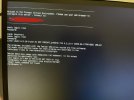
I'm new to setting up a home lab and seeking some guidance (so please don't roast me too hard). I recently installed Proxmox following the setup instructions correctly, but now I'm encountering an issue. I'm stuck on a black screen that displays a message: "Welcome to the Proxmox Virtual Environment. Please use your web browser to configure this server - connect to: "
I'm unable to proceed beyond this screen and return to the Windows home interface where I can open a browser. I've attempted to reset the Mini PC by pressing the power button, as it's the only button available, and even tried resetting the BIOS settings. However, it keeps bringing me back to this Proxmox login page.
I've watched other videos, and most people can use open a new browser?? But I can't because I can't get out this screen
I've clicked every button possible.I'd greatly appreciate any help or advice to resolve this situation. Thank you!
Last edited:
