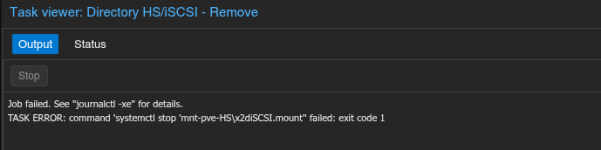
I was experimenting with iSCSI target and while trying to move I made a rookie mistake of deleting the folder first instead of gracefully cleaning it. I had tgt installed on the system that I have uninstalled. Can some please help me fix the issue, just trying to clean up the mess. I am not an expert in tgt/iSCSI targets. Logs from Proxmox listed below:
:
:
:
Jul 03 13:34:56 pve01 systemd[1]: Unmounting mnt-pve-HS\x2diSCSI.mount - Mount storage 'HS-iSCSI' under /mnt/pve...
Jul 03 13:34:56 pve01 umount[5056]: umount: /mnt/pve/HS-iSCSI: target is busy.
Jul 03 13:34:56 pve01 systemd[1]: mnt-pve-HS\x2diSCSI.mount: Mount process exited, code=exited, status=32/n/a
Jul 03 13:34:56 pve01 systemd[1]: Failed unmounting mnt-pve-HS\x2diSCSI.mount - Mount storage 'HS-iSCSI' under /mnt/pve.
Jul 03 13:35:42 pve01 systemd[1]: Unmounting mnt-pve-HS\x2diSCSI.mount - Mount storage 'HS-iSCSI' under /mnt/pve...
Jul 03 13:35:42 pve01 systemd[1]: mnt-pve-HS\x2diSCSI.mount: Mount process exited, code=exited, status=32/n/a
Jul 03 13:35:42 pve01 umount[5186]: umount: /mnt/pve/HS-iSCSI: target is busy.
Jul 03 13:35:42 pve01 systemd[1]: Failed unmounting mnt-pve-HS\x2diSCSI.mount - Mount storage 'HS-iSCSI' under /mnt/pve.
Jul 03 13:37:11 pve01 systemd[1]: Starting systemd-tmpfiles-clean.service - Cleanup of Temporary Directories...
Jul 03 13:37:11 pve01 systemd[1]: systemd-tmpfiles-clean.service: Deactivated successfully.
Jul 03 13:37:11 pve01 systemd[1]: Finished systemd-tmpfiles-clean.service - Cleanup of Temporary Directories.
Jul 03 13:37:11 pve01 systemd[1]: run-credentials-systemd\x2dtmpfiles\x2dclean.service.mount: Deactivated successfully.
Jul 03 13:40:33 pve01 pvedaemon[1301]: <root@pam> starting task UPID ve01:00001816:0001C05B:68667A41:dirremove:HS-iSCSI:root@pam:
Jul 03 13:40:33 pve01 systemd[1]: Unmounting mnt-pve-HS\x2diSCSI.mount - Mount storage 'HS-iSCSI' under /mnt/pve...
Jul 03 13:40:33 pve01 umount[6173]: umount: /mnt/pve/HS-iSCSI: target is busy.
Jul 03 13:40:33 pve01 systemd[1]: mnt-pve-HS\x2diSCSI.mount: Mount process exited, code=exited, status=32/n/a
Jul 03 13:40:33 pve01 systemd[1]: Failed unmounting mnt-pve-HS\x2diSCSI.mount - Mount storage 'HS-iSCSI' under /mnt/pve.
Jul 03 13:40:33 pve01 pvedaemon[6166]: command 'systemctl stop 'mnt-pve-HS\x2diSCSI.mount'' failed: exit code 1
Jul 03 13:40:33 pve01 pvedaemon[1301]: <root@pam> end task UPIDve01:00001816:0001C05B:68667A41:dirremove:HS-iSCSI:root@pam: command 'systemctl stop 'mnt-pve-HS\x2diSCSI.mount'' failed: exit code 1
:
:
:
Jul 03 13:34:56 pve01 systemd[1]: Unmounting mnt-pve-HS\x2diSCSI.mount - Mount storage 'HS-iSCSI' under /mnt/pve...
Jul 03 13:34:56 pve01 umount[5056]: umount: /mnt/pve/HS-iSCSI: target is busy.
Jul 03 13:34:56 pve01 systemd[1]: mnt-pve-HS\x2diSCSI.mount: Mount process exited, code=exited, status=32/n/a
Jul 03 13:34:56 pve01 systemd[1]: Failed unmounting mnt-pve-HS\x2diSCSI.mount - Mount storage 'HS-iSCSI' under /mnt/pve.
Jul 03 13:35:42 pve01 systemd[1]: Unmounting mnt-pve-HS\x2diSCSI.mount - Mount storage 'HS-iSCSI' under /mnt/pve...
Jul 03 13:35:42 pve01 systemd[1]: mnt-pve-HS\x2diSCSI.mount: Mount process exited, code=exited, status=32/n/a
Jul 03 13:35:42 pve01 umount[5186]: umount: /mnt/pve/HS-iSCSI: target is busy.
Jul 03 13:35:42 pve01 systemd[1]: Failed unmounting mnt-pve-HS\x2diSCSI.mount - Mount storage 'HS-iSCSI' under /mnt/pve.
Jul 03 13:37:11 pve01 systemd[1]: Starting systemd-tmpfiles-clean.service - Cleanup of Temporary Directories...
Jul 03 13:37:11 pve01 systemd[1]: systemd-tmpfiles-clean.service: Deactivated successfully.
Jul 03 13:37:11 pve01 systemd[1]: Finished systemd-tmpfiles-clean.service - Cleanup of Temporary Directories.
Jul 03 13:37:11 pve01 systemd[1]: run-credentials-systemd\x2dtmpfiles\x2dclean.service.mount: Deactivated successfully.
Jul 03 13:40:33 pve01 pvedaemon[1301]: <root@pam> starting task UPID
ve01:00001816:0001C05B:68667A41:dirremove:HS-iSCSI:root@pam:Jul 03 13:40:33 pve01 systemd[1]: Unmounting mnt-pve-HS\x2diSCSI.mount - Mount storage 'HS-iSCSI' under /mnt/pve...
Jul 03 13:40:33 pve01 umount[6173]: umount: /mnt/pve/HS-iSCSI: target is busy.
Jul 03 13:40:33 pve01 systemd[1]: mnt-pve-HS\x2diSCSI.mount: Mount process exited, code=exited, status=32/n/a
Jul 03 13:40:33 pve01 systemd[1]: Failed unmounting mnt-pve-HS\x2diSCSI.mount - Mount storage 'HS-iSCSI' under /mnt/pve.
Jul 03 13:40:33 pve01 pvedaemon[6166]: command 'systemctl stop 'mnt-pve-HS\x2diSCSI.mount'' failed: exit code 1
Jul 03 13:40:33 pve01 pvedaemon[1301]: <root@pam> end task UPID
ve01:00001816:0001C05B:68667A41:dirremove:HS-iSCSI:root@pam: command 'systemctl stop 'mnt-pve-HS\x2diSCSI.mount'' failed: exit code 1