[SOLVED] Installation failed

cgethycx

New Member
Sep 8, 2021
3
1
3
47
I am attempting my first ever install of ProxMox and it is failing.

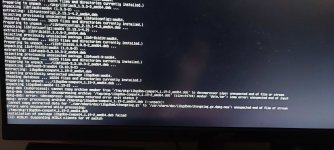
Here is the message I am receiving:

installation of package libgdbm-compat4_1.19-3_amd64.deb failed

I am installing this on a dedicated machine.

MB: ASUS Prime A320M-K BIOS Ver. 4023
CPU: AMD Ryzen 7 1700x
RAM: 16gb Corsair (2-8 gb sticks)
SSD: 512gb

It has onboard graphics and also an GTX980

Thanks in advance.
 
If you're using the PVE ISO - please start the installation in debug mode - after the error you can abort the installation and should be presented with a shell - where the error might be shown with more details (check the other virtual consoles (Alt+F1, Alt+F2))

If you're installing on top of Debian - please post the complete error message

I hope this helps!
 
There is the error. If it can't be seen in the pic I will type it all out. Unless there is a way to see a log.
IMG_20210909_063609-min.jpg
 
hmm - my guess - either the iso was corrupted on download - verify with the provided checksums!
or ... the USB-drive you're using with the iso has an issue - try with a different USB drive

I hope this helps!
 
  • Like
Reactions: cgethycx
It seems like it was an issue with my USB stick. The sum checked out so I went with your advice on switching USB sticks.

Thanks for your help.
 
  • Like
Reactions: Stoiko Ivanov
240617_QnA_dea81565cb55b4729eff058f68fc29695594c686.jpg


나는 여러 장치를 사용했지만, 같은 증상으로 약 2~3일 고생했습니다.

I struggled with the same issue for about 2-3 days despite using several devices.

① USB2.0 8GB

② USB3.0 128GB

③ SSD 40GB (Intel X25-V / S-ATA to USB3.0)


호환 불가능으로 생각을 하고 포기할 때쯤, USB를 오래된 PC가 아닌 노트북에서 만들어 문제를 해결했습니다.

Just when I was about to give up, thinking it was an incompatibility issue, I resolved it by creating the USB on a laptop instead of an old PC.


개인적으로 설치 미디어를 만들 때 [BalenaEtcher]사용을 추천합니다.

I personally recommend using “BalenaEtcher” for creating installation media.


설치 미디어를 만들 때 가급적이면 꼭 PC 후면 USB Port를 사용하세요.

When creating installation media, if possible, always use the rear USB ports on your PC.
 
Last edited:
  • Like
Reactions: tashimox