Hi,
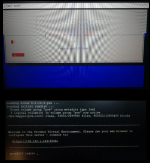
I'm trying to install proxmox on this dell switch
Just to see if it's possible at all and maybe then run FTOS9 inside of it maybe (plus openwrt and a few other network essentials)
This is basically a x64 install atom quad core PC with 8gb ram and a sata ssd.
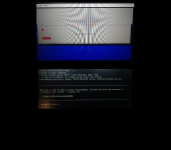
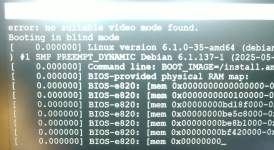
However, the installer doesn't show console output, instead shows
"Booting into blind mode"
Where it does obtain a dhcp address and it can be pinged, but nmap reveals no open ports.
Telnet, ssh, nothing wants to connect.
I tried the automatic installer but it behaves no different.
After rebooting from the automatic installer, there is no change to the sata ssd, it did not install nor even wipe the drive
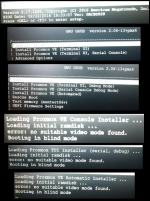
For testing, I have tried installing latest debian on it
After a lot of testing and getting the same errors as above
I discovered the following to at least install debian successfully
Selecting the non-graphical install
Then pressing the key "e"
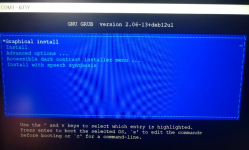
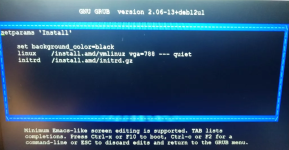
Then performing the following modifications
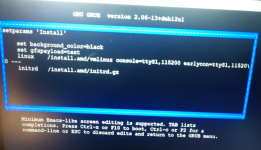
This boots and installed debian successfully
I started this thread because I was stuck
But I seem to be on my way to figure it out.
Next step is to try to implement this with the proxmox installer and see if I can get better results
My goal is then to install FTOS9 with PCIE passthrough and run FTOS9 in a VM while maintaining proxmox as the host OS
It is looking like this crazy idea just might work !!
I'm trying to install proxmox on this dell switch
Just to see if it's possible at all and maybe then run FTOS9 inside of it maybe (plus openwrt and a few other network essentials)
This is basically a x64 install atom quad core PC with 8gb ram and a sata ssd.
However, the installer doesn't show console output, instead shows
"Booting into blind mode"
Where it does obtain a dhcp address and it can be pinged, but nmap reveals no open ports.
Telnet, ssh, nothing wants to connect.
I tried the automatic installer but it behaves no different.
After rebooting from the automatic installer, there is no change to the sata ssd, it did not install nor even wipe the drive
For testing, I have tried installing latest debian on it
After a lot of testing and getting the same errors as above
I discovered the following to at least install debian successfully
Selecting the non-graphical install
Then pressing the key "e"
Then performing the following modifications
This boots and installed debian successfully
I started this thread because I was stuck
But I seem to be on my way to figure it out.
Next step is to try to implement this with the proxmox installer and see if I can get better results
My goal is then to install FTOS9 with PCIE passthrough and run FTOS9 in a VM while maintaining proxmox as the host OS
Code:
user@debians6010:~$ lspci
00:00.0 Host bridge: Intel Corporation Atom processor C2000 SoC Transaction Router (rev 02)
00:01.0 PCI bridge: Intel Corporation Atom processor C2000 PCIe Root Port 1 (rev 02)
00:02.0 PCI bridge: Intel Corporation Atom processor C2000 PCIe Root Port 2 (rev 02)
00:03.0 PCI bridge: Intel Corporation Atom processor C2000 PCIe Root Port 3 (rev 02)
00:04.0 PCI bridge: Intel Corporation Atom processor C2000 PCIe Root Port 4 (rev 02)
00:0e.0 Host bridge: Intel Corporation Atom processor C2000 RAS (rev 02)
00:0f.0 IOMMU: Intel Corporation Atom processor C2000 RCEC (rev 02)
00:13.0 System peripheral: Intel Corporation Atom processor C2000 SMBus 2.0 (rev 02)
00:14.0 Ethernet controller: Intel Corporation Ethernet Connection I354 (rev 03)
00:14.1 Ethernet controller: Intel Corporation Ethernet Connection I354 (rev 03)
00:14.2 Ethernet controller: Intel Corporation Ethernet Connection I354 1.0 GbE Backplane (rev 03)
00:14.3 Ethernet controller: Intel Corporation Ethernet Connection I354 (rev 03)
00:16.0 USB controller: Intel Corporation Atom processor C2000 USB Enhanced Host Controller (rev 02)
00:17.0 SATA controller: Intel Corporation Atom processor C2000 AHCI SATA2 Controller (rev 02)
00:18.0 SATA controller: Intel Corporation Atom processor C2000 AHCI SATA3 Controller (rev 02)
00:1f.0 ISA bridge: Intel Corporation Atom processor C2000 PCU (rev 02)
00:1f.3 SMBus: Intel Corporation Atom processor C2000 PCU SMBus (rev 02)
01:00.0 Ethernet controller: Broadcom Inc. and subsidiaries Device b860 (rev 02)
user@debians6010:~$
It is looking like this crazy idea just might work !!