input/output error

radoslav

New Member
Feb 9, 2026
5
0
1
Hello,

I have the following problem.
I have a Lenovo System X3650 M4 server with 32GB RAM.

I have 2 x 600GB in RAID 0 for Proxmox and 4 x 4 TB in Linux Software Raid 6.
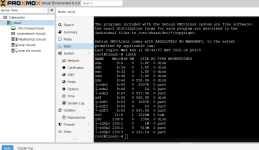
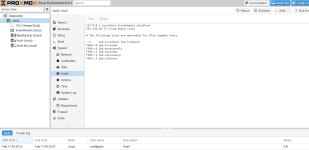
1770644323079.png 1770645485856.png
1770645760965.png

In Proxmox, there is only one virtual machine installed with Ubuntu and Nextcloud configured on it.

The problem is that it often crashes the Linux Raid, and I don't know why.

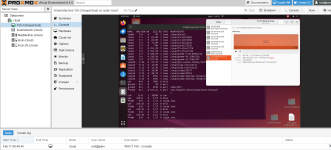
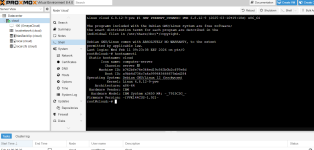
When the problem occurs, neither Proxmox nor Ubuntu crash. They work normally. The problem is that it throws this error in Linux

1770645217448.png

The SSD drives are new.
Can anyone tell me where to look for the problem?
Thank you!
 
Last edited:
Hi, @Onslow,
This is in /proc/mdstat

Personalities : [raid6] [raid5] [raid4] [raid0] [raid1] [raid10]
md0 : active raid6 vdb[1] vdc[2] vdd[3] vda[0]
7813772288 blocks super 1.2 level 6, 512k chunk, algorithm 2 [4/4] [UUUU]
bitmap: 1/30 pages [4KB], 65536KB chunk

unused devices: <none>
-----------------------------------

This is in the log

2026-02-09T18:22:52.738187+02:00 Omaya-cloud systemd[1]: Finished File System Check on /dev/md0.
2026-02-09T18:22:52.740231+02:00 Omaya-cloud kernel: md/raid:md0: device vdb operational as raid disk 1
2026-02-09T18:22:52.740232+02:00 Omaya-cloud kernel: md/raid:md0: device vda operational as raid disk 0
2026-02-09T18:22:52.740233+02:00 Omaya-cloud kernel: md/raid:md0: device vdd operational as raid disk 3
2026-02-09T18:22:52.740233+02:00 Omaya-cloud kernel: md/raid:md0: device vdc operational as raid disk 2
2026-02-09T18:22:52.740234+02:00 Omaya-cloud kernel: md/raid:md0: raid level 6 active with 4 out of 4 devices, algorithm 2
2026-02-09T18:22:52.740235+02:00 Omaya-cloud kernel: md0: detected capacity change from 0 to 15627544576
2026-02-09T18:22:52.740406+02:00 Omaya-cloud kernel: EXT4-fs (md0): mounted filesystem d6b52598-05c3-4b39-bca0-f1330185301f r/w with ordered da
ta mode. Quota mode: none.
2026-02-09T18:30:09.199734+02:00 Omaya-cloud kernel: Aborting journal on device md0-8.
2026-02-09T18:30:09.518829+02:00 Omaya-cloud kernel: EXT4-fs error (device md0): ext4_journal_check_start:84: comm php: Detected aborted journa
l
2026-02-09T18:30:09.521699+02:00 Omaya-cloud kernel: EXT4-fs (md0): Remounting filesystem read-only
2026-02-09T18:36:16.927350+02:00 Omaya-cloud udisksd[876]: Unmounted /dev/md0 on behalf of uid 1000
2026-02-09T18:36:26.663455+02:00 Omaya-cloud udisksd[876]: Mounted /dev/md0 (system) at /mnt on behalf of uid 1000
2026-02-09T18:37:07.214950+02:00 Omaya-cloud udisksd[876]: Unmounted /dev/md0 on behalf of uid 1000
2026-02-09T18:40:43.819966+02:00 Omaya-cloud udisksd[876]: Mounted /dev/md0 (system) at /mnt on behalf of uid 1000
2026-02-09T18:42:15.135557+02:00 Omaya-cloud mdadm[553]: mdadm: NewArray event detected on md device /dev/md0
2026-02-09T18:42:15.135605+02:00 Omaya-cloud systemd-fsck[573]: /dev/md0: recovering journal
2026-02-09T18:42:15.135943+02:00 Omaya-cloud systemd-fsck[573]: /dev/md0 contains a file system with errors, check forced.
2026-02-09T18:42:15.135953+02:00 Omaya-cloud systemd-fsck[573]: /dev/md0: 457619/244183040 files (0.8% non-contiguous), 433906896/1953443072 bl
ocks
2026-02-09T18:42:15.143266+02:00 Omaya-cloud kernel: md/raid:md0: device vdb operational as raid disk 1
2026-02-09T18:42:15.143267+02:00 Omaya-cloud kernel: md/raid:md0: device vdc operational as raid disk 2
2026-02-09T18:42:15.143268+02:00 Omaya-cloud kernel: md/raid:md0: device vdd operational as raid disk 3
2026-02-09T18:42:15.143268+02:00 Omaya-cloud kernel: md/raid:md0: device vda operational as raid disk 0
2026-02-09T18:42:15.143269+02:00 Omaya-cloud kernel: md/raid:md0: raid level 6 active with 4 out of 4 devices, algorithm 2
2026-02-09T18:42:15.143270+02:00 Omaya-cloud kernel: md0: detected capacity change from 0 to 15627544576
2026-02-09T18:42:15.143434+02:00 Omaya-cloud kernel: EXT4-fs (md0): mounted filesystem d6b52598-05c3-4b39-bca0-f1330185301f r/w with ordered da
ta mode. Quota mode: none.
2026-02-09T18:56:38.999774+02:00 Omaya-cloud kernel: Aborting journal on device md0-8.
2026-02-09T18:56:41.070745+02:00 Omaya-cloud kernel: EXT4-fs error (device md0): ext4_journal_check_start:84: comm apache2: Detected aborted jo
urnal
2026-02-09T18:56:41.078802+02:00 Omaya-cloud kernel: EXT4-fs (md0): Remounting filesystem read-only
2026-02-09T20:08:58.200518+02:00 Omaya-cloud sh[2284]: mdadm:

 
[UUUU] shows that all four elements of the raid array are UP (OK).

If I understand the situation correctly, these four x 4 TB disks are passed-through to the VM.

I may be wrong, but I wonder if it's OK that these are configured as virtio...
At least mine I have configured as scsi.

The docs at https://pve.proxmox.com/wiki/Passthrough_Physical_Disk_to_Virtual_Machine_(VM)#Update_Configuration show scsi, not virtio, too. But don't take my words as the ultimate sentence :)
 
When the error appears:

/mnt : input/output error
all disks are visible both in Ubuntu and in the virtual machine. Linux RAID itself is also visible.
I cannot access the MNT folder where Linux RAID is actually mounted. When I try to open the MNT folder, I get this error.

There are pictures in my first post.

I will try to add them as SCSI disks. Is there a safe way to do this so that I don't lose the information on the Linux RAID?
 
all disks are visible both in Ubuntu and in the virtual machine.
I must say I don't exactly understand what you mean:
You say above you only have 1 VM on the Proxmox host, but then you refer to Ubuntu and a virtual machine? Maybe you just mean the Ubuntu desktop within the VM?

If you passthrough a disk/s to a VM - then only that VM may access the disk/s.

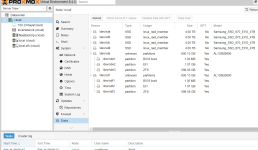
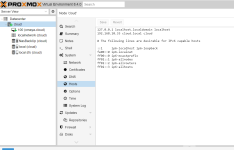
Something else I don't get with your setup, in your initial post you show a Proxmox host image for Disks, those disks are shown as a linux_raid_member, I didn't think that on passed-through disks to a VM this should be showing in the host.

Have you somehow setup the raid on the host? Have you installed Ubuntu alongside or some other shenanigan?
 
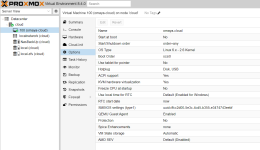
easy way to determine whats going on. OP please post the content of your vmid.conf for your ubuntu vm.

If you ARE passing the drives to your VM, this behavior is consistent. mdadm is picking up the drive at pve boot, and then cutting them off when the vm is started for the passthrough, leading to very inconsistent behavior. The solution is to NOT do that.
 
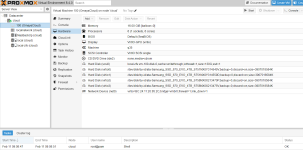
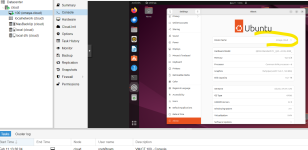
This photo may clarify things.

1770677200423.png


What I did:

- I installed Proxmox on a 600GB SAS disk

- I created a VM and installed Ubuntu

- I added all 4TB SSD disks to the virtual machine in Porxmox one by one with this command:

qm set 100 --virtio /dev/disk/by-id/ata-Samsung_SSD_870_EVO_4TB_S******

- then, once all the disks were visible in Ubuntu, I created a Linux Raid there

- in Ubuntu, I mounted it in /mnt

1770677744311.png
 
Got the picture.

As stated above, on Proxmox host reboot, the mdadm raid is probably being picked up by the host & then terminated.
To avoid this, you could try to edit (host-side) :

Code:
nano /etc/mdadm/mdadm.conf #to specifically ignore these passed-through disks.
ARRAY <ignore> UUID=xxxxxxxx:xxxxxxxx:xxxxxxxx:xxxxxxxx

update-initramfs -u

dpkg-reconfigure mdadm

Another possibility maybe removing/uninstalling the mdadm package from the host. But what is interesting here, AFAIK by default the mdadm package is not installed in Proxmox. Did you install it? Or was the raid still automatically picked up?

Please note: I have no personal experience with this setup.
 
I don't have mdadm installed on the host
Interesting situation. I will assume you also have no /etc/mdadm/mdadm.conf present on the PVE host (otherwise detection may still be possible host-side).

Does lsblk (on PVE host) show /dev/mdX device/s?
What happens if you freshly boot the Proxmox node WITHOUT starting the VM (set it not to run at boot). Is the Linux array available in the PVE host?

If it is, you could consider disabling the Linux array, kernel-side in grub:

Code:
GRUB_CMDLINE_LINUX_DEFAULT="quiet raid=noautodetect"

It is also possible that your issues are caused by something else (other than the host picking up the Linux raid).

Something that is interesting in your above output:
2026-02-09T18:22:52.738187+02:00 Omaya-cloud
Is this the logs from inside the VM 100? On your image (above) VM 100 is named "OmayaCloud". (This maybe due to you changing the hostname within the VM). What is the hostname of your PVE host?