Hi community,
Today i moved my home server running Proxmox to a different room after doing a clean shutdown of the server. I boot my server from usb with a operational version of proxmox. The disks in my server contain all the data.
After moving the server the usb got corrupted and my server would not boot from it, complaining about missing blocks. Some research on the net comfirmed i was forced to reinstall Proxmox on the usb. I did just that, and after my server rebooted like expected. Added my existing disks containing all the *.qcow2 images.
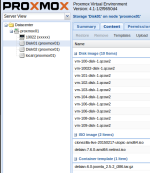
For some reason i cant manage to load these images so Proxmox doesnt see them as VM's i can turn on and play with. I attached a screenshot "proxmox_screen.png".
All i want is to select for example the exsisting vm-100-disk-1.qcow2 image and reload it. I cant manage to find out how though. What am i overlooking? What should i google for?
With kind regards,
Michael Akkermans
Today i moved my home server running Proxmox to a different room after doing a clean shutdown of the server. I boot my server from usb with a operational version of proxmox. The disks in my server contain all the data.
After moving the server the usb got corrupted and my server would not boot from it, complaining about missing blocks. Some research on the net comfirmed i was forced to reinstall Proxmox on the usb. I did just that, and after my server rebooted like expected. Added my existing disks containing all the *.qcow2 images.
For some reason i cant manage to load these images so Proxmox doesnt see them as VM's i can turn on and play with. I attached a screenshot "proxmox_screen.png".
All i want is to select for example the exsisting vm-100-disk-1.qcow2 image and reload it. I cant manage to find out how though. What am i overlooking? What should i google for?
With kind regards,
Michael Akkermans