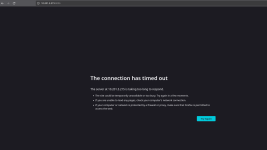
I cannot make a proxmox cluster with msi z790 motherboard.

onam

Member
Nov 7, 2022
17
0
6
I want to create a cluster with two nodes. one node is msi motherboard z790 7e25 the other is an old laptop . I want to do some test runs before adding the msi motherboard to a real running pve instance.
I create a cluster then try to add the node to it. Whenever I try this, the process seems to stall, and the one node seems to have status unknown. I tried to create a two node cluster with the old laptop and another machine and it worked perfectly fine.
It looks like the issue is the msi motherboard. Then I started to tinker with the BIOS where I:
- disabled C-states
- disabled secure boot
- disabled tpm
- disabled fastboot
- disabled turbo boost

Still the same problem. The msi motherboard has 64 GB, i9-14900k and 4090 gpu.
 
Hi onam,

To get the terminology right, you mean cluster as in: "I can manage node A when logging in to node B, and vice versa", not the specific combination of nodes into a HA-cluster, correct?

Either way, as far as I'm aware, clustering is purely network / configuration dependent, not hardware dependent. Did you maybe try it the other way around, creating the cluster on the MSI machine, and join the laptop to it?

Can you log in from one machine to the other via SSH, and the other way around? Does the MSI come with onboard LAN, or PCIe? Realtek, Intel, Broadcom or something else?
 
sorry for weak terminology.
machine A - msi motherboard
machine B - laptop
machine C - dell

Scenario A:
same network A and B:
I created cluster in machine A, add machine B.
result:
- Both pve instances show up in the cluster when I am at machine A
- Can login port 8006 machine A, Cannot go from theere to shell machine B.
- Cannot login port 8006 to machine B.

clean install pve on all three machines.
Scenario B:
same network B and C:
I created cluster in machine B, add machine C.
result:
- can login port 8006 machine B, Can go to shell from there to machine C. Both machines show up in cluster
- can login port 8006 machine C. Can go to shell from there to machine B. Both machines show up in cluster

Scenario C:
same network A, B and C:
I try to add machine in cluster where B and C are.
- machine A cannot join the cluster

My conclusion:
It must be something wrong with machine A.

I tried to do the steps mentioned in the first post in BIOS and still no results.
 
Last edited:
I was thinking maybe there must be an issue when corosync or pve-cluster tries to properly start due to some condition in msi motherboard when I in the process of adding nodes to the cluster. When I do pvecm nodes both nodes show up.
 
Scenario A:
same network A and B:
I created cluster in machine A, add machine B.
result:
- both pve instances show up in the cluster when I am at machine A
- Can login to machine A, cannot go to shell machine B.
- cannot login to machine B.
Hi, more questions:
  • "Same network": you mean they are connected to the same switch, or at least in the same VLAN or broadcast domain?
  • "am at machine A" : you mean, you log in to the GUI at https://a:8006 ?
  • "Can login to machine A...": again, log in to the GUI, or SSH?
  • "... cannot go to shell machine B" : do you mean SSH? SSH from your 'desktop' (or whichever machine you use to connect to the Proxmox machines) to B, or SSH from A to B?
  • "cannot login to machine B": Log in from where using what? Taken at face value, I'd say "Using SSH on my desktop to connect to B", but that does not have anything to do with A
Same questions more or less for the other scenarios.

Edit for PS: what makes you think it has to do with BIOS settings?
 
"Same network": you mean they are connected to the same switch, or at least in the same VLAN or broadcast domain?
Yes, same switch, same vlan. I can ping all of them
"am at machine A" : you mean, you log in to the GUI at https://a:8006 ?
Yes this is what I mean. I have a totally different machine within the vlan separate from pve instances where I can go and see their respective web guis.

"Can login to machine A...": again, log in to the GUI, or SSH?
Login in the gui. From there testing whether I can get into the shell of each of the nodes.
"... cannot go to shell machine B" : do you mean SSH? SSH from your 'desktop' (or whichever machine you use to connect to the Proxmox machines) to B, or SSH from A to B?
Logging by using the IP of the node. If I go to https://ip_of_A:8006 and ip_of_B:8006 it is supposed to show both nodes, right? Have not tried to ssh.
"cannot login to machine B": Log in from where using what? Taken at face value, I'd say "Using SSH on my desktop to connect to B", but that does not have anything to do with A
Cannot login to https://ip_of_B:8006 from any machine within that vlan.


what makes you think it has to do with BIOS settings?
Because I tried to create a two node cluster just with machine B (laptop) and machine C (dell PC) and it worked just fine. I can access both of the IP webguis and see both nodes.
 
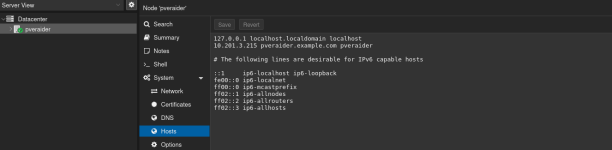
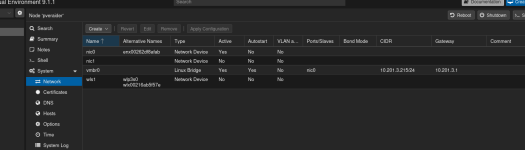
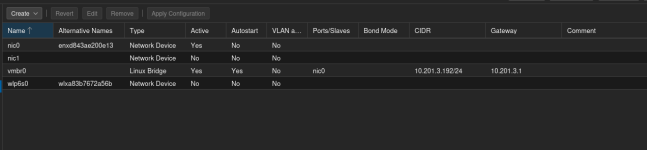
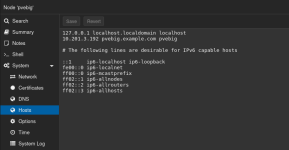
post the contents of /etc/network/interfaces for all 3 nodes. also double check each machine's hosts file and make sure they contain the same records for all 3 machines, and that they all match the output of hostname for each.
 
  • Like
Reactions: wbk
> > "Can login to machine A...": again, log in to the GUI, or SSH?

> Login in the gui. From there testing whether I can get into the shell of each of the nodes.

You mean the >_ shell or console in the web GUI?

1773250063641.png

My cluster has been running for years, but most of the time when I click it by accident, it does not do anything, It may not be the best test case.

Most of the time either xterm.js or noVNC do give me a CLI,

1773250217686.png

Even so, SSH is more comfortable to use than the webshell.

Once a machine has joined another, can you let them show each others summary, for example?

Just to verify: you did not configure any PCIe pass-through or IOMMU settings that could impact the NIC?

I seem to recall some incident (not Proxmox-related) involving hardware settings that impacted software behaviour in unexpected ways, but it was years ago and the details slip. More recently I have had to enable >4 GB decoding for PCIe on older devices where it was not the default, but that would impact the effected hardware no matter whether Corosync / clustering is active or not.

The cluster depends on Corosync, which depends on network connectivity. If you got an active network and followed the popups for joining the cluster, the certificates are in place and there would be no reason for clustering not to work.

Some far-fetched troubleshooting:
  • You run as root
  • Installed via the default Proxmox-installer (I usually install on top of Debian, but with the default installer even less can go wrong)
  • Your storage and filesystem do not show errors
    • failing SSD / HDD
    • wobbly SATA / power connector
    • errors in the filesystem introducing errors in the certificate or corosync databas
Have you used Proxmox and/or Linux before, or are you "feeling the water" ?
 

Attachments

  • 1773250209932.png
    1773250209932.png
    10.7 KB · Views: 1
Have you used Proxmox and/or Linux before, or are you "feeling the water" ?
Yes, I have used linux everyday and proxmox often,I just cannot get to present the problem in a coherent way.
 

Attachments

  • hostsraider.png
    hostsraider.png
    46.5 KB · Views: 5
  • networkraider.png
    networkraider.png
    52.6 KB · Views: 6
  • networkbig.png
    networkbig.png
    28.3 KB · Views: 6
  • hostsbig.png
    hostsbig.png
    42 KB · Views: 5
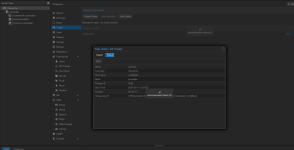
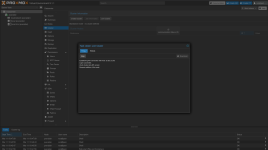
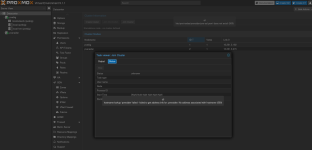
This is after I tried to join the cluster created on the big node.
 

Attachments

  • status_pveraider.png
    status_pveraider.png
    92.7 KB · Views: 5
  • output_pveraider.png
    output_pveraider.png
    122.5 KB · Views: 5
  • error_from_cluster_created_on_pvebig.png
    error_from_cluster_created_on_pvebig.png
    109.3 KB · Views: 5
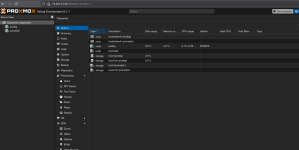
After a while I can no longer access the slave node. only the master node.
 

Attachments

  • masternode.png
    masternode.png
    91.7 KB · Views: 6
  • slave-node.png
    slave-node.png
    48.7 KB · Views: 6
It seems more of a network (-configuration) issue, than BIOS/hardware.

I wouldn't put my hosts in the 'example.com' domain, but it won't hurt in this case either I suppose.

Some thoughts after seeing the actual error, 'hostname loockup 'pveraider' failed:
  • Does your network provide DNS for local hosts? Depending on what you run for DHCP, it may or may not do that automatically.
  • When you join the cluster, do you use the hostname 'pvebig' or the IP '10.291.3.192' as "peer address"? Using the IP, I would not expect this error.
It's a bit of a hack, but you could add pvebig to the hosts file on pveraider, `10.201.3.215 hostraider` and see whether that resolves (no pun intended) the issue
 
Appreciate your help so far @wbk

Maybe there is other ways to attack the problem which I am missing. I will look more into the details of proxmox manuals regarding this.
 
It's a bit of a hack, but you could add pvebig to the hosts file on pveraider, `10.201.3.215 hostraider` and see whether that resolves (no pun intended) the issue
Oh, my bad, I mixed up your hostnames while zooming in and out of screenshots and trying to remember the names in the mean time.

On pvebig:

Code:
echo '10.201.3.215 pveraider' >> /etc/hosts

and on pveraider

Code:
echo '10.201.3.192 pvebig' >> /etc/hosts