

how to get cpu correct frequency in pve vm client ?

cpakest

New Member
Nov 15, 2023
3
0
1
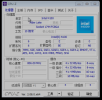
I have installed PVE 8.0.3 in my pc and created a vm client to run windows 7 . But i can't get the correct cpu useage in windows with cpu-z , just like this:
微信截图_20231115162407.png
The cpu freq is aways display "806.00mhz" with no change when it running some software.
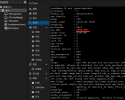
But at the same time , PVE can get the right status when i type " cat /proc/cpuinfo " at PVE's shell.
微信截图_20231115163151.png

Do i miss somethings ?
 
You mean frequency, not usage.


Why is having the correct frequency so important to you?
i'm sorry for my pool english , that's the reason why i need upload the picture to the post.

yet, it's important to me to get the correct frequency of cpu, and i can't explain it in english , sorry again.
 
On my Win11 VM on the last Proxmox 8 release it's as it it.

I don't care!
The real Intel Cor I5 cpu has 6 core with 12 threads, an the cpu clock jumps all the time.
That's ok for my.

When i run prime95 (linux) on the Proxmox VE debian 12 host, the speed settle for the first 56 seconds to the PL2, that i have set.
And drop then to the PL2 value, that my cpu cooler can handle for long time.

So i can check, if the system will work for me ok, over the test runtime of prime95.