


VM Migration is looping on failure, I need to fail and failback.
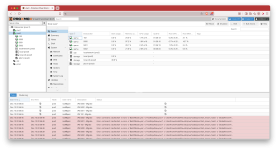
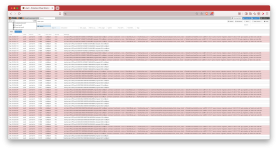
I have 4 VMs that are somehow still accessible (thank goodness), but are in a failed HA migration loop on pve2 where a finishing step of pve1 sshing into pve2 to run a network migration command is failing every few seconds.
I need to cause the migration to fail, and be certain that they will migrate back - because one of them is the jumpbox through which I am managing this problem.
What I was doing
I manage a 2-node ZFS HA cluster for a client on the Community Enterprise subscription.
I saw that it was still on 9.0.5 and I wanted to run updates.
`pvecm status` showed that the cluster was quorate with the qdevice.
I started the upgrade from the GUI on the second node, pve2, which is solely a failover backup.
I rebooted and saw that it came back up and turned green and I believed everything to be working correctly.
(although I'm not certain the vmbr0 networking came up as expected, nor am I certain that it could be accessed from the webui)
I switched the affinity of VMs to pve2 (in preparation for updating pve1), and they began to migrate.
The first 4 appeared on pve2 as if everything was going fine.
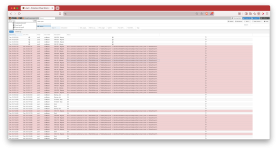
However, they failed at the final step, and now they're stuck in limbo - trying over and over to run `pvecm mtunnel -migration_network ...`.
Troubleshooting / What I think is wrong
Prior to the upgrade, I was able to access pve2 directly via its own web interface. I _thought_ I did after the upgrade, but it may have just been showing old data.
I can't get into pve2 via its management address (a vlan of vmbr0), but corosync (also a vlan of vmbr0) is up.
When I try to click on it or its VMs in the web GUI I get a loading spinner and eventually timeout messages.
Via iDRAC I've been able to get into pve2 and I can't ping the nameservers, the local router, or even pve1 on its management address.
The problem seems to have started during the HA affinity switch - that's when I noticed that my pve2 and pve1 web GUIs weren't matching up, and before I lost access to pve2 entirely - I'm almost certain I had intentionally directly accessed pve2 after reboot.
In any case, something is definitely wrong with the network on pve2.
How I want to solve it
I'm in a precarious position. One of the VMs that's in limbo is the jumpbox through which I have remote access.
I would like to kill the HA migration task for 5002, which is an auxiliary VM that it's okay to have downtime for.
- I can't stop it from the GUI
- I removed it from HA and tried `qm stop`
- I eventually ran `kill` to kill it
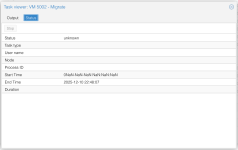
- The migrate task is still running for it in the GUI, even though `ps aux | grep migrate` doesn't reveal it
- I was able to start it with `qm start`, but I can't easily tell if it has network access
I'm willing to hard reset pve2, but I would lose access to it and the evidence that I have right now suggests that that won't cause the migration to actually fail and roll back (i.e. it seems like that should have already happened).
What it looks like
Update: Root Cause (not a solution)
Things stayed stable enough that I was able to delay additional troubleshooting until I had someone on-site.
We removed everything from all HA groups, and manually ran `qm stop` on all VMs on pve2.
We found that when rebooting pve2, the networking would work until the VMs started, so we changed the VMs to not boot on start and were able to do an offline migration.
The root cause of this was that the "VLAN Aware" checkbox wasn't checked on vmbr0 on pve2 - either we had previously tested with VMs that weren't on a VLAN, or we accidentally unchecked it at some point since the initial failover test (some networking changes occurred between the initial setup and today).
Both pve2 had its own vlan100 interface, and some of the VMs were on vmbr0 tagged for 100, and as they started their networking, the vlan100 interface became unresponsive.
It required a full reboot, not just a restart of networking, but after VLAN Aware was enabled, pve2 worked as expected again.
This is not a solution for the problem of how to get the migrations out of a loop of half-failed, half-working, but it is what would have prevented that problem is this case.
I have 4 VMs that are somehow still accessible (thank goodness), but are in a failed HA migration loop on pve2 where a finishing step of pve1 sshing into pve2 to run a network migration command is failing every few seconds.
I need to cause the migration to fail, and be certain that they will migrate back - because one of them is the jumpbox through which I am managing this problem.
What I was doing
I manage a 2-node ZFS HA cluster for a client on the Community Enterprise subscription.
I saw that it was still on 9.0.5 and I wanted to run updates.
`pvecm status` showed that the cluster was quorate with the qdevice.
I started the upgrade from the GUI on the second node, pve2, which is solely a failover backup.
I rebooted and saw that it came back up and turned green and I believed everything to be working correctly.
(although I'm not certain the vmbr0 networking came up as expected, nor am I certain that it could be accessed from the webui)
I switched the affinity of VMs to pve2 (in preparation for updating pve1), and they began to migrate.
The first 4 appeared on pve2 as if everything was going fine.
However, they failed at the final step, and now they're stuck in limbo - trying over and over to run `pvecm mtunnel -migration_network ...`.
Troubleshooting / What I think is wrong
Prior to the upgrade, I was able to access pve2 directly via its own web interface. I _thought_ I did after the upgrade, but it may have just been showing old data.
I can't get into pve2 via its management address (a vlan of vmbr0), but corosync (also a vlan of vmbr0) is up.
When I try to click on it or its VMs in the web GUI I get a loading spinner and eventually timeout messages.
Via iDRAC I've been able to get into pve2 and I can't ping the nameservers, the local router, or even pve1 on its management address.
The problem seems to have started during the HA affinity switch - that's when I noticed that my pve2 and pve1 web GUIs weren't matching up, and before I lost access to pve2 entirely - I'm almost certain I had intentionally directly accessed pve2 after reboot.
In any case, something is definitely wrong with the network on pve2.
How I want to solve it
I'm in a precarious position. One of the VMs that's in limbo is the jumpbox through which I have remote access.
I would like to kill the HA migration task for 5002, which is an auxiliary VM that it's okay to have downtime for.
- I can't stop it from the GUI
- I removed it from HA and tried `qm stop`
- I eventually ran `kill` to kill it
- The migrate task is still running for it in the GUI, even though `ps aux | grep migrate` doesn't reveal it
- I was able to start it with `qm start`, but I can't easily tell if it has network access
I'm willing to hard reset pve2, but I would lose access to it and the evidence that I have right now suggests that that won't cause the migration to actually fail and roll back (i.e. it seems like that should have already happened).
What it looks like
Update: Root Cause (not a solution)
Things stayed stable enough that I was able to delay additional troubleshooting until I had someone on-site.
We removed everything from all HA groups, and manually ran `qm stop` on all VMs on pve2.
We found that when rebooting pve2, the networking would work until the VMs started, so we changed the VMs to not boot on start and were able to do an offline migration.
The root cause of this was that the "VLAN Aware" checkbox wasn't checked on vmbr0 on pve2 - either we had previously tested with VMs that weren't on a VLAN, or we accidentally unchecked it at some point since the initial failover test (some networking changes occurred between the initial setup and today).
Both pve2 had its own vlan100 interface, and some of the VMs were on vmbr0 tagged for 100, and as they started their networking, the vlan100 interface became unresponsive.
It required a full reboot, not just a restart of networking, but after VLAN Aware was enabled, pve2 worked as expected again.
This is not a solution for the problem of how to get the migrations out of a loop of half-failed, half-working, but it is what would have prevented that problem is this case.
Last edited:


