

How to display vm properties in prometheus?
- Thread starter deathnote
- Start date
You are using an out of date browser. It may not display this or other websites correctly.
You should upgrade or use an alternative browser.
You should upgrade or use an alternative browser.
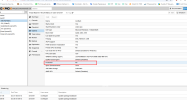

I ask how it display on prometheus.--protection <boolean> (default = 0)
Sets the protection flag of the VM. This will disable the remove VM and remove disk operations.
How it do in proxmox I know
If you ask, then you don't know how extract a specific property in to prometheusHow are you getting the stats into Prometheus?

There's no standard way to export PVE metrics into prometheus. PVE supports Graphite and InfluxDB. That's why I asked. Don't be an ass.
If you want to implement it yourself, a node exporter textfile written by a simple bash script should do.
If you want to implement it yourself, a node exporter textfile written by a simple bash script should do.
Last edited:
I used pve exporter prometheus then into grafanaThere's no standard way to export PVE metrics into prometheus. PVE supports Graphite and InfluxDB. That's why I asked. Don't be an ass.
If you want to implement it yourself, a node exporter textfile written by a simple bash script should do.
This exporter does not appear to export such settings. What you can do is to write a simple script like this that you can then call every minute or so
No, it's not pretty, but it should do. It gives output like this
You can write its output into a
Install
Please don't quote every message.
Bash:
#!/usr/bin/env bash
set -euo pipefail

pct list | awk '/[0-9]/ {print $1}' | while read -r ct; do
  (pct config "${ct}" | grep -q "protection: 1") && echo "pve_protection_{id=\"lxc/${ct}\"} 1" || echo "pve_protection_{id=\"lxc/${ct}\"} 0"
done

qm list | awk '/[0-9]/ {print $1}' | while read -r vm; do
  (qm config "${vm}" | grep -q "protection: 1") && echo "pve_protection_{id=\"qemu/${vm}\"} 1" || echo "pve_protection_{id=\"qemu/${vm}\"} 0"
done
Code:
pve_protection{id="lxc/101"} 0
pve_protection{id="qemu/100"} 1.prom file the textfile collector can then read.
Bash:
* * * * * bash /path/to/script.sh | sponge /path/to/textfiledir/pveprotection.prommoreutils to get sponge. Test, extend and modify as needed. It's just an example.Please don't quote every message.
Last edited:
in this exporter need to add something so that it collects the parameter data and compile it again.This exporter does not appear to export such settings. What you can do is to write a simple script like this that you can then call every minute or so
No, it's not pretty, but it should do. It gives output like thisBash:#!/usr/bin/env bash set -euo pipefail pct list | awk '/[0-9]/ {print $1}' | while read -r ct; do (pct config "${ct}" | grep -q "protection: 1") && echo "pve_protection_{id=\"lxc/${ct}\"} 1" || echo "pve_protection_{id=\"lxc/${ct}\"} 0" done qm list | awk '/[0-9]/ {print $1}' | while read -r vm; do (qm config "${vm}" | grep -q "protection: 1") && echo "pve_protection_{id=\"qemu/${vm}\"} 1" || echo "pve_protection_{id=\"qemu/${vm}\"} 0" done
You can write its output into aCode:pve_protection{id="lxc/101"} 0 pve_protection{id="qemu/100"} 1.promfile the textfile collector can then read.
InstallBash:* * * * * bash /path/to/script.sh | sponge /path/to/textfiledir/pveprotection.prommoreutilsto getsponge. Test, extend and modify as needed. It's just an example.
Please don't quote every message.