You would configure your access rights that the PVE is only allowed to create backups on the PBS but not to remove oder modify them like described in the already linked doc chapters:
https://pbs.proxmox.com/docs/storage.html#ransomware-protection-recovery
So you would never, ever remove the backups from the PVE host. Instead you would create prune jobs on the PBS or (alternatively) remove older backups manually in the PBS web interface.
Please note that the root user on the PVE is not the same as on the PBS. But if you happen to give both the same password of course somebody who figured out the root password on one system can also access the other one.
Now there might still be a chance that your local PBS gets compromised. This can be mitigated by setting up another PBS on a offsite location (could also be a cloud vserver or a PBS-as-a-service provider like Inett). Both PBS have permissions setup in a way, that they can't alter each other backups.
On the offsite PBS you would create a pull-sync-job which will pull the backups from your main PBS. Please note, that it's a pull-sync NOT a push-sync. Why? Because then you can create two firewall rules:
- Access on port 8007 to the remote PBS on your local PBS
- No access at all to your offsite PBS The pull-sync jobs will still work (they need to be able your local PBS so the closed ports on the offsite PBS are no problem)
This way a attacker might take over your local PBS but still wouldn't be able to do anything on your remote system. Even if your backups get compromised and pulled to your offsite PBS as long as you still have older backups available you can restore from a backup older than the time of attack.
Now you might wonder how you will be able to access the web interface on your offsite pbs if the firewall closes everything? For this you would create a vpn consisting of your remote PBS and your local management client (and maybe your local PBS). Then you would modifie the firewall rules this way:
- The managment client can access the remote PBS on port 8007, this is controled by its vpn IP
- The remote PBS can access the local PBS via it's VPN IP
- The remote PBS access is still closed for everything except the VPN ip of the management client
Depending on your level of paranoia (aka threat model) you could modify this setup but the most important thing is to configure the permissions that the PVE only can add backups but not modify or remove them.



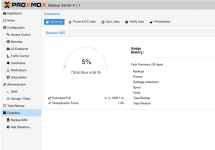
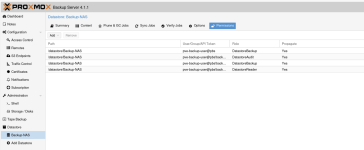
 )
)
 ) this can be achieved this way: Create another namespace "remote-encrypt" in your local datastore. Add your local PBS as "remote" ( otherwise you can't add the sync job ) and a pysh-sync encryption job to the remote "localhost" namespace remote-encrypt. Afterwards edit the pull-sync on the remote pbs to pull only encrypted backups from the remote-sync namespace.