

Help understanding PVE SDN

amplifire

Member
Oct 3, 2023
1
0
6
1770632983981.png1770634198514.png
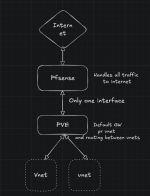
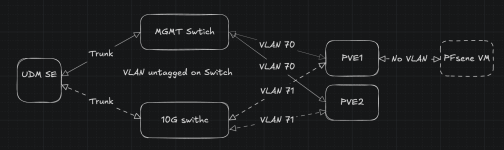
I have my home lab running at my friends.currently I have an bridge internal to pve that I have connected to pfsense and define vlans in pfsense.
it works but I wanna move more into automation and this isn't pfsense strong side.
hence I wanna switch to proxmox SDN, but I want all my vnets to be routable in pfsense
I do not understand how to solve this and Ai gives me confusing answers.
I would like to not mess with my friends network internal to my lab.
so I want to not have vlan conflicts with his network

as far I as I understand I need a VXlan and OSPF fabric to enable this?
but I dont understand how I get PFsense to see my vnets?
do I need a BGP controller and BGP in pfsense to enable this?
if like for routing between pfsense and my SND vnets to be automatic.

I cant find any good guides or videos, tho im not sure what im looking for as SDN and BGP is way over my head.
I hope someone here can give me pointers?
EDIT: I added a simple drawing of my current network config.
 
Last edited:
(I've dropped loads of terms that can be searched on here)

Proxmox SDN does not include a router. It looks to be designed for layer 2 and tunneled layer 2. To be honest I haven't bothered with it. However I have been fiddling with networks for 40 odd years. Your diagram manages to misspell switch twice - get a better AI 8)

Let's start off with: what are you trying to achieve? You might off with a "simple" multi site setup. No VXLANs (its a bodge) or BGP (internet routing - you don't need it yet). You do have some switches and a router. Cool.

Here is one example networking scheme. Note that the terms VLAN, subnet and network are used interchangeably in the real world, which is really confusing when you are learning this stuff. It actually gets worse ...

We'll start off with IP and why not? NAT is a thing so we'll go RFC 1918 and co. There are three address ranges assigned for "internal use" (which sounds a bit medical) - 10/8, 172.16/12 and 192.168/16. All are useful but 10/8 is best in nearly all cases, for example:

10 . <site> . <vlan/subnet> . <device>

So, allocate numbers for your sites: "me", "friend", "mum and dad", "marketing", etc. Now think about VLANs. A VLAN/subnet is a group of devices that might need similar treatment. For example DEFAULT/LAN/Servers/THINGS/SEWER/DMZ. Finally, you have devices. As an aside, I have a home VLAN for IoT devices called things and another one that I am really scared of called sewer - that's where the Reolink cameras end up - they do not see the internet!

So in IP terms, for example: 10 (RFC 1918) . 33 (my home) . 10 (LAN) . 139 (my PC). Your switches will have VLAN 10 defined to match 10.33.10/24 and devices will have access ports on that VLAN and trunks will tag that VLAN.

You need to start off with the basics and work up. AI won't do this for you, because it can't. AI (LLMs) are a tool. ChatGPT talks a good talk but it will not replace me in my sphere of expertise. I do use LLMs as a better "search".

A note on numbers: VLANs (layer 2 - switches) can range from 1-4096. IP addresses (layer 4) are "dotted quads" so four lots of 0-255. Now VLANs can be dot1q or QinQ for extra complexity and excitement!

Once you have your scheme, then you need to implement it. Set up your switches first and work on out. Your router will need an interface and address for all subnets. You'll need a IP scheme. Use DHCP as you see fit.

You'll need a firewall policy. pfSense generally filters on inbound and defaults to drop and it has a handy floating policy. If you have pfSense then please use pfBlocker - its rather good.

So. Get your network planned out. Apply routers/firewalls with default deny rules and crack on.